Organization tab
Every organization has its own organizational hierarchy, such as Organization > Division > Department or University > Campus > Faculty, etc.
The default organizational hierarchy in OpenIAM is built around a three-tier structure: Organization > Division > Department. However, in this tab, users can customize it by creating their own hierarchy among their pre-created organization types with more than three tiers.
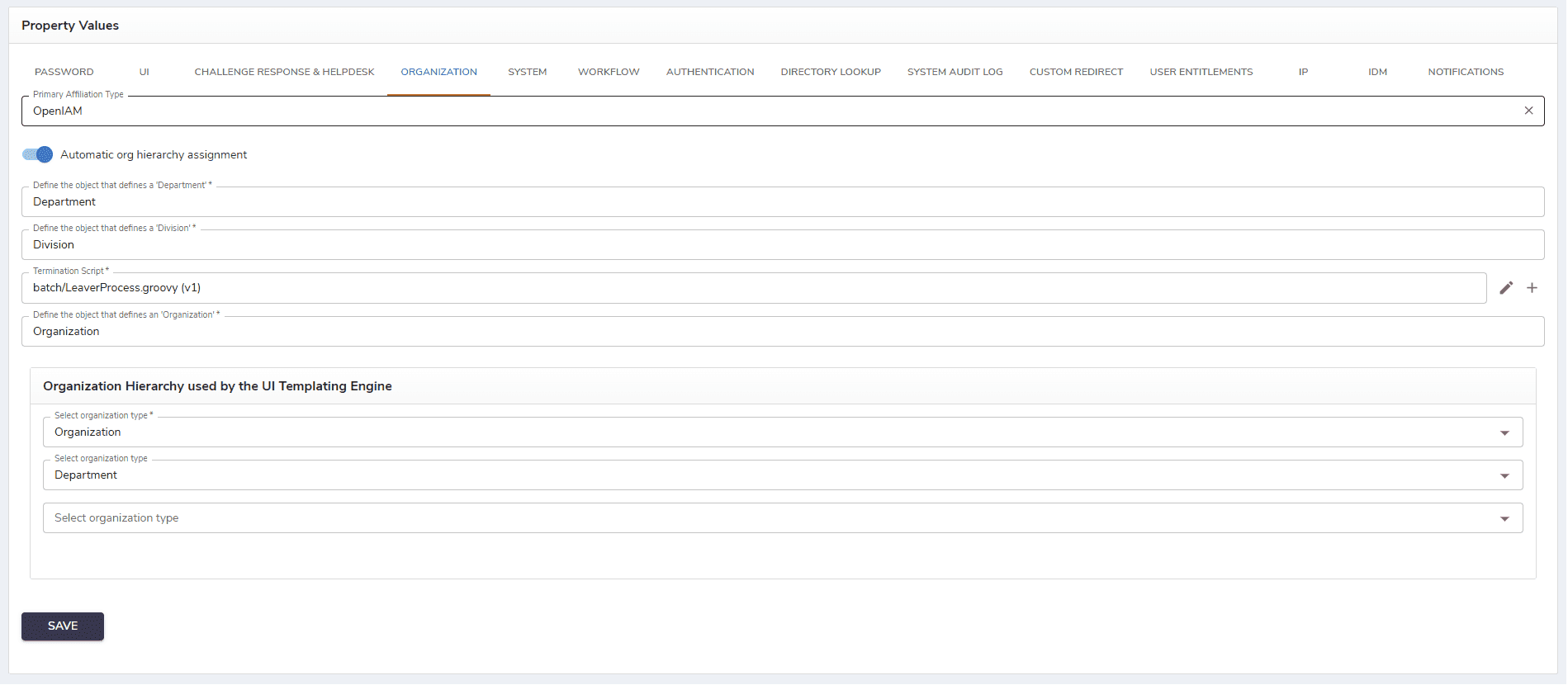
The description of fields in this tab is provided in the table below.
| Field | Description |
|---|---|
| Primary Affiliation Type | Allows choosing and setting the primary organization with which users will be affiliated upon creation. |
| Automatic org hierarchy assignment | When checked, this options allows assigning organization hierarchy automatically, |
| Define the object that defines a 'Department' | The field allows defining the third tier of the organizational structure. |
| Define the object that defines a 'Division' | The field allows defining the second tier of the organizational structure. |
| Termination script | A Groovy script that is executed when a user account is being terminated or deprovisioned, and it defines what actions should occur during that process. |
| Define the object that defines an 'Organization' | The field allows defining the first tier of the organizational structure. |
| Organization Hierarchy used by the UI Templating Engine | Allows controlling the order in which the user shall select the organization hierarchy during self-registration or new user creation. |
After configuring all properties, click Save to save the changes.