UI tab
The UI tab allows configuration of UI properties and partially determines its appearance.
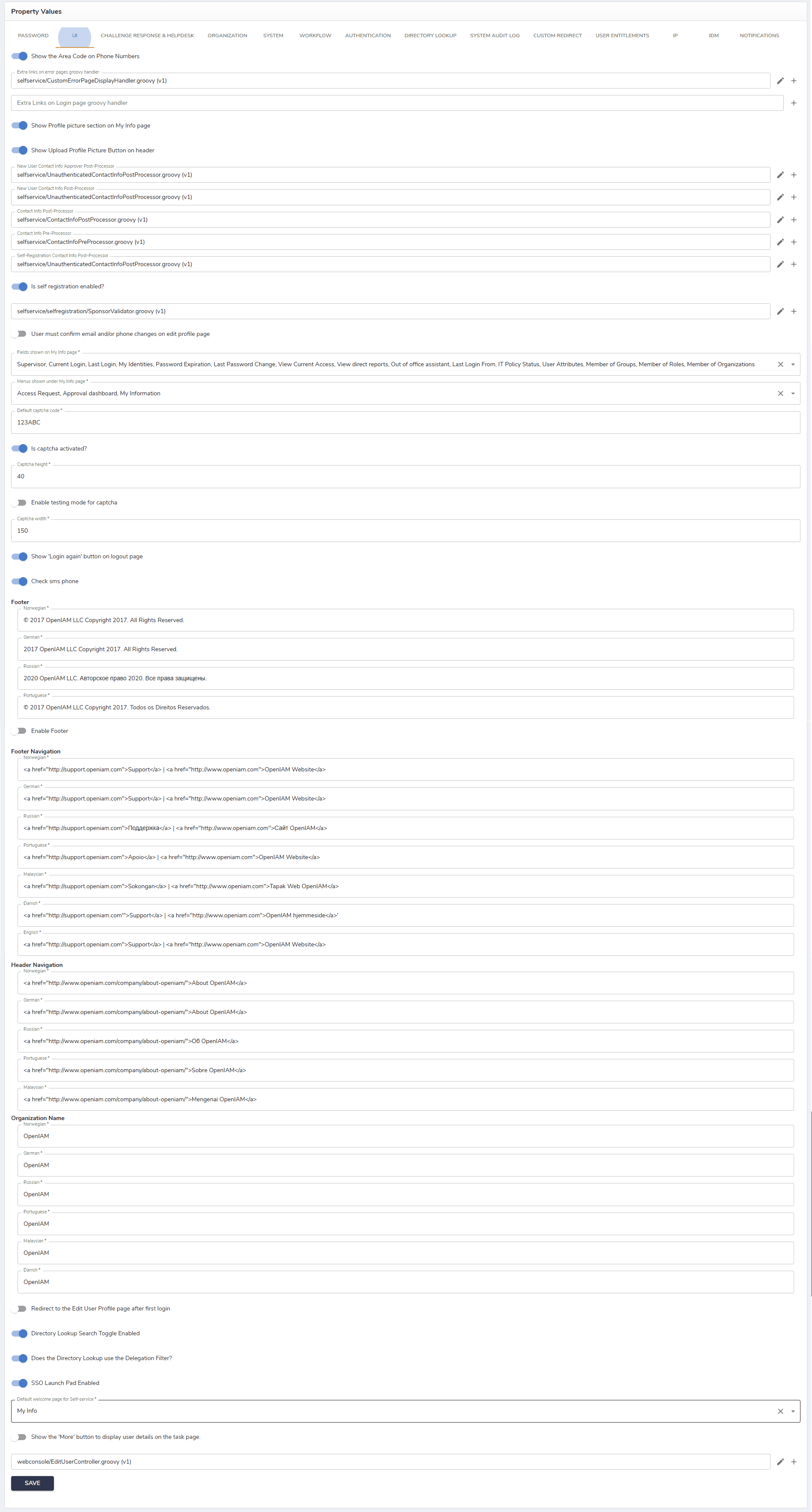
The description of fields in this tab is provided in the table below.
| Field | Description |
|---|---|
| Show the Area Code on Phone Numbers | If set to 'true,' the numerical code used to designate a specific geographic area within a country is displayed with a phone number. |
| Extra links on error pages groovy handler | A customization or configuration option where extra links are added to the standard error page using a Groovy script. |
| Extra Links on Login page groovy handler | A customization or configuration option where extra links are added to the standard login page using a Groovy script. |
| Show Profile picture section on My Info page | If checked, allows seeing the profile picture section on the My Info page. |
| Show Upload Profile Picture Button on header | If checked, enables the Profile Picture Button to appear on the header. |
| New user contact info approver post-processor | Executes after a new user’s contact information is approved, performing additional processing or updates as needed. |
| New user contact info post-processor | Runs after a new user’s contact information is submitted, handling tasks such as validation, enrichment, or notifications. |
| Contact info post-processor | Executes after any user’s contact information is updated, enabling custom logic like data synchronization or logging. |
| Contact info pre-processor | Runs before a user’s contact information is submitted or saved, allowing validation, formatting, or transformation of the data. |
| Self-registration contact info post-processor | Executes after a self-registered user submits their contact information, performing tasks such as notifications, data enrichment, or workflow initiation. |
| Is self-registration enabled? | If checked, enables self-registration when the login page is accessed. |
| User must confirm email and/or phone changes on the edit profile page | If set to 'true,' the user will be asked to confirm any changes to the set email or phone number via the Edit profile page. |
| Fields shown on My Info page | Allows selecting the fields that a user can see on the My Info page. |
| Menus shown under My Info page | Allows selecting the menus that the user can see under the My Info page. |
| Default captcha code | Default implementation or code used to generate and verify captcha. |
| Is captcha activated? | If set to 'true,' the user is asked to answer a captcha upon logging in. |
| Captcha height | Refers to the vertical dimension or size of a captcha. |
| Enable testing mode for captcha | If checked, the configuration allows using a special mode for captcha challenges during testing or development. |
| Captcha width | Refers to the horizontal dimensions or size of a captcha. |
| Show 'Login again' button on the logout page | Enables the Log in again button to be seen on the logout page. |
| Check SMS phone | If checked, enables the verification or validation of a phone number via SMS. |
| Footer | Here, the user can insert text to be displayed at the footer of the UI and localize it. |
| Enable Footer | If this property is set to 'true,' the footer is shown at the bottom of a page. |
| Footer Navigation | Allows configuring the navigation menu or links placed in the footer. |
| Header Copyright Content | Insert the copyright message to be displayed in the footer. |
| Header Navigation | Allows configuring the navigation menu or links placed in the header. |
| Organization Name | Allows inserting an organization name into the header and localizing it. |
| Redirect to the Edit user profile page after first login | Automatically directs users to the Edit User Profile page upon their first login, prompting them to complete or update their personal information. |
| Directory Lookup Search Toggle Enabled | If this feature is checked, it allows users to activate the capability to perform searches within a specified directory. |
| Does the Directory Lookup use the Delegation Filter? | If this parameter is set to 'true,' users can use a Delegation Filter when searching. |
| SSO Launch Pad Enabled | If this feature is enabled, users can access various integrated applications from the launch pad without the need for separate logins. If this box is checked, the user can see and use the launch pad in the SelfService portal. If it is not checked, the feature is disabled. |
| Default welcome page for SelfService | Specifies the initial page that users see when they log in to the SelfService portal, providing a starting point for navigation and access to available features. |
| SelfService default welcome page | The field allows choosing the SelfService default page. |
| Show button 'More' to display user details on the task page. | Enables showing the More button to access user details on the task page. |
After configuring all properties, click Save to save the changes.