Docker log checking guide
Logs are essential for understanding what’s happening inside a system — they record events, actions, and errors that occur during operation. Hence, for troubleshooting and debugging, identifying and diagnosing errors is it vital to have an access to respective logs. Below, you will find a quick guide on how to access and check logs in Docker environment.
- Start with accessing the instance with the following commands.
ssh <username>@<server-ip>sudo su
- View the running containers. Use the command below to list all running services.
docker ps
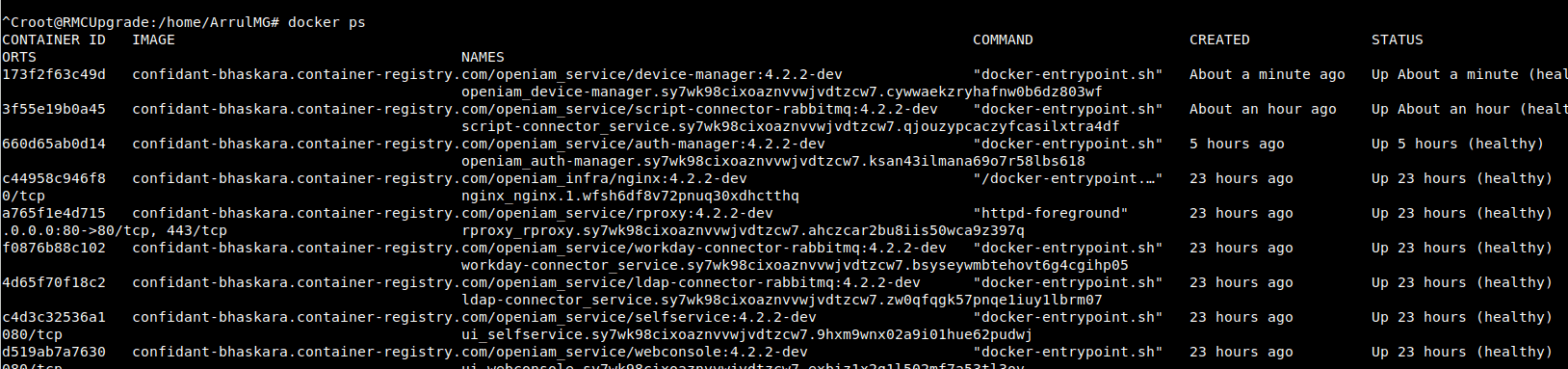
You can filter and see a particular service as follows.
docker ps | grep <servicename>
For example:
docker ps | grep idm
Here, the first column in the output is the container ID, which will be used to fetch logs.

- To view logs of a particular container use the commands below.
docker logs <containerId>
Example:
docker logs 7bf8b5be18bb
You can also stream logs continuously using the command below.
docker logs -f <containerId>
Example:
docker logs -f 7bf8b5be18bb
It can also be convenient to view only the last N lines (e.g., last 100 lines) of logs, not to scroll the whole file. You can do it as follows.
docker logs -n 100 -f <containerId>
Example:
docker logs -n 100 -f 7bf8b5be18bb

To exit log view Press Ctrl + C
- It can also be useful to view OpenIAM Service-Specific logs. Below are the main containers and what their logs contain:
| Service name | Purpose / When to check |
|---|---|
openiam_idm | Core identity management logs. Check for user/group/role creation or update errors, and AD connector-related issues. |
openiam_reconciliation | Logs related to user/group reconciliation activities. |
openiam_workflow | Approval, revocation, and termination workflow logs (especially those triggered via SelfService). |
openiam_auth-manager | Authentication issues — e.g., login failures, token validation errors. |
openiam_business-rules-manager | Errors related to Business Rules (BR) — creation issues, targets not getting applied, BR not getting applied etc. |
openiam_email-manager | Email sending/processing errors — failed email attempts, SMTP issues. |
openiam_synchronization | Sync process errors or anomalies. Check here for any synchronization-related problems. |
openiam_esb | Batch task execution logs — use when batch jobs fail or behave unexpectedly. |
openiam_groovy_manager | Logs for Groovy script save/run errors or compilation failures. |
openiam_connector_<name> | Each external connector (e.g., AD, SAP, Guacamole) has its own container. Check this for:
|
Useful Docker commands
In addition to the commands given above for accessing and checking Docker logs, Command Description there are several other commands that might be useful for working with logs. The are given below.
docker ps -a. Lists all containers (including stopped ones).docker restart <containerId>. Restarts a container.docker stop <containerId>. Stops a running container.docker start <containerId>. Starts a stopped container.docker exec -it <containerId> /bin/bash. Opens an interactive shell inside the container (useful for direct log/file inspection).docker inspect <containerId>. Shows container configuration, mounted volumes, and environment details.
Example
Checking a specific log flow
Scenario: User provisioning failing during synchronization
✅ Step 1: Identify the sync container.
docker ps | grep synchronization
✅ Step 2: Stream the logs.
docker logs -f <syncContainerId>
✅ Step 3: If a connector error appears, switch to connector logs.
docker ps | grep connectordocker logs -f <connectorContainerId>
Useful tips
- Use
grepwithin log output to search for specific keywords.
docker logs -f <containerId> | grep "ERROR"
- Use timestamps if available to correlate across services.
- If disk space is an issue, check
/var/lib/docker/containers/<container-id>/*-json.logfile size.
You can also consult the table below for what needs to be checked in the event of an error.
| Task | Command / Container |
|---|---|
| Check user/group creation issue | openiam_idm |
| Approval or termination flow | openiam_workflow |
| Login/authentication issue | openiam_auth-manager |
| Business rules not applying | openiam_business-rules-manager |
| Email not sent | openiam_email-manager |
| Sync errors | openiam_synchronization |
| Batch failures | openiam_esb |
| Groovy errors | openiam_groovy_manager |
| Connector errors | Specific connector container (e.g., openiam_connector_ad) |