Active Directory PowerShell connector
The Active Directory PowerShell connector lets OpenIAM provision and reconcile identities in Microsoft Active Directory. It runs as part of the OpenIAM connector service on a Windows host, receives requests from OpenIAM over RabbitMQ, and executes them against AD using the Active Directory PowerShell module. The connector manages users, groups, and computers, and can additionally manage file shares (SMB shares, AD-published shares, and DFS targets). All business logic lives in a customizable Connector.ps1 script and its shared module, so behavior can be tailored per deployment.
Installation and connection to OpenIAM
All PowerShell connectors are installed in the same way, which is described in the document:
Details related to installing the PowerShell Active Directory connector
The AD PowerShell connector can be deployed on either:
- A domain-joined server inside the same domain which contains the identities the AD connector is supposed to manage. This is the recommended approach.
- A non-domain-joined server. However, the domain controller of the target domain must be network-reachable from the AD connector server.
Installing the AD PowerShell connector directly on domain controllers is possible as well, however, this is not recommended for production environments.
Regardless of where it runs, the host must have the Active Directory module for Windows PowerShell installed (RSAT AD PowerShell feature) and network access to a domain controller over port 9389 (Active Directory Web Services) and LDAP/LDAPS (389/636).
General usage
All PowerShell connectors are used in the same way, which is described in the document:
Service account information:
During Managed System configuration inside OpenIAM webconsole you should set Login and Password, which are the credentials of a dedicated service account — a regular Active Directory user account. To avoid confusion: this is an Active Directory account, not an OpenIAM application user or administrator.
Grant the service account only the permissions it needs for the operations you intend to use, delegated on the target OUs:
- Create / modify / delete user, group, and computer objects.
- Read object attributes (required for search and for the lookup that precedes every update).
- Reset password and unlock account (for password reset and account suspend/resume).
- Manage group membership (add/remove members).
- Move objects between OUs (required when a request changes an object's location).
- For cross-domain group membership: equivalent rights in the other domain(s).
- For file-share management: local administrative rights on the file server and rights to publish shares to AD/DFS.
For POC scenarios and test environments you can add the service account to administrative groups so the connector is not restricted. For production, use the minimum required permission set described above.
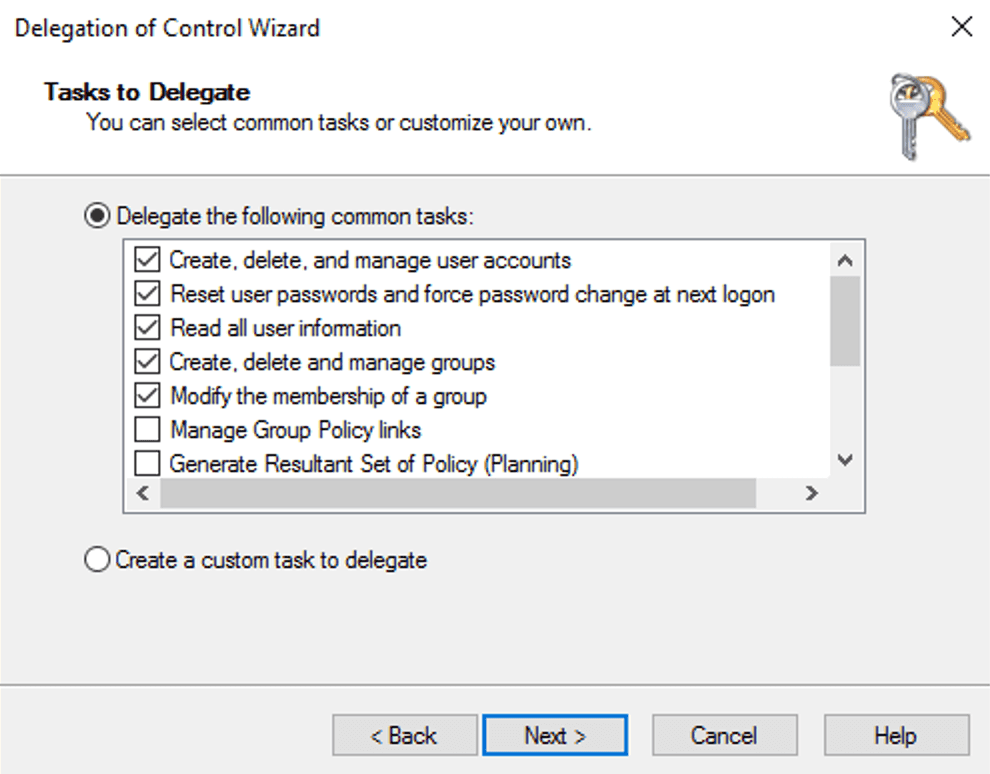
As an example, you can use Delegation control to give your service account permissions for a given OU. To do this you can select your OU inside ADUC (Active Directory Users and Computers) by right-clicking and picking the Delegation control wizard like shown below.
Limiting connector scope
It is strongly recommended that service accounts should have only the required set of permissions. For example, if the connector is used for one-way sync from AD, the service account should not be given permission to write to AD. Permissions for service accounts are controlled on the Active Directory side (for example, by applying permission delegation).
However, as an additional safety measure, you may use the PermittedDN parameter at the managed system level. If this setting is configured, the connector will skip all ADD operations if a new object would be created outside the specified OU or its sub-OUs. Similarly, all MODIFY operations will be stopped if the object being modified is located outside the PermittedDN scope. In both cases the connector returns a FAIL status with an appropriate message.
Supported operations
| Operation | Behavior |
|---|---|
| Save | Looks the object up by its identity attribute. If it does not exist, the object is created; if it exists, its attributes are updated. Renames and OU moves are handled here (see How attributes are processed below). |
| Delete | Removes the object from Active Directory. For a file share, the SMB share is removed on the file server (the underlying folder data is left in place). |
| Search | Runs a query against AD and returns the requested attributes for every matching object. Supports scope restrictions and batched responses (see Synchronization). |
| Reset password | Sets a new password for a user or computer. For users, set ChangePasswordAtLogon to true to require a password change at next logon. |
| Login | Validates a user's password against AD and reports account state and password expiry details (see Password validation below). |
| Suspend | Applies the policy map (update), then disables the account. Users and computers only — groups cannot be suspended. For a file share, access is closed by removing the share. |
| Resume | Applies the policy map (update), then unlocks and enables the account. For a file share, the share is re-created/updated. |
How attributes are processed
OpenIAM sends each attribute with an operation code:
- No change — the attribute is ignored.
- Add / Replace — the value is written to AD.
- Delete — the attribute is cleared. For attributes that cannot hold an empty value (booleans and certain enums), the connector applies a safe default instead of an empty value (for example, boolean flags are set to
False; a group's scope/category and a computer's Kerberos encryption type fall back to their defaults).
Identity and renaming. The connector finds objects by the configured identity attribute (typically sAMAccountName). To rename the identity value, OpenIAM sends the previous value as the original identity; the connector locates the existing object and renames it. If the original identity is provided but the object cannot be found, the operation stops with an error — it is not silently turned into a create.
Name attribute changes the object's RDN/common name via a rename.
Path attribute moves the object to another OU/container; the connector first validates that the target is an existing OU or container.
Unknown attributes are ignored by default. They can optionally be written to AD by enabling isUnknownAttrBindAllowed in the managed-system settings (see Managed-system-level settings below). Attributes that are ignored are written to the log so you can see why a value was not applied.
Provisioning identities
The AD PowerShell connector supports working with the following identities:
- Users
- Groups
- Computers
- File shares
This document describes parameters that can be sent to the connector to modify certain attributes inside Active Directory. Each parameter is described in detail.
User provisioning
Principal — SamAccountName
| Parameter | Description | Required | Type |
|---|---|---|---|
| Name | Specifies the name of the object. This parameter sets the Name property of a user object. The LDAP display name (ldapDisplayName) of this property is name. | Yes | String |
| AccountExpirationDate | Specifies the expiration date for an account. When you set this parameter to 0, the account never expires. This parameter sets the AccountExpirationDate property of an account object. The LDAP display name (ldapDisplayName) for this property is accountExpires. Use the DateTime syntax when you specify this parameter. Time is assumed to be local time unless otherwise specified. When a time value is not specified, the time is assumed to be 12:00:00 AM local time. When a date is not specified, the date is assumed to be the current date. | No | DateTime, for example 10/18/2018 |
| AccountNotDelegated | Indicates whether the security context of the user is delegated to a service. When this parameter is set to $true, the security context of the account is not delegated to a service even when the service account is set as trusted for Kerberos delegation. This parameter sets the AccountNotDelegated property for an Active Directory account and the ADS_UF_NOT_DELEGATED flag of the UAC attribute. Note checking this parameter back requires UAC int attribute (NOT_DELEGATED) conversion. There is no PowerShell parameter that is appropriate for this provisioning attribute. If the service account password is missing or empty in the managed system configuration, the connector stops the operation immediately with a clear error rather than failing later with an ambiguous connection error. | No | True, False |
| AccountPassword | Specifies a new password value for an account. User accounts are created without a password by default. If you provide a password, an attempt will be made to set that password; however, this can fail due to password policy restrictions. To have a new account enabled, set both AccountPassword and Enabled. | No (required if account should be enabled) | String |
| AllowReversiblePasswordEncryption | Indicates whether reversible password encryption is allowed for the account. This parameter sets the AllowReversiblePasswordEncryption property of the account and the ADS_UF_ENCRYPTED_TEXT_PASSWORD_ALLOWED flag of the UAC attribute. | No | True, False |
| CannotChangePassword | Indicates whether the account password can be changed. This parameter sets the CannotChangePassword property of an account. | No | True, False |
| ChangePasswordAtLogon | Indicates whether a password must be changed during the next logon attempt. | No | True, False |
| City | Specifies the user's town or city. This parameter sets the City property of a user object. The LDAP display name (ldapDisplayName) of this property is l. | No | String |
| Company | Specifies the user's company. This parameter sets the Company property of a user object. The LDAP display name (ldapDisplayName) of this property is company. | No | String |
| Country | Specifies the country or region code for the user's language of choice. This parameter sets the Country property of a user object. The LDAP display name (ldapDisplayName) of this property is c. | No | String |
| Department | Specifies the user's department. This parameter sets the Department property of a user object. The LDAP display name (ldapDisplayName) of this property is department. | No | String |
| Description | Specifies a description of the object. This parameter sets the value of the Description property for the user object. The LDAP display name (ldapDisplayName) for this property is description. | No | String |
| DisplayName | Specifies the display name of the object. This parameter sets the DisplayName property of the user object. The LDAP display name (ldapDisplayName) for this property is displayName. | No | String |
| Division | Specifies the user's division. This parameter sets the Division property of a user object. The LDAP display name (ldapDisplayName) of this property is division. | No | String |
| EmailAddress | Specifies the user's e-mail address. This parameter sets the EmailAddress property of a user object. The LDAP display name (ldapDisplayName) of this property is mail. | No | String |
| EmployeeID | Specifies the user's employee ID. This parameter sets the EmployeeID property of a user object. The LDAP display name (ldapDisplayName) of this property is employeeID. | No | String |
| EmployeeNumber | Specifies the user's employee number. This parameter sets the EmployeeNumber property of a user object. The LDAP display name (ldapDisplayName) of this property is employeeNumber. | No | String |
| Enabled | Specifies if an account is enabled. An enabled account requires a password. This parameter sets the Enabled property for an account object and the ADS_UF_ACCOUNTDISABLE flag of the UAC attribute. | No | True, False |
| Fax | Specifies the user's fax phone number. This parameter sets the Fax property of a user object. The LDAP display name (ldapDisplayName) of this property is facsimileTelephoneNumber. | No | String |
| FolderName | The path to the local folder that should be created or modified for the provisioned user. This attribute can work in tandem with the Permissions attribute that sets NTFS permissions on the FolderName path. | No | String, e.g. C:\TestFolder |
| GivenName | Specifies the user's given name. This parameter sets the GivenName property of a user object. The LDAP display name (ldapDisplayName) of this property is givenName. | No | String |
| MemberOf | The list of group distinguished names to which the current user should belong. Contains a dictionary of key-value pairs. Key — distinguished name (DN) of the group. Value — add, nochange, or delete. On user creation, only add and nochange are accepted (both mean the same thing). | No | Dictionary of key-value pairs |
| HomeDirectory | Specifies a user's home directory. This parameter sets the HomeDirectory property of a user object. The LDAP display name (ldapDisplayName) for this property is homeDirectory. | No | String |
| HomeDrive | Specifies a drive that is associated with the UNC path defined by the HomeDirectory property. The drive letter is specified as DriveLetter: where DriveLetter is a single uppercase letter. This parameter sets the HomeDrive property of the user object. The LDAP display name (ldapDisplayName) for this property is homeDrive. | No | String |
| HomePage | Specifies the URL of the home page of the object. This parameter sets the homePage property of a user object. The LDAP display name (ldapDisplayName) for this property is wWWHomePage. | No | String |
| HomePhone | Specifies the user's home telephone number. This parameter sets the HomePhone property of a user object. The LDAP display name (ldapDisplayName) of this property is homePhone. | No | String |
| Initials | Specifies the initials that represent part of a user's name. You can use this value for the user's middle initial. This parameter sets the Initials property of a user object. The LDAP display name (ldapDisplayName) of this property is initials. Maximum default attribute length on the AD side is 6 characters. | No | String |
| KerberosEncryptionType | Specifies whether an account supports Kerberos encryption types used during the creation of service tickets. Possible values: DES, RC4, AES128, AES256. None removes all encryption types from the account, resulting in the KDC being unable to issue service tickets for services using the account. DES is a weak encryption type not supported by default since Windows 7 and Windows Server 2008 R2. Warning: domain-joined Windows systems and services such as clustering manage their own msDS-SupportedEncryptionTypes attribute; any changes may be overwritten. | No | String — one of the values listed |
| LogonWorkstations | Specifies the computers the user can access. To specify more than one computer, provide a comma-separated list. You can identify a computer by its SAM account name (sAMAccountName) or DNS host name. The LDAP display name (ldapDisplayName) for this property is userWorkstations. | No | String or comma-separated list (no spaces around commas) |
| Manager | Sets manager for the specified user. Contains the sAMAccountName of the manager. Only one manager per user is supported. If the referenced manager does not exist in AD, a warning is returned and the attribute is skipped rather than failing the whole request. | No | String (sAMAccountName) |
| MobilePhone | Specifies the user's mobile phone number. This parameter sets the MobilePhone property of a user object. The LDAP display name (ldapDisplayName) of this property is mobile. | No | String |
| Office | Specifies the location of the user's office or place of business. This parameter sets the Office property of a user object. The LDAP display name (ldapDisplayName) of this property is physicalDeliveryOfficeName. | No | String |
| OfficePhone | Specifies the user's office telephone number. This parameter sets the OfficePhone property of a user object. The LDAP display name (ldapDisplayName) of this property is telephoneNumber. | No | String |
| Organization | Specifies the user's organization. This parameter sets the Organization property of a user object. The LDAP display name (ldapDisplayName) of this property is o. | No | String |
| OtherName | Specifies a name in addition to a user's given name and surname, such as the user's middle name. This parameter sets the OtherName property of a user object. The LDAP display name (ldapDisplayName) of this property is middleName. | No | String |
| POBox | Specifies the user's post office box number. This parameter sets the POBox property of a user object. The LDAP display name (ldapDisplayName) of this property is postOfficeBox. | No | String |
| PasswordNeverExpires | Specifies whether the password of an account can expire. This parameter sets the PasswordNeverExpires property of an account object and the ADS_UF_DONT_EXPIRE_PASSWD flag of the UAC attribute. | No | True, False |
| PasswordNotRequired | Specifies whether the account requires a password. A password is not required for a new account. This parameter sets the PasswordNotRequired property of an account object. | No | True, False |
| Path | Specifies the X.500 path of the Organizational Unit (OU) or container where the new object is created. If no Path is set, the BASE_DN managed-system parameter is used. If OpenIAM sends a new Path for an existing user, the connector will attempt to move the object. Note: movement fails if the object is protected from accidental deletion. Changing Path updates the DN to 'CN={NAME},{NEW_PATH}'. | No | String, e.g. OU=TestUsers,DC=DC1,DC=local |
| Permissions | Applied only if FolderName is set. A set of key-value pairs where the key is a value from the FileSystemRights enum and the value is add or delete. | No | Dictionary of key-value pairs |
| PostalCode | Specifies the user's postal code or zip code. This parameter sets the PostalCode property of a user object. The LDAP display name (ldapDisplayName) of this property is postalCode. | No | String |
| PrincipalsAllowedToDelegateToAccount | Specifies an array of principal objects. This parameter sets the msDS-AllowedToActOnBehalfOfOtherIdentity attribute of a computer account object. By default the connector supports one principal; this behavior can be extended on request. | No | String (sAMAccountName) |
| ProfilePath | Specifies a path to the user's profile. This value can be a local absolute path or a UNC path. This parameter sets the ProfilePath property of the user object. The LDAP display name (ldapDisplayName) for this property is profilePath. | No | String |
| SamAccountName | Specifies the Security Account Manager (SAM) account name. The maximum length is 256 characters; for compatibility with older operating systems, use 20 characters or fewer. The LDAP display name (ldapDisplayName) for this property is sAMAccountName. | No | String |
| ScriptPath | Specifies a path to the user's logon script. This value can be a local absolute path or a UNC path. This parameter sets the ScriptPath property of the user object. The LDAP display name (ldapDisplayName) for this property is scriptPath. | No | String |
| SmartcardLogonRequired | Specifies whether a smart card is required to log on. This parameter sets the SmartCardLoginRequired property for a user object and the ADS_UF_SMARTCARD_REQUIRED flag of the UAC attribute. | No | True, False |
| State | Specifies the user's or Organizational Unit's state or province. This parameter sets the State property of a user object. The LDAP display name (ldapDisplayName) of this property is st. | No | String |
| StreetAddress | Specifies the user's street address. This parameter sets the StreetAddress property of a user object. The LDAP display name (ldapDisplayName) of this property is streetAddress. | No | String |
| Surname | Specifies the user's last name or surname. This parameter sets the Surname property of a user object. The LDAP display name (ldapDisplayName) of this property is sn`. | No | String |
| Title | Specifies the user's title. This parameter sets the Title property of a user object. The LDAP display name (ldapDisplayName) of this property is title. | No | String |
| TrustedForDelegation | Indicates whether an account is trusted for Kerberos delegation. A service that runs under an account trusted for Kerberos delegation can assume the identity of a client requesting the service. This parameter sets the TrustedForDelegation property and the ADS_UF_TRUSTED_FOR_DELEGATION flag of the UAC attribute. | No | True, False |
| UserPrincipalName | Specifies a user principal name (UPN) in the format user@DNS-domain-name. A UPN is a friendly name shorter than the LDAP distinguished name and easier to remember. The UPN is independent of the user object's distinguished name, so a user object can be moved or renamed without affecting the user logon name. | No | String, e.g. user@DNS-domain-name |
| SMBFileServerAddress | The address of the file server on which SMB permissions should be set for this user. | No | DNS hostname |
| SMBShareName | The name of the SMB file share on the server specified by SMBFileServerAddress. | No | String |
| SMBPermissionsSet | JSON array of permissions to merge with the current share permissions. Example: [{"Operation": "Grant","AccountName": "SomeUser","AccessRight": "Read"}] | No | JSON array |
| SMBOverwriteWithPermissions | JSON array of permissions that replace all current share permissions. If both this and SMBPermissionsSet are set, this attribute takes precedence and SMBPermissionsSet is ignored. Example: [{"Operation": "Grant","AccountName": "SomeUser","AccessRight": "Read"}] | No | JSON array |
| Certificates | Allows you to manage certificates for a specific user (assign or delete). The value must be the Base64-encoded certificate in a single line, without the -----BEGIN CERTIFICATE----- / -----END CERTIFICATE----- headers, spaces, or newlines. The certificate must be an X.509v3 certificate. Note: to delete all certificates from a user, send this attribute empty with the DELETE operation code. | No | String |
| AccountExpires | Sets the account expiration date using the format defined by DateTimeStringFormat on the managed system. When sent with the Delete operation code, the account is set to never expire. | No | String (format per DateTimeStringFormat) |
| LockedOut | Only the value False is acted upon — it unlocks the account. Sending True is ignored. | No | False |
| ProxyAddresses | Sets proxy addresses on the user object (for example Exchange SMTP addresses). Accepts a comma-separated list; multiple values are supported. | No | String (comma-separated) |
| ThumbnailPhoto | Sets the user's thumbnail photo. Must be a Base64-encoded image string. | No | String (Base64) |
| TerminalServicesProfilePath | Sets the Remote Desktop Services profile path for the user. | No | String |
| TerminalServicesHomeDirectory | Sets the Remote Desktop Services home directory path for the user. | No | String |
| ExtensionAttribute1–ExtensionAttribute15 | Maps to the AD extensionAttribute1 through extensionAttribute15 schema attributes. | No | String |
| msDS-cloudExtensionAttribute1–msDS-cloudExtensionAttribute20 | Maps to the corresponding msDS-cloudExtensionAttribute attributes. | No | String |
| adminDisplayName | Sets the adminDisplayName attribute on the user object. | No | String |
| EmployeeType | Sets the employeeType attribute. | No | String |
| mailNickname | Sets the mail nickname (alias) attribute. | No | String |
| Co | Sets the country name (co) attribute (full country name, as opposed to the two-letter Country code). | No | String |
| CountryCode | Sets the countryCode integer attribute. | No | Integer |
| physicalDeliveryOfficeName | Sets the physical delivery office name attribute. | No | String |
| Info | Sets the info (Notes) attribute on the user object. | No | String |
| Comment | Sets the comment attribute on the user object. | No | String |
Provisioning custom attributes in AD with extended schema
For provisioning user attributes related to the extended AD schema:
- These attributes must exist in the User Policy map.
- At the managed system level, create an
ExtraUserAttributesattribute and add all provisioning attributes related to the extended AD schema to it, separated by commas.

Group provisioning
Principal — SamAccountName
To add a new group, OpenIAM must send two attributes:
- Name
- GroupScope (
DomainLocal,Global, orUniversal)
| Parameter | Description | Required | Type |
|---|---|---|---|
| Name | Specifies the name of the object. This parameter sets the Name property of the Active Directory object. The LDAP display name (ldapDisplayName) of this property is name. | Yes | String |
| GroupScope | Specifies the scope of the group. Acceptable values: DomainLocal, Universal, Global. The LDAP display name of this property is groupType. | Yes | String |
| MemberOf | Key-value pair — sets the groups in which the current group should be added. | No | Key-value |
| Description | Specifies a description of the object. The LDAP display name (ldapDisplayName) for this property is description. | No | String |
| DisplayName | Specifies the display name of the object. The LDAP display name (ldapDisplayName) for this property is displayName. | No | String |
| GroupCategory | Specifies the category of the group. Acceptable values: Distribution, Security. This parameter sets the GroupCategory property of the group. Combined with other group values, it sets the groupType attribute. | No | String |
| HomePage | Specifies the URL of the home page of the object. The LDAP display name (ldapDisplayName) for this property is wWWHomePage. | No | String |
| Instance | Specifies an instance of a group object to use as a template for a new group object. | No | String |
| Members | Key-value pair for group members. Key — distinguished name of the object. Value — add, nochange, or delete. On group creation, only add and nochange are accepted (both mean the same thing). | No | Key-value |
| ManagedBy | Specifies the user or group that manages the object. Acceptable values: a distinguished name, a GUID (objectGUID), a security identifier (objectSid), or a SAM account name (sAMAccountName). | No | String |
| Path | Specifies the destination path in DistinguishedName format for the newly created object. | No | String |
| SamAccountName | Specifies the Security Account Manager (SAM) account name. Maximum length is 256 characters; for compatibility with older operating systems, use 20 characters or fewer. The LDAP display name (ldapDisplayName) for this property is sAMAccountName. | No | String |
OpenIAM configuration
To enable group provisioning, add the group provision fields to the managed system. Go to Webconsole > Provisioning > Connectors > AD PowerShell Connector > Connector configuration and enable the checkboxes for:
- Base DN for Group
- Object Primary Key for Group
- Search Base DN for Group
- Search Filter for Group
Save changes. Go to the managed system edit page and populate the new fields for group, then save. Make sure that you have a policy map for the group object type — if not, create one by copying from the out-of-the-box managed system.
Now each group linked with the AD managed system will have an identity generated and will be provisioned to AD.
Group membership behaviour
Group membership is reconciled on every Save request. The connector adds or removes members as needed to match the requested state. Failures on individual membership changes are reported as warnings and do not fail the whole request.
Cross-domain membership is supported. Provide the relevant domain controllers via the EnvironmentControllers managed-system attribute (semicolon-separated list of DC hostnames) so the connector can target the correct domain for each membership change.
Two optional flags prune memberships not present in OpenIAM's map:
RemoveUnknownGroupMembership— removes the object from groups that are not in itsMemberOfmap. The built-in Domain Users group is never removed.RemoveUnknownGroupMembers(groups only) — removes members from a group that are not in the group'sMembersmap.
Computer provisioning
Principal — SamAccountName
| Parameter | Description | Required | Type |
|---|---|---|---|
| Name | Specifies the name of the object. This parameter sets the Name property of the Active Directory object. The LDAP display name (ldapDisplayName) of this property is name. | Yes | String |
| AccountExpirationDate | Specifies the expiration date for an account. When you set this parameter to 0, the account never expires. The LDAP display name (ldapDisplayName) for this property is accountExpires. Use the DateTime syntax when you specify this parameter. Time is assumed to be local time unless otherwise specified. | No | DateTime, e.g. 10/18/2018 |
| AccountNotDelegated | Specifies whether the security context of the user is delegated to a service. When set to true, the security context of the account is not delegated even when the service account is set as trusted for Kerberos delegation. Also sets the ADS_UF_NOT_DELEGATED flag of the UAC attribute. | No | True, False |
| AllowReversiblePasswordEncryption | Specifies whether reversible password encryption is allowed for the account. Also sets the ADS_UF_ENCRYPTED_TEXT_PASSWORD_ALLOWED flag of the UAC attribute. | No | True, False |
| AuthenticationPolicy | Specifies an Active Directory Domain Services authentication policy object. Acceptable formats: a distinguished name, a GUID, or a name. | No | String |
| AuthenticationPolicySilo | Specifies an Active Directory Domain Services authentication policy silo object. Acceptable formats: a distinguished name, a GUID, or a name. | No | String |
| CannotChangePassword | Specifies whether the account password can be changed. This parameter sets the CannotChangePassword property of an account. | No | True, False |
| ChangePasswordAtLogon | Specifies whether a password must be changed during the next logon attempt. | No | True, False |
| CompoundIdentitySupported | Specifies whether an account supports Kerberos service tickets that include authorization data for the user's device. Warning: domain-joined Windows systems and services such as clustering manage their own msDS-SupportedEncryptionTypes attribute; any changes may be overwritten. | No | True, False |
| DNSHostName | Specifies the fully qualified domain name (FQDN) of the computer. The LDAP display name for this property is dNSHostName. | No | String |
| Description | Specifies a description of the object. The LDAP display name (ldapDisplayName) for this property is description. | No | String |
| DisplayName | Specifies the display name of the object. The LDAP display name (ldapDisplayName) for this property is displayName. | No | String |
| Enabled | Specifies if an account is enabled. An enabled account requires a password. Also sets the ADS_UF_ACCOUNTDISABLE flag of the UAC attribute. | No | True, False |
| HomePage | Specifies the URL of the home page of the object. The LDAP display name (ldapDisplayName) for this property is wWWHomePage. | No | String |
| KerberosEncryptionType | Specifies whether an account supports Kerberos encryption types used during the creation of service tickets. Acceptable values: None, DES, RC4, AES128, AES256. None removes all encryption types from the account. DES is a weak encryption type not supported by default since Windows 7 and Windows Server 2008 R2. Warning: domain-joined Windows systems and services such as clustering manage their own msDS-SupportedEncryptionTypes attribute; any changes may be overwritten. | No | String |
| Location | Specifies the location of the computer, such as an office number. The LDAP display name (ldapDisplayName) of this property is location. | No | String |
| ManagedBy | Specifies the user or group that manages the object. Acceptable values: a distinguished name, a GUID (objectGUID), a security identifier (objectSid), or a SAM account name (sAMAccountName). | No | String |
| OperatingSystem | Specifies an operating system name. The LDAP display name (ldapDisplayName) for this property is operatingSystem. | No | String |
| OperatingSystemHotfix | Specifies an operating system hotfix name. The LDAP display name for this property is operatingSystemHotfix. | No | String |
| OperatingSystemServicePack | Specifies the name of an operating system service pack. The LDAP display name (ldapDisplayName) for this property is operatingSystemServicePack. | No | String |
| OperatingSystemVersion | Specifies an operating system version. The LDAP display name (ldapDisplayName) for this property is operatingSystemVersion. | No | String |
| PasswordNeverExpires | Specifies whether the password of an account can expire. Also sets the ADS_UF_DONT_EXPIRE_PASSWD flag of the UAC attribute. | No | True, False |
| PasswordNotRequired | Specifies whether the account requires a password. Also sets the ADS_UF_PASSWD_NOTREQD flag of the UAC attribute. | No | True, False |
| Path | Specifies the X.500 path of the Organizational Unit (OU) or container where the new object is created. If no Path is set, the BASE_DN managed-system parameter is used. | No | String (DN format) |
| SAMAccountName | Specifies the Security Account Manager (SAM) account name. Maximum length is 256 characters; for compatibility with older operating systems, use 15 characters or fewer. The LDAP display name (ldapDisplayName) for this property is sAMAccountName. Note: if the SAMAccountName string provided does not end with '$', a '$' will be appended automatically. | No | String |
| TrustedForDelegation | Specifies whether an account is trusted for Kerberos delegation. A service that runs under an account trusted for Kerberos delegation can assume the identity of a client requesting the service. Also sets the ADS_UF_TRUSTED_FOR_DELEGATION flag of the UAC attribute. | No | True, False |
| UserPrincipalName | Specifies a user principal name (UPN) in the format user@DNS-domain-name. | No | String, e.g. user@DNS-domain-name |
File share provisioning
Principal — UNCPath
File shares are modelled as Group objects in OpenIAM with the policy-map attribute Type set to fileshare. The connector detects this and handles the request as a file share operation rather than a standard group operation.
| Parameter | Description | Required | Type |
|---|---|---|---|
| Type | Must be set to fileshare to indicate that this Group request should be treated as a file share. | Yes | String |
| Name | A unique name that identifies this share on the target file server. No duplicate names are allowed on the same server. | Yes | String |
| Path | The physical path on the target file server where the share will be located. If the path does not exist, the connector will create it, including nested sub-folders (if the supplied credentials have sufficient permissions). | Yes | String |
| FileServerAddress | The network address of the file server — either an IP address or a DNS hostname. For remoting operations in an AD environment, use DNS names. | Yes | String, e.g. dc1.openiamdemo.com |
| UNCPath | Serves as the unique ID for OpenIAM. Represents the network path, e.g. \\dc12.openiamtest.local\FileShare. | Yes | String |
| Description | An optional description of the SMB share. Maximum 256 characters. | No | String |
| CachingMode | Specifies the caching mode of offline files for the SMB share. Acceptable values: None (prevents offline storage), Manual (user-selected offline files), Programs (automatic program caching), Documents (automatic document caching), BranchCache (enables BranchCache). | No | String |
| PublishedLDAPPath | Optionally applies in Windows Active Directory environments. Publishes the share link in AD at the specified LDAP path, e.g. LDAP://OU=Australia,DC=openiamtest,DC=local. | No | String |
| PreviousPublishedLDAPPath | Used when moving the PublishedLDAPPath from one location to another. Set PublishedLDAPPath to the new destination and this attribute to the current (old) location. Only works when PublishedLDAPPath is set with operation code 2 (replace). | No | String |
| ConcurrentUserLimit | Specifies the maximum number of concurrent users allowed to access the share. | No | Integer |
| PermissionsSet | JSON array of share permissions to merge with existing permissions. Does not remove existing permissions unless overwritten. Each entry contains: Operation (Grant or Revoke), AccountName (sAMAccountName or a name like Everyone), AccessRight (Full, Change, or Read). Note: share permissions are combined with NTFS permissions; the most restrictive apply. | No | JSON array |
| OverwriteWithPermissions | If set to True, removes all existing share permissions and replaces them with the DefaultPermissionsSet, then applies PermissionsSet if present. Requires DefaultPermissionsSet to be set. | No | True, False |
| DefaultPermissionsSet | Works like PermissionsSet but is applied when OverwriteWithPermissions is True. Defines the baseline permission set after the wipe. Requires OverwriteWithPermissions to be set. Example: [{"Operation": "Grant","AccountName": "SomeUser","AccessRight": "Read"}] | No | JSON array |
| DFSNPath | The DFS namespace path under which this share should be registered as a DFS target, e.g. \\domain\dfsroot\folder. | No | String (UNC path) |
| DFSNTargetPath | The physical UNC target path to register under the DFS namespace path defined by DFSNPath. | No | String (UNC path) |
Managed-system-level settings
The following can be set as additional attributes on the managed system in OpenIAM to control connector behaviour:
| Attribute | Effect |
|---|---|
BASE_DN (or baseDN) | Default location for new objects when no Path is supplied, and the target when a Path is cleared. |
PermittedDN | Restricts all create/update/delete/rename/move operations (and filters search results) to one or more locations. Accepts a single distinguished name, or several comma-separated, quoted DNs. |
isUnknownAttrBindAllowed | If true, attributes the connector does not recognise are written to AD instead of being ignored. Boolean-like string values are converted automatically. Use with care: sending an attribute that does not exist in the schema will cause an error. |
DateTimeStringFormat | Format used to parse and return date/time values (such as AccountExpires). Must match the format OpenIAM uses when sending date strings. |
LDAPLoginAddress | Overrides the managed-system host for password validation (Login) only. Useful when the LDAP endpoint differs from the AD endpoint. |
EnvironmentControllers | Semicolon-separated list of domain controller hostnames for cross-domain group membership operations. |
RemoveUnknownGroupMembership | If true, removes an object from groups that are not present in its MemberOf map. Domain Users is never removed. |
RemoveUnknownGroupMembers | If true (groups only), removes members from a group that are not present in the group's Members map. |
isSimulation | If true, write operations are skipped and reported back to OpenIAM with a warning. Read-only operations (search, login) still run normally. |
ADD_HANDLER, MODIFY_HANDLER, SEARCH_HANDLER, DELETE_HANDLER, PASSWORD_HANDLER, SUSPEND_HANDLER, RESUME_HANDLER | Override the built-in logic for an operation with a custom PowerShell script. Point the value at a .ps1 file located in the connector folder. PASSWORD_HANDLER applies to both Reset password and Login. |
Password validation
A Login request validates a user password against Active Directory. By default the connector connects over LDAPS; if a port is configured on the managed system it connects to LDAP://<host>:<port> (port 636 is treated as LDAPS). LDAPLoginAddress can override the host for this check only.
The response reports:
- Whether the account was found and enabled.
- Whether the password must be changed at next logon.
- When the password is valid: the password expiration date and number of days until expiry.
A disabled or missing account, or an invalid password, is returned as a failed login.
Synchronization
Synchronizing AD users
Running synchronization is very similar to performing PowerShell queries targeted to AD. In most cases it leverages the functionality of Get-ADUser, Get-ADGroup or Get-ADComputer cmdlets.
General query execution logic
OpenIAM sends the query to the connector along with the list of attributes it expects to receive. The query result on the connector side is treated as key-value pairs. When this key-value structure is formed, the connector matches attributes requested from OpenIAM against the available keys (case-insensitive). If a key is matched, the value(s) are returned to OpenIAM. If a key is not found but an attribute was requested, the attribute value is returned as null.
While running search requests, the connector authenticates against AD using the service account. The query, although almost identical to PowerShell queries, is evaluated on the connector side and translated to real PowerShell commands. The connector allows you to run pure PowerShell requests but also offers simplified syntax described below.
In all examples below we will use Get-ADUser; the same examples apply with Get-ADUser replaced by Get-ADGroup or Get-ADComputer.
Returned attributes
If the query does not contain a -Properties parameter, the basic attributes the connector returns from AD are:
- DistinguishedName
- Enabled
- GivenName
- Name
- ObjectClass
- ObjectGUID
- SamAccountName
- SID
- Surname
- UserPrincipalName
Getting extra attributes. To add extra attributes, specify -Properties X,Y,Z or -Properties * where X, Y, Z are required attributes in a comma-separated list. If you need all attributes, specify *. Be aware that querying all attributes using * significantly decreases performance, so it is recommended to always specify only the attributes you need.
A full query example:
Get-ADUser -Filter * -Properties Mail,WhenCreated
The query above searches for all users inside AD (or inside SearchBaseDN) and returns the basic attribute set plus Mail and WhenCreated.
Get-ADUser -Filter * -Properties *
The query above searches for all users and returns all attributes from the user profile. This can be very slow and memory-intensive with large user directories.
Query syntax
You can run a direct query using the syntax described at Get-ADUser, Get-ADGroup or Get-ADComputer.
If you specify the Filter parameter without specifying SearchBase, the SearchBase value will be set to the SearchBaseDN setting on your managed system page.
Query examples:
Get-ADUser -Filter *
The query above gets all users from AD. If SearchBaseDN is set, the scope will be limited to that location.
Get-ADUser -Identity 'SamAccountName or SID, GUID or DN' -Properties *
Use this form to synchronize a single user — typically for testing or validating functionality.
Get-ADUser -Filter {Surname -eq 'Potter'}
The query above selects all users with the surname 'Potter'. The search is limited to SearchBaseDN because the -Filter parameter is present and no -SearchBase is specified. To override the SearchBaseDN:
Get-ADUser -Filter {Surname -eq 'Potter'} -SearchBase 'DC=openiamtest,DC=local'
If you run queries that do not use the -Filter parameter, they are not limited to SearchBaseDN.
One common scenario is filtering users modified after a certain date:
Get-ADUser -LDAPFilter '(whenChanged>=20200726000000.0Z)' -Properties whenChanged
Here the whenChanged attribute is specified in YYYYMMDD format (plus hours and minutes), so the query returns all users modified after 26 July 2020.
To sync user objects from specific locations inside AD, use filtering in your query (the -SearchBase parameter accepts only one location):
Get-ADUser -Filter * -Properties property1,property2 | Where-Object {$_.DistinguishedName -like '*OU=SomeOU1,DC=openiamtest,DC=local' -or $_.DistinguishedName -like '*OU=SomeOU2,DC=openiamtest,DC=local'}
This request gets all users inside AD but filters and returns only those whose DistinguishedName ends with the given locations, including child locations.
Synchronizing AD group memberships
Group memberships are synchronized as part of user synchronization. To get information about the groups a user belongs to, include the memberOf attribute in your request:
Get-ADUser -Filter * -Properties memberOf
Alternatively, use * to return all possible properties, though this greatly decreases performance.
Primary group membership — Active Directory does not return primary group membership inside the memberOf attribute by design. In the vast majority of cases the primary group for all users is Domain Users. If you need to sync the primary group membership, include the PrimaryGroup attribute in your request:
Get-ADUser -Filter * -Properties memberOf, PrimaryGroup
OpenIAM configuration for AD user sync
OpenIAM supplies an out-of-the-box configuration named AD PowerShell USER Example.
Synchronizing AD groups
AD group synchronization is performed in the same way as user synchronization. Replace Get-ADUser with Get-ADGroup in the filter expressions.
Getting all AD distribution groups:
Get-ADGroup -Filter 'groupcategory -eq "Distribution"'
Getting all security groups in a certain location:
Get-ADGroup -Filter 'groupcategory -eq "Security"' -SearchBase 'CN=Users,DC=openiamtest,DC=local'
Attributes returned by AD group sync
If you run requests like above, the connector returns the following default attributes for the AD Group object:
- DistinguishedName
- GroupCategory —
SecurityorDistribution - GroupScope —
DomainLocal,Global, orUniversal - Name — the name of the group, which usually acts as the principal for group object provisioning in AD
- ObjectClass — always
group - ObjectGUID — unique identifier, e.g.
d8168b10-f45e-43f4-bd9c-37a53896e4bc - SamAccountName
- SID — security identifier, e.g.
S-1-5-21-3577459162-1270948675-2189036518-2886
To get additional attributes, add -Properties prop1,prop2,... to your request, or use * for everything (note the performance impact). For example, to get all available information about all security groups in a domain:
Get-ADGroup -Filter 'groupcategory -eq "Security"' -Properties *
For better performance, specify only the properties you need:
Get-ADGroup -Filter 'groupcategory -eq "Security"' -Properties cn,whenCreated
The example above returns all basic attributes plus CN and WhenCreated.
You can also request the following additional properties:
- CanonicalName — e.g.
openiamtest.local/Builtin/Administrators - Created
- createTimeStamp
- Deleted
- Description
- HomePage
- isCriticalSystemObject
- isDeleted
- LastKnownParent
- ManagedBy
- MemberOf — DNs of the parent groups
- Members — DNs of members of this group
- Modified
- modifyTimeStamp
- ProtectedFromAccidentalDeletion
- whenChanged
- whenCreated
OpenIAM configuration for AD group sync
OpenIAM supplies an out-of-the-box configuration named AD PowerShell GROUP Example.
Synchronizing AD file shares
The AD connector can synchronize file shares located on domain-joined Windows servers. Target Windows servers must run Windows Server 2012 R2 or later.
Because file shares reside on individual servers and are not managed centrally by AD, the AD connector connects to each file share server directly using PowerShell Remoting and executes PowerShell commands over a remote session.
The AD connector service account must have the following permissions on the target file share server:
- Member of the local Remote Management Users group — to discover all file shares on the server.
- Member of the local Administrators group — to collect share permissions.
To synchronize file shares, use Get-SmbSharesInfo in your synchronization query:
Get-SmbSharesInfo -ComputerNames 'server1','server2'
In this scenario, the AD connector connects to server1 and server2 to retrieve information about the file shares stored there.
To get information about all file shares in your domain:
Get-SmbSharesInfo -DomainController 'yourDCHostname'
When the AD connector receives the query above, it connects to your domain controller (using the credentials stored in the managed system configuration), pulls all computers registered in AD, and then connects to each of them (using multithreading) to collect file share information.
Getting permissions. To determine whether the connector needs to collect permissions, the connector checks the list of requested attributes from OpenIAM. This list is set in the Attribute names lookup parameter of the OpenIAM synchronization configuration page. If this list contains the Permissions attribute, the connector retrieves permissions for each file share found. If the attribute is not listed, this step is skipped.
Incremental sync of users or groups
When running incremental sync, OpenIAM relies on the time of the last user/group modification in AD. Each user or group in AD has a Modified property that is updated each time the object is changed.
To get objects modified after a certain date:
Get-AdGroup -Filter "Modified -gt '$((Get-Date '?').ToUniversalTime())'"
In this example, OpenIAM replaces ? with a real value during runtime.
OpenIAM also needs to know the time format to use when receiving values from the connector. This format is sent in the request metadata as the DateTimeStringFormat parameter:
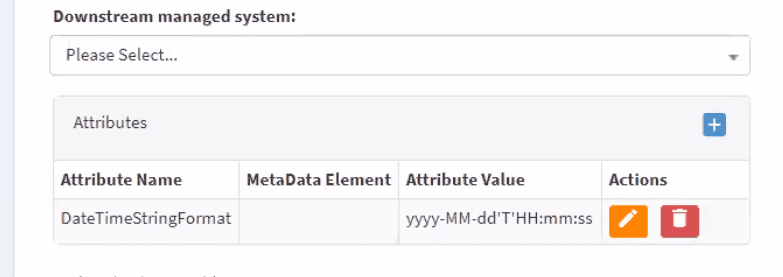
This setting can be changed in the configuration of your Managed System.
Urgent queues
A connector is responsible for transferring data between systems. If some messages require immediate processing, an urgent queue can be implemented to prioritize them over regular traffic. To add a connection, follow the steps below.
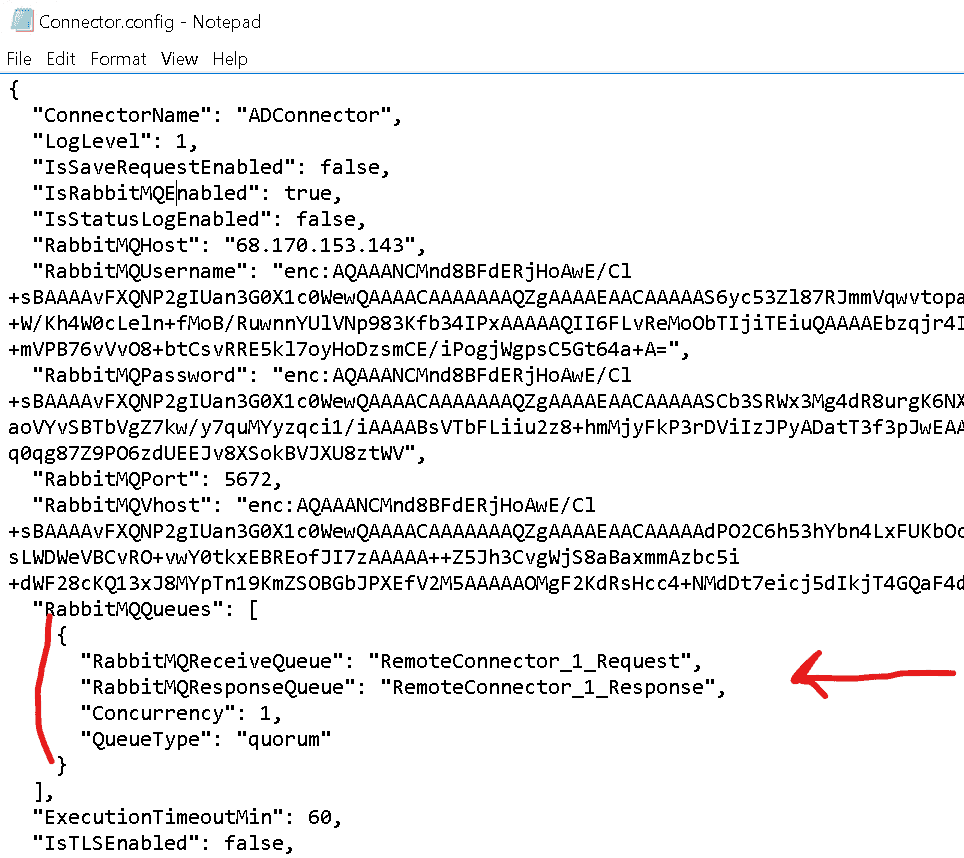
- Open
Connector.configinside the connector folder on the Windows machine and add a new record to the"RabbitMQQueues"array, as shown below.
Duplicate the existing queue record and append URGENT_ to the *ReceiveQueue and *ResponseQueue property values. The configuration that supports urgent queues looks like the one below.
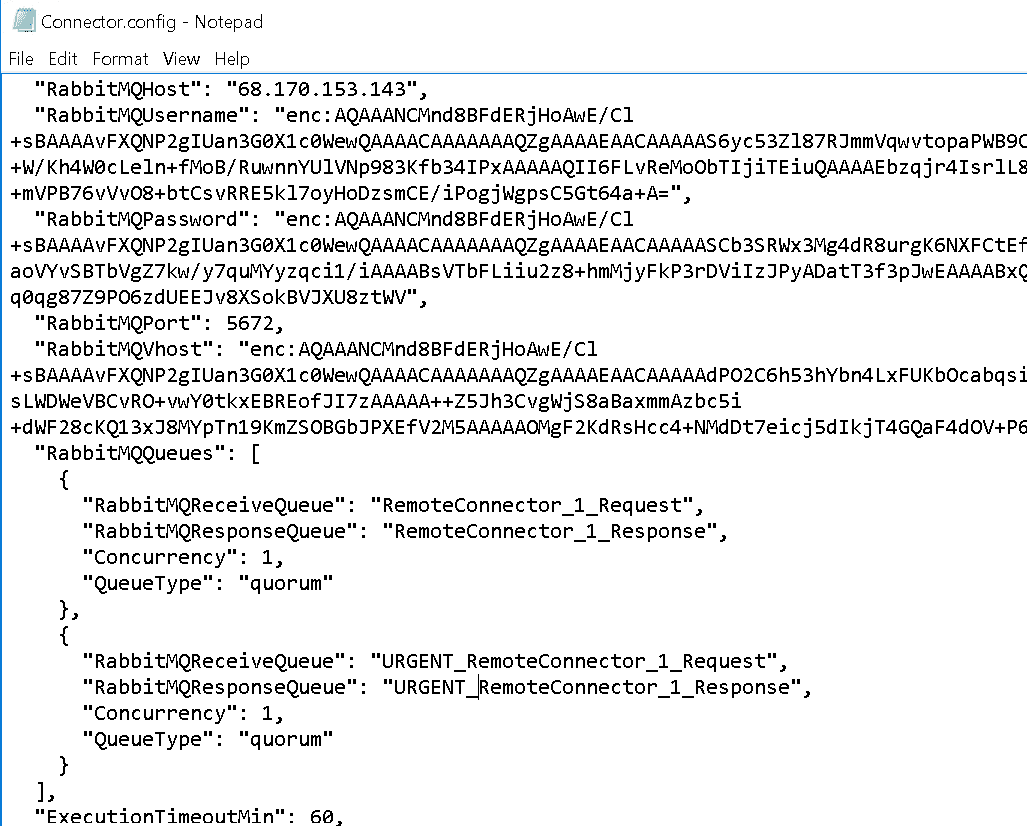
Concurrency values can be set independently for the normal and urgent queues.
Connector troubleshooting and tips
Connector troubleshooting is covered in the document that describes all .NET/PowerShell connector usage:
- It is always better to specify the DNS hostname of your domain controller on the Managed System configuration page, especially when the connector server is a domain member. Specifying an IP address may lead to non-obvious errors.
- Port 9389 must be open on the domain controller side for the connector to reach it. It is open in almost all standard configurations.
- To validate the connection to AD in the same way as the connector, you can run the following script:
Import-Module ActiveDirectory$dc = 'YOUR_DOMAIN_CONTROLLER_HOSTNAME'$ADcred = Get-CredentialNew-PSDrive -PSProvider ActiveDirectory -Server $dc -Credential $ADcred -Root "" -Name IamADDrv -FormatType Canonicalif((Test-Path IamADDrv:) -eq $false){throw "Unable to connect to AD"}Set-Location IamADDrv:
Possible errors
Errors in the table below are captured from customer feedback. These are the most frequently reported.
| Error | Possible cause | How to fix |
|---|---|---|
| Cannot find newly created user X for further operations | This is a top-level stack trace error indicating the connector cannot process the request due to an error that occurred earlier. Other information is not usually visible when such messages appear. | Read the full error message — it contains the exact reason why the connector failed to create the object. |
| Script that was specified for execution does not exist — xxx | This message appears if the Add/Modify (or other operation) Object Rules parameter is set in the OpenIAM Managed System configuration. That section allows custom scripts to handle specific operations. By default, the connector uses the default Connector.ps1 script in the connector folder. | Either remove the value (leaving it empty) to use the default script, or ensure the custom handler script exists in the connector folder. |
| X: The name provided is not a properly formed account name | You are trying to create an object (where X is the object type) with a sAMAccountName longer than 20 characters, which is not compatible with older systems. | Set the sAMAccountName to 20 characters or fewer. Check/fix the provisioning Groovy script at the policy map for the sAMAccountName attribute. |
| Cannot process argument transformation on parameter 'Credential'. A command that alerts the user failed because the host program or the command type does not support user interaction | This error occurs when syncing without a password configured in the Managed System. | Set the password in the Managed System configuration. |