OpenIAM report services
This document provides detailed instructions on how to configure the Report Service in OpenIAM and an overview of the reports available within the system. It explains the prerequisites, configuration steps, and settings required to ensure the reporting functionality operates correctly.
Common considerations about reports
The following section describes common architectural patterns of the OpenIAM report service, common export formats, delivery methods, performance considerations, and other common issues about reports.
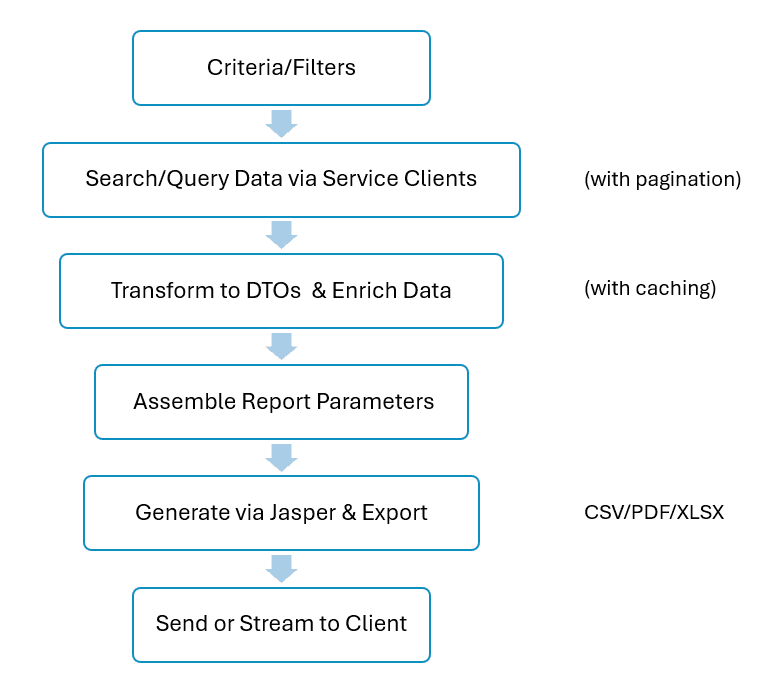
The architectural pattern of the OpenIAM report looks as follows.
The generated reports can be delivered either through direct download, which streams the file directly to the browser, or via email, where the report is saved to disk and sent using the mail service. In many cases, both delivery methods can be configured individually for each report.
From a performance perspective, several aspects must be taken into account. Query optimization plays a key role: reports typically use pagination of 100–500 records per batch, with ElasticSearch enabled where available, and employ caching of service calls through in-memory maps such as HashMap. Additionally, date range filtering is applied on the backend to limit query scope and improve efficiency.
Memory management is another critical consideration. Currently, reports are often held entirely in memory using large, ByteArrayOutputStream objects, which can cause performance issues with large datasets. To address this and to handle large outputs more efficiently, streaming should be implemented.
To further enhance performance, service call reduction techniques are used. This includes caching frequently accessed entities such as roles, groups, users, managed systems, and resource types. By avoiding redundant lookups, these strategies reduce overall system load and improve report generation speed.
When reviewing your reporting setup, it is advisable to download reports individually and focus on aspects such as how report-specific data is gathered, which output fields are included, and what filtering options are available. Pay special attention to patterns like pagination limits, caching strategies, and service integration points. Finally, consider which reports are most frequently used within your organization, what customizations might be needed, and how the system performs when working with large datasets.
Configuring report generation
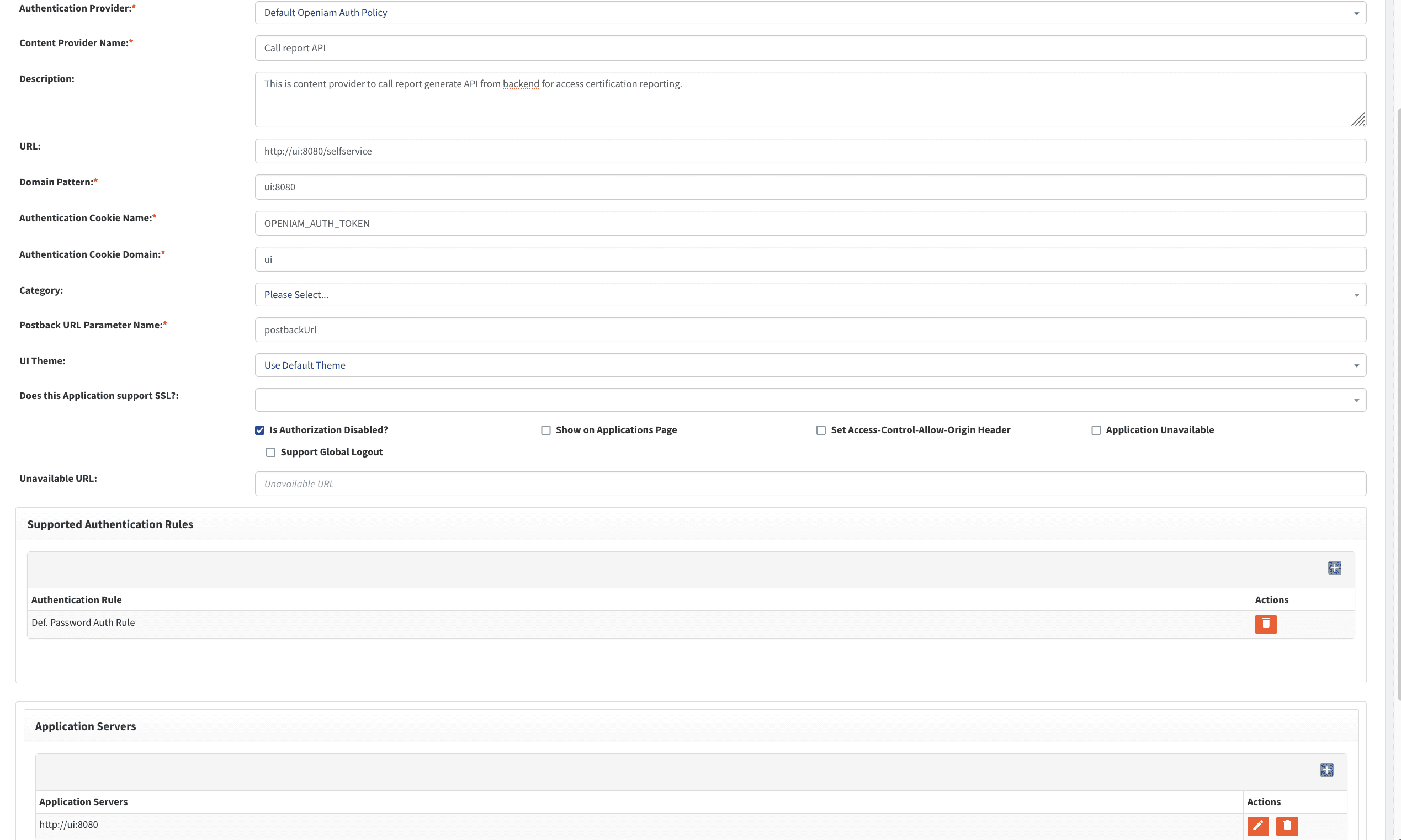
- Create a content provider. You can name it Call report API or give it any other applicable name.
Below is an example of the content provider configuration when running OpenIAM in Docker.
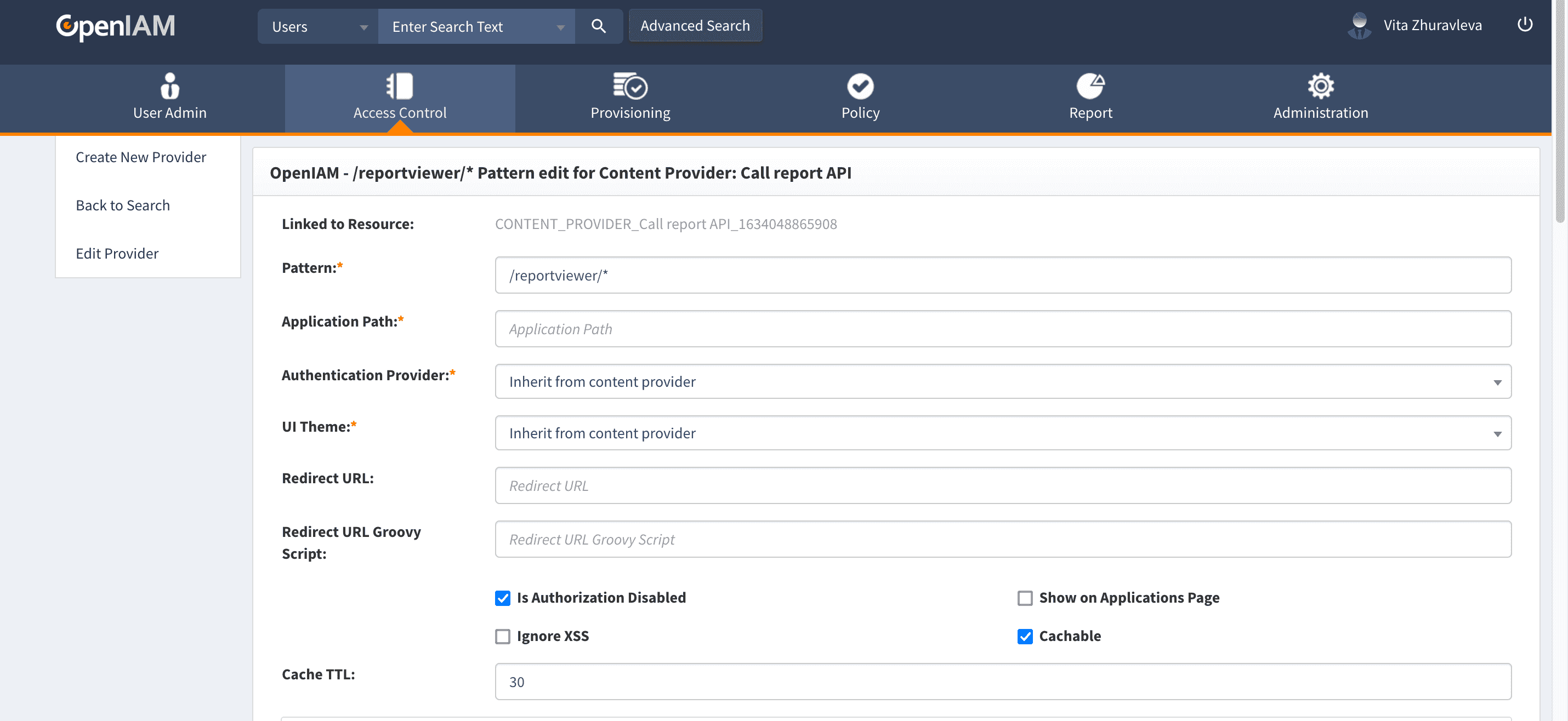
- Save it and add one
/reportviewer/*URL pattern. Click Create in the URI Patterns section.
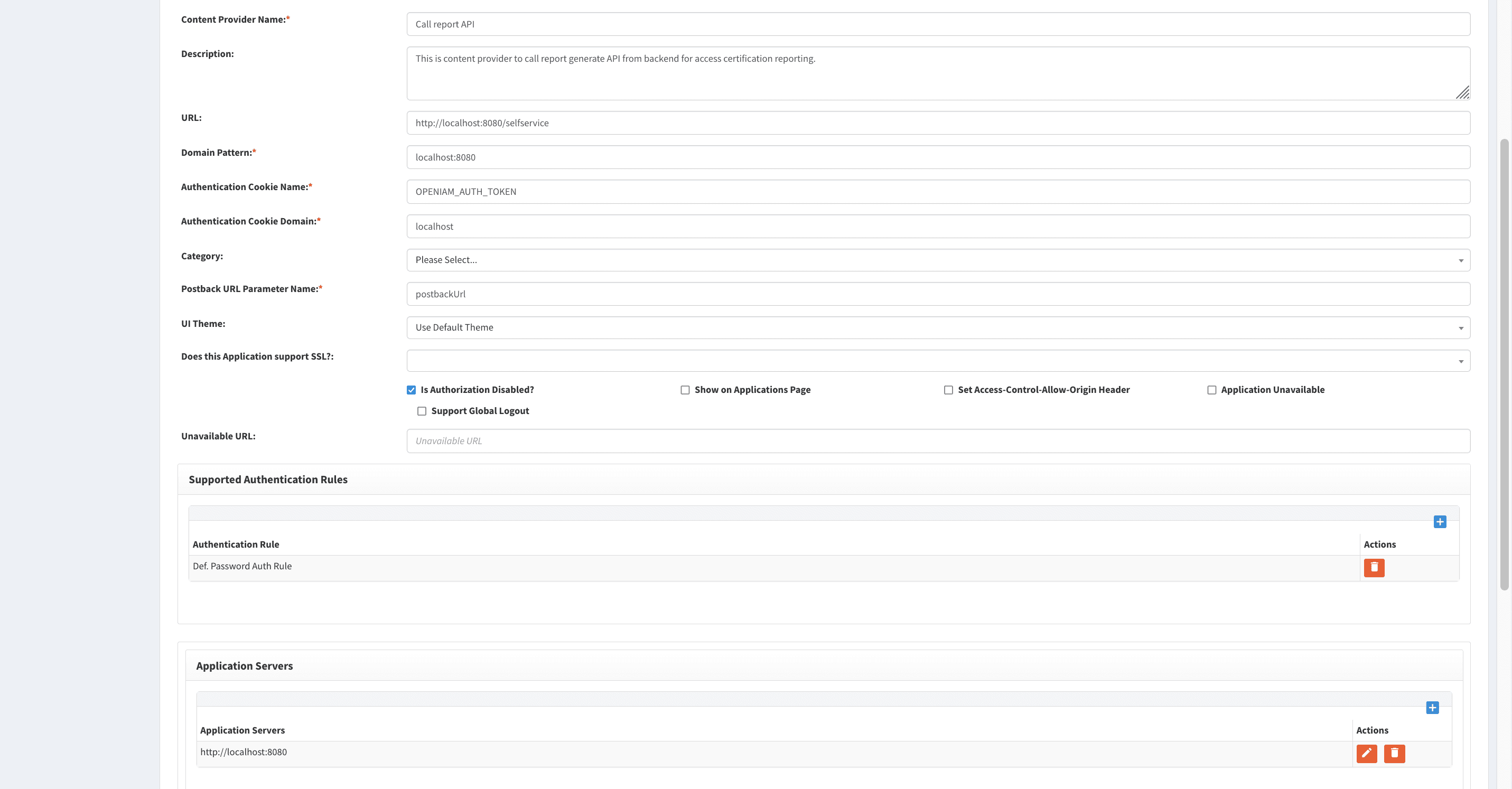
If you are using RPM as your installation environment, use localhost instead of ui (see the screenshot below).
This URL will be called by OpenIAM as a background task to generate the scope and result reports.
Navigate to System configuration > Authentication and fill in the fields as described below:
- API call base domain. If running a Docker install, insert
http://ui:8080. If running an RPM install, inserthttp://localhost:8080. - Default base domain. Enter the base domain URL that will be used to generate links to open campaigns for reviewer email notifications. An example can be found here.
- API call base domain. If running a Docker install, insert
At this point, reporting is configured.
Reports available in OpenIAM
In the sections below, you can find the descriptions for each report currently available, outlining its purpose, output fields, and key features. The report mapping is also given in the table below for your convenience and quick identification of the report function.
| Report Type | Service class | File status | Purpose |
|---|---|---|---|
USER_REPORT | UserReportService | Provided | User directory listing with status. |
USER_ACCESS_REPORT | UserAccessReportService | Provided | User entitlements (roles/groups). |
REQUEST_REPORT | RequestReportService | Provided | Request lifecycle with approvals. |
RESOURCE_USAGE_REPORT | ResourceUsageReportService | Provided | Resource usage by user. |
LAST_LOGIN_REPORT | LastLoginReportService | Provided | User login activity tracking. |
ACCESS_CERTIFICATION_REPORT | AccessCertificationReportService | Provided | Access review and certification. |
USER_LIFE_CYCLE_ACTIVITIES | UserLifeCycleActivitiesReportService | Provided | User lifecycle events. |
ORPHANED_USER_ACCOUNTS | OrphanedUserAccountsReportService | Provided | Orphaned accounts detection. |
AUDIT_REPORT | AuditReportService | Provided | System audit logs. |
GENERIC_REQUEST_REPORT | GenericRequestReportService | Provided | Generic request tracking. |
ENTITLEMENTS_MEMBERSHIP_REPORT | EntitlementsMembershipReportService | Provided | Entitlement membership details. |
ENTITLEMENTS_REPORT | EntitlementsReportService | Provided | Entitlement attributes. |
PROVISION_FAILURE_REPORT | ProvisionFailureReportService | Provided | Provisioning failure tracking. |
TERMINATED_USER_REPORT | TerminatedUserReportService | Provided | Terminated user reconciliation. |
USER_REPORT
This report is used for UserReportService with the purpose of generating a directory listing of all users with detailed information. It contains the following output fields.
- First Name, Last Name, Middle Initial.
- Employee ID, Company/Department.
- User Status (Active, Inactive, Terminated).
- Account Status (Enabled, Disabled).
- Email Address, Phone Number.
- Login ID, Last Login Date.
- Start Date, End Date.
- Manager/Supervisor Name.
The key features of the USER_REPORT include the following:
- Multi-status filtering.
- Supervisor hierarchy filtering.
- Uses ElasticSearch for performance.
- Pagination support.
USER_ACCESS_REPORT
This report is used for UserAccessReportService with the purpose of showing all access rights (roles/groups) assigned to users. It has the following output fields.
- User credentials (name, login, employee ID).
- User status (active/inactive).
- Account status (enabled/disabled).
- Access Type (Role or Group).
- Access Name.
- Start Date, End Date.
- Access Rights details.
- Resources associated with access.
The key features of the USER_ACCESS_REPORT include the following:
- Caches roles/groups/resources to reduce service calls.
- Shows resource allocation.
- Filters by managed systems or specific entitlements.
- Supports "show all entitlements" toggle.
REQUEST_REPORT
This report is used for RequestReportService with the purpose of providing a detailed view of a single request with all lifecycle information. It has the following output fields.
- Request Number, Type, Status.
- Requester (name, login).
- Requested For (name, login).
- Request Date, Submitted Date, Completed Date.
- Duration in Days.
- Reason/Notes.
- Resources requested (with operation type:
ADD/REVOKE). - Approvers at each level (name, decision, date).
- Current approver in workflow.
- Questionnaire responses.
- Comments from task.
The key features of the REQUEST_REPORT include the following:
- Shows full approval workflow with decisions.
- Displays resource changes with operation types.
- Integrates questionnaire data.
- Tracks request duration.
- Shows provisioning status for each managed system.
RESOURCE_USAGE_REPORT
This report is used for ResourceUsageReportService (deprecated) with the purpose of tracking resource usage across users and time periods. It contains the following output fields.
- Request Number, Requested Date.
- Requested For (name, login, employee ID).
- Request Status.
- Application Category, Subcategory.
- Managed System (Application).
- Roles/Groups assigned.
- Start Date, End Date (of access).
- Supervisor/Manager.
- Approver information and dates.
- Implemented Date.
The key features of the RESOURCE_USAGE_REPORT include the following:
- Complex resource hierarchy navigation.
- Resolves parent/child resource relationships.
- Tracks approval chain.
- Shows implementation timeline.
- Supports multi-level resource filtering.
LAST_LOGIN_REPORT
This report is used for LastLoginReportService to track user login activity. It contains the following output fields.
- First Name, Last Name.
- Login (username).
- Last Login Date/Time.
- Last Login IP Address.
- Number of Users (metric).
The key features of the LAST_LOGIN_REPORT include the following:
- ElasticSearch not used (
useElasticSearch=false). - Tracks IP addresses.
- Date-based filtering.
- Lightweight, fast query.
ACCESS_CERTIFICATION_REPORT
This report is used for AccessCertificationReportService with the purpose of generating a compliance report for access reviews and certifications. It has the following output fields.
- Request Number (Task ID).
- Username, First Name, Last Name.
- Employee ID, Title.
- Email, Manager/Supervisor.
- Organization Structure.
- Access Name (role/group).
- Access Type (role/group).
- Certification Status (
IN_PROGRESS,COMPLETED). - Certification Start Date, Completed Date.
- End Date of Entitlement (access expiry).
- First/Second/Third Approver names and emails.
- Approver Decisions and Decision Dates.
- Entitlement Note, Request Note.
The key features of the ACCESS_CERTIFICATION_REPORT include the following:
- Links access reviews to specific certifications.
- Tracks multiple approval levels.
- Shows access decisions (
APPROVED/REVOKED/PENDING). - Supports both new and legacy data formats.
- Caches users/roles/groups to reduce API calls.
USER_LIFE_CYCLE_ACTIVITIES
This report is used for UserLifeCycleActivitiesReportService with the purpose of tracking all lifecycle events and request activities for a user. It has the following output fields.
- Request Number, Request Type, Request Status.
- User info (first name, last name, employee ID, title).
- Manager/Supervisor.
- Email Address, Organization Structure.
- Request Start Date, Completed Date.
- Request Description, Notes.
- First/Second/Third Approver names and decisions.
- Decision Dates for each approver.
The key features of the USER_LIFE_CYCLE_ACTIVITIES include the following:
- Shows complete user request history.
- Tracks activities over time.
- Multi-level approval tracking.
- Supervisor filtering.
- Covers all request types.
ORPHANED_USER_ACCOUNTS
This report is used for OrphanedUserAccountsReportService with the purpose of identifying accounts in managed systems with no corresponding IDM user. It has the following output fields.
- Identity (account username).
- Managed System name.
- First Name, Last Name.
- Email Address.
- Employee ID.
- Created Date.
Here, the user can use the following search criteria within the report:
- Managed System ID.
- Identity (exact match).
- First Name, Last Name (contains match).
- Email Address (exact match).
- Employee ID (exact match).
- Created Date (date range).
The key features of the ORPHANED_USER_ACCOUNTS include the following:
- Identifies provisioning data quality issues.
- Supports multi-criteria search.
- Caches managed system lookups.
- Can email report or download.
AUDIT_REPORT
This report is used for AuditReportService to track the system audit trail and compliance logging. It has the following output fields.
- Requester (who performed action).
- Event Source (system component).
- Linked Events (related child events).
- Action (
CREATE,UPDATE,DELETE, etc.). - Result (
SUCCESS,FAILURE). - Date/Timestamp.
- Client IP Address.
- Target User, Managed System, Organization, Role, Group.
- Support Details (attribute changes).
- Content Provider.
- Request Body.
The key features of the AUDIT_REPORT include the following:
- Comprehensive audit trail.
- Shows attribute-level changes.
- Tracks system actions.
- Supports parent/child event relationships.
- Content provider integration.
GENERIC_REQUEST_REPORT
This report is used for GenericRequestReportService with the purpose of tracking all user-centric request activity (not access certification). It has the following output fields.
- Request Number, Description, Status.
- Request Start Date, Completed Date.
- Target User (name, login, email, employee ID, title).
- Target User Manager.
- Requester (name, login, email, employee ID).
- First/Second/Third Approver names and emails.
- Approver Decisions and Decision Dates.
You can use the following attributes for filtering:
- Request Status (IN_PROGRESS, COMPLETED, etc.).
- Request Type (Hire, Transfer, Terminate, etc.).
- Date Range.
- Target User IDs.
- Requester User IDs.
The key features of the GENERIC_REQUEST_REPORT include the following:
- Multi-status support.
- Tracks both active and completed requests.
- Shows approval chain (up to three levels).
- User-centric perspective.
ENTITLEMENTS_MEMBERSHIP_REPORT
This report is used for EntitlementsMembershipReportService with the purpose of showing membership relationships for entitlements (roles/groups). It has the following output fields.
- Entitlement Type (Role/Group/Resource/Organization).
- Entitlement Name, Description.
- Created Date, Created By.
- Admin Name, Owner Name.
- Entitlement Membership Type (what this entitlement contains).
- Entitlement Membership Name (child entitlements).
The key features of the ENTITLEMENTS_MEMBERSHIP_REPORT include the following:
- Shows hierarchy relationships.
- Maps parent to all children.
- Supports multiple entitlement types.
- Deep copy for safety.
ENTITLEMENTS_REPORT
This report is used for EntitlementsReportService with the purpose of showing detailed entitlement attributes and properties. It has the following output fields.
- Entitlement Type (Role/Group/Resource/Organization).
- Entitlement Name, Description.
- Created Date, Created By.
- Admin Name, Owner Name.
- Managed System (for roles/groups).
- Optional:
- Attribute Name.
- Attribute Value.
The key features of the ENTITLEMENTS_REPORT include the following:
- Shows custom attributes.
- Optional detailed vs summary view.
- Supports configurable page sizes.
- Per-entitlement-type processing.
PROVISION_FAILURE_REPORT
This report is used for ProvisionFailureReportService with the purpose of showing detailed entitlement attributes and properties. It has the following output fields.
- Identity (target account username).
- Managed System ID, Managed System Name.
- Date/Timestamp of failure.
- Description (error message).
- Parent ID (link to parent event).
- Request Type (parent operation type).
- Provision Operation (specific operation that failed).
The key features of the PROVISION_FAILURE_REPORT include the following:
- Links failures to parent operations.
- Shows error details.
- Timestamp tracking.
- Managed system filtering.
- Helpful for troubleshooting.
TERMINATED_USER_REPORT
This report is used for TerminatedUserReportService with the purpose of tracking terminated users and account deprovisioning status. It has the following output fields.
- Employee ID.
- Managed System Name.
- User Status.
- Identity Status (account status).
- End Date, Actual Term Date.
- Custom Fields 1–5 (for extended data).
The key features of the TERMINATED_USER_REPORT include the following:
- Uses specialized backend service for terminated users.
- Tracks deprovisioning status.
- Supports custom fields.
- Date range filtering.
Troubleshooting tips
| Issue | Likely cause | Solution |
|---|---|---|
| Empty report | No data matches criteria | Verify search criteria |
| Slow performance | Large dataset, no pagination | Enable pagination, use filters |
| Memory error | Large report in memory | Split date range, use streaming |
| Missing approvers | Legacy data format | Check deprecated code paths |
| Wrong data | Caching issue | Clear cache between runs |
| Date parsing error | Date format mismatch | Verify date format in config |