Session management utility for RPM
The session management utility allows administrators to view and manage active session tokens directly from the backend via the command line. It provides a quick way to invalidate both user and OAuth (service) sessions without requiring access to the UI. The session management utility in OpenIAM is used when administrators need immediate, backend-level control over active sessions — such as during security incidents, troubleshooting, or when the UI is unavailable or insufficient. It is also useful for bulk session cleanup, enforcing policy changes, and invalidating user or OAuth tokens for service accounts and integrations.
To use the utility, use the steps below.
- SSH into the OpenIAM server.
ssh <user>@<host>
- Run the session command.
openiam-cli sessions
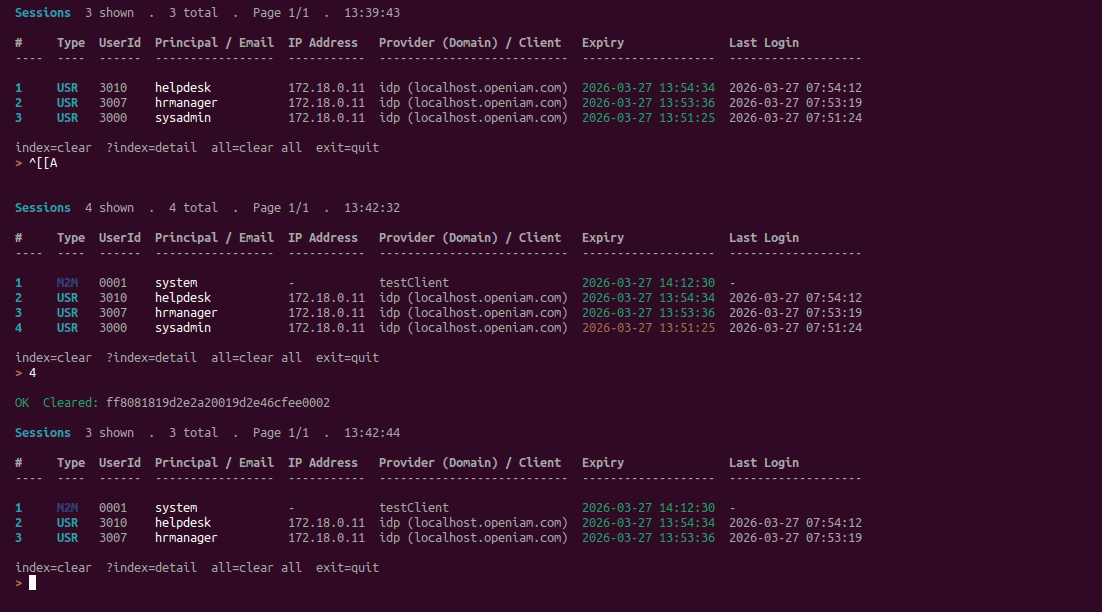
The command outputs a table of all active sessions with details such as:
- Type. Session type (e.g., USR for user, M2M for service/OAuth).
- UserId. Internal user identifier.
- Principal / Email. Username or service name.
- IP Address. Source IP of the session.
- Provider (Domain) / Client. Authentication source or client name.
- Expiry. Session expiration timestamp.
- Last Login. Last login time for the session.
Each session is assigned an index number (#) which is used for performing actions.
Available actions
After listing sessions, the utility provides an interactive prompt with options.
- Enter index number → Clear a specific session.
? <index>→ View detailed information for a session.- all → Clear all active sessions.
- exit or quit → Exit the utility.
Example behavior
Running the command shows all active sessions, while entering a session index removes that specific session; entering all clears all sessions at once and after clearing, the session list refreshes automatically.