Password breach detection
Overview
The Password breach detection feature automatically checks user passwords against known data breaches after successful authentication. When a compromised password is detected, the system sends an email notification to the user, prompting them to change their password immediately.
This feature uses the Have I Been Pwned (HIBP) API to check passwords securely without exposing user credentials.
How it works
Security and privacy
The password breach detection system uses k-Anonymity to protect user privacy:
1. The user's password is hashed using SHA-1 (always produces a 40-character hash).2. Only the first 5 characters of the hash are sent to the HIBP API.3. The API returns all hash suffixes that match those first 5 characters.4. The system compares the results locally to determine if the password is compromised.5. The actual password never leaves your server.
Example:
User Password: "MyPassword123"SHA-1 Hash: 5BAA61E4C9B93F3F0682250B6CF8331B7EE68FD8Sent to API: 5BAA6 (first 5 characters only)Checked Locally: 1E4C9B93F3F0682250B6CF8331B7EE68FD8 (remaining 35 characters)
Why SHA-1 is safe for this use case
While SHA-1 is no longer recommended for cryptographic signatures or password storage, it is perfectly safe for password breach checking:
- SHA-1 weaknesses relate to collision attacks (finding two inputs with the same hash).
- Password checking requires preimage resistance (finding the original from a hash).
- SHA-1 remains excellent for preimage resistance.
- This approach is endorsed by NIST and used by major companies including Microsoft, Mozilla, and 1Password.
More on SHA-1 and Have I Been Pwned can be found here.
Configuration
To enable password breach detection feature navigate to webconsole > Policy > Password Policies. Then, enable the Check for compromised passwords after login checkbox. Ensure your system SMTP configuration is properly set up to send email notifications.
Implementation details
The password breach check is performed asynchronously immediately after successful authentication when:
- User submits valid credentials.
- Authentication succeeds.
- User is logged in (no delay).
- Background task checks password against HIBP API.
- If compromised, email notification is sent to user
This approach ensures no impact on login performance.
What users see
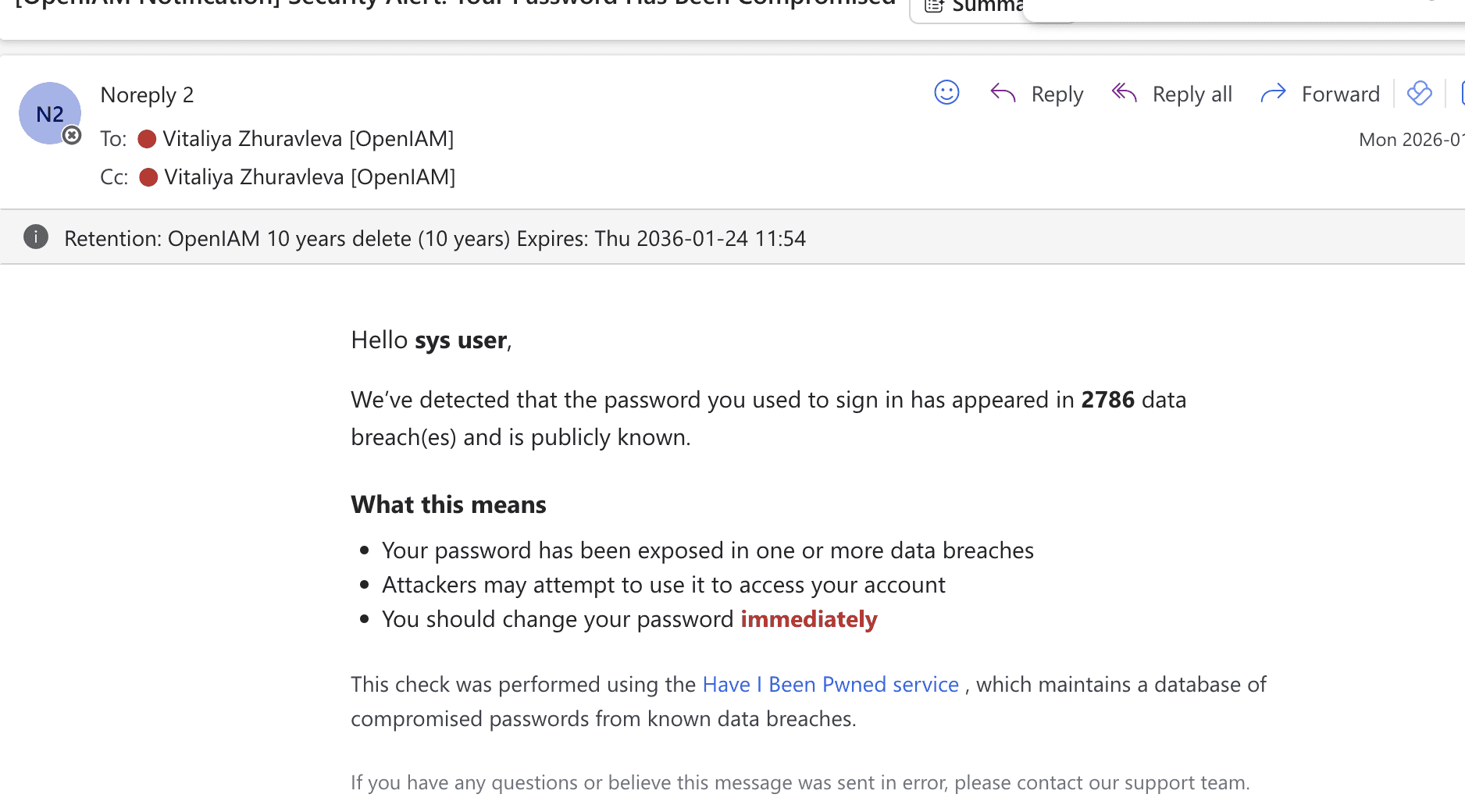
Users receive an email with the following information:
- Alert that their password has been found in data breaches.
- Number of times the password appeared in breach databases.
- Explanation of what this means for their security.
- Step-by-step instructions to secure their account
Monitoring and maintenance
The users shall monitor the following:
- Email delivery success rate.
- HIBP API response times.
- HIBP API errors or timeouts.
- Number of breached passwords detected.
- User response rate (password changes after notification)
Logging
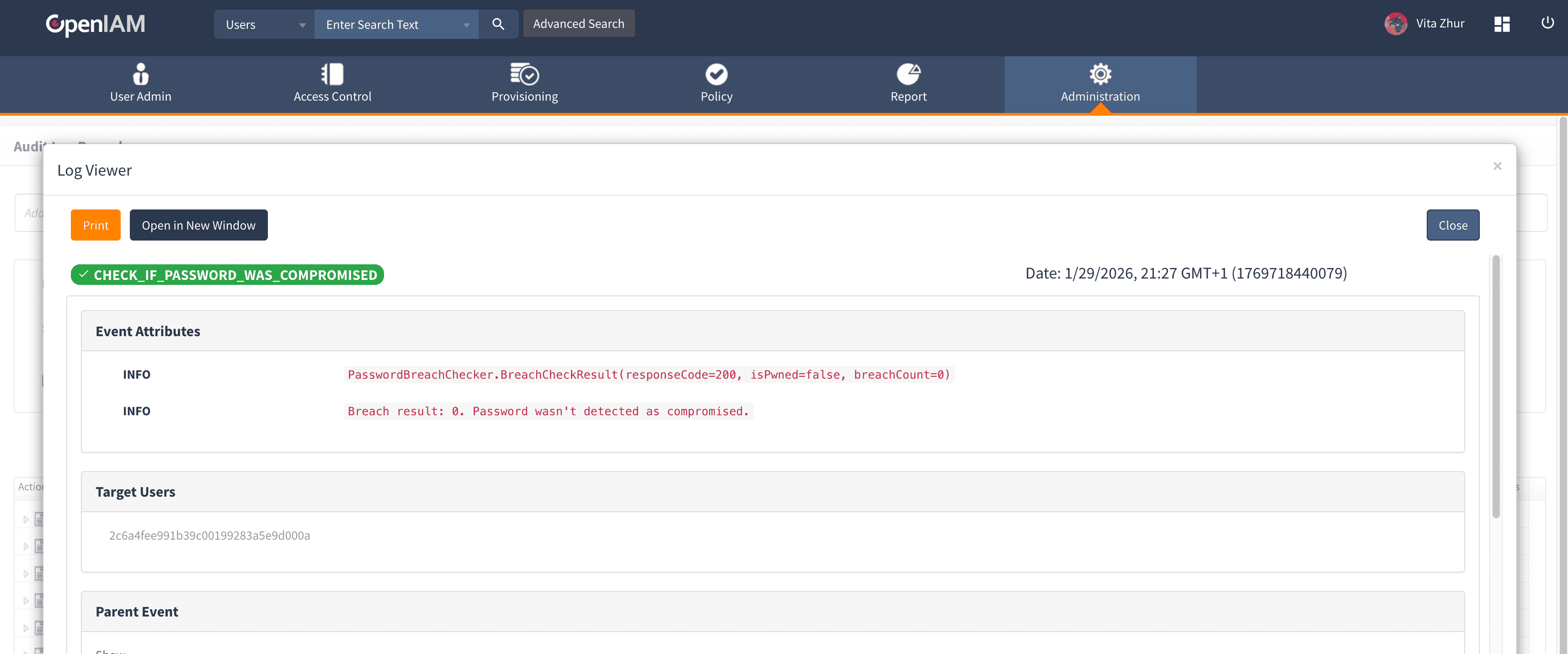
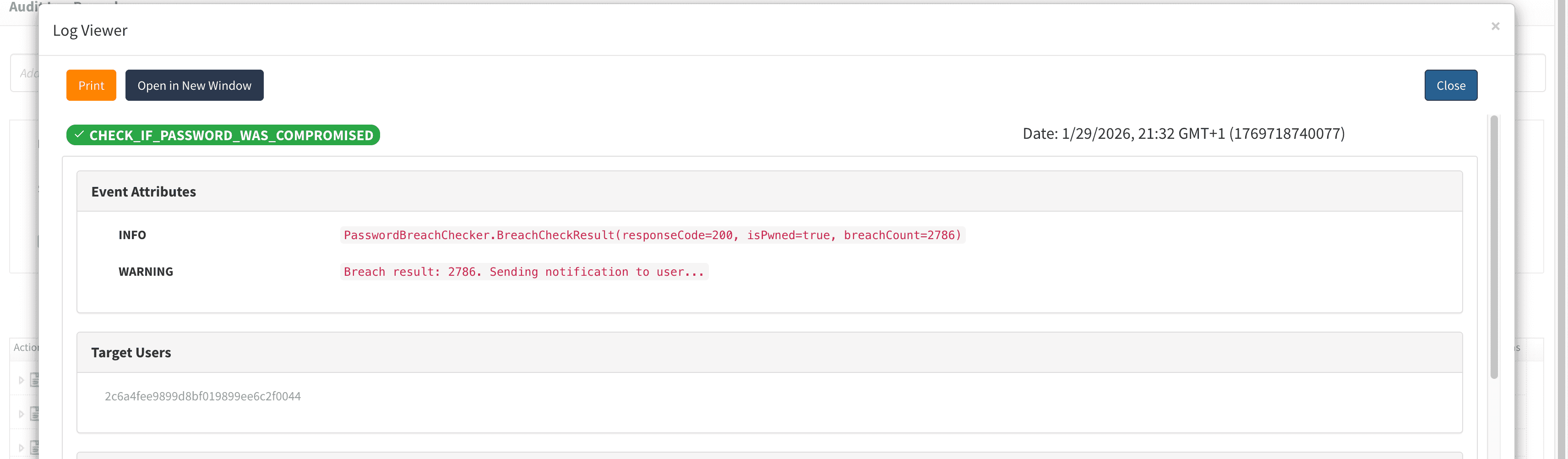
The system logs the following events:
- Password breach checks initiated.
- Breaches detected (breach count only, never the password).
- Email notifications sent successfully.
- Email delivery failures.
- HIBP API errors.
Troubleshooting
In case emails are not sent, use the following steps to troubleshoot.
- Verify your system's SMTP configuration is correct.
- Check email logs for specific error messages.
- Ensure the feature is enabled in settings
HIBP API errors
- Check network connectivity to
api.pwnedpasswords.com. - Verify no proxy/firewall blocking requests.
- Review system logs for specific error messages.
Frequently asked questions
Is this required by compliance standards?
While not always explicitly required, password breach checking is:
- Recommended by NIST (SP 800-63B).
- Considered best practice by security organizations.
- May help meet compliance requirements for data protection (GDPR, SOC 2, etc.)
Does this slow down login?
No. The breach check runs asynchronously in the background after authentication completes. Users experience no delay during login.
What if the HIBP API is down?
The system "fails open" - users can still log in, and the check is simply skipped. An error is logged for monitoring purposes.
Can users opt out of these notifications?
This is a security feature and should not have an opt-out. However, you can choose to:
- Only log breaches without sending emails.
- Implement a "snooze" feature (not recommended).
- Force password reset instead of notification.
How often is the breach database updated?
Have I Been Pwned continuously updates its database as new breaches are discovered and published. Your checks always use the latest data.
What about false positives?
The HIBP database only includes passwords from verified data breaches. False positives are extremely rare. Even if a SHA-1 collision occurred (unlikely), the user should still change their password as a security precaution.
Testing instructions
✅ Make sure SMTP is enabled, make sure two test users with weak and strong password. Have email addresses.
✅ Make sure that the new option is enabled in the password policy.
✅ Login as user with weak password.
✅ Make sure you can see new audit log.
✅ Make sure you got email notification about password has been compromised.
✅ Login as user strong password, no email should be sent. They still should be audited log saying that there is no breach found.
Resources
To know more about the feature, its importance and applicability, visit the following resources.