Enforcement modes
A wrong access-control policy can lock real users out of real systems, so PBAC policies are not switched on with a single flag. An ACTIVE policy carries an enforcement mode that decides whether the decisions it reaches are actually served:
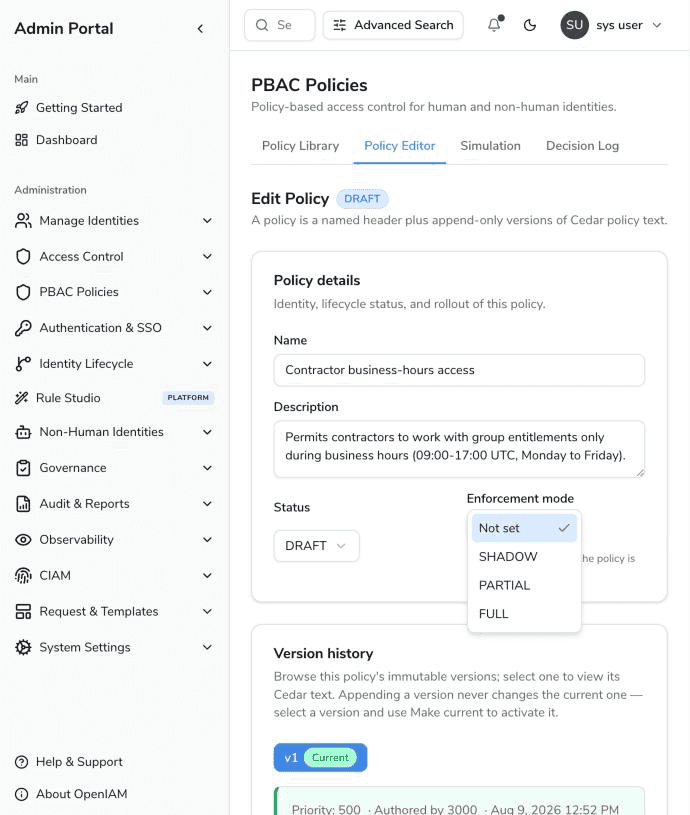
| Mode | Behavior |
|---|---|
SHADOW | The policy is evaluated on every request it matches and each outcome is recorded, but the decision served to the caller is the one the enforced policies reached — as though this policy were not active at all. A shadow outcome that disagrees with what was actually served is logged, and that divergence count is the number to watch before promoting the policy. |
PARTIAL | The policy is enforced for a percentage of users and skipped for the rest. Membership is deterministic, not sampled per request (see below). |
FULL | The policy is enforced against every request it matches. |
The mode is read on the decision path every time the policy is applicable, so moving a policy through the stages takes effect on the next cache sweep (minutes) and needs no redeployment. A policy with no mode recorded is enforced once it is ACTIVE — the mode only adds staging on the way there.
Partial rollout
Selecting PARTIAL reveals the Rollout percentage field (0–100):
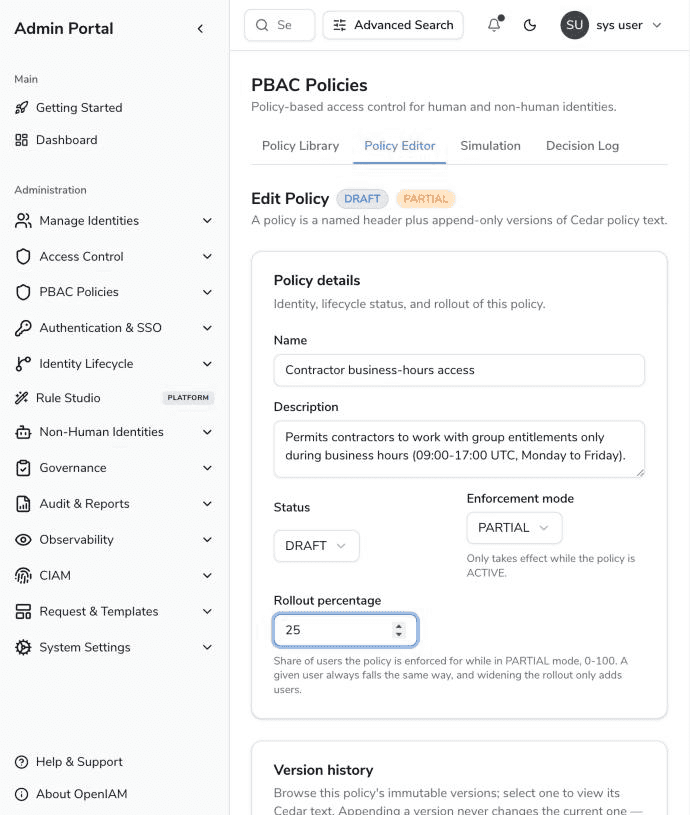
The rollout is deterministic. Each user is hashed into one of 100 buckets per policy, and the policy governs the users whose bucket falls below the percentage. This gives three guarantees:
- Stable — the same user always gets the same answer for the same policy, on every node, across restarts. Users do not flicker in and out of enforcement between two clicks.
- Independent cohorts — two policies at 10% do not narrow to the same tenth of the directory.
- Monotonic widening — raising the percentage from 10 to 20 keeps everyone already governed and only adds users; nobody who was enforced drops back out.
Users outside the rollout are not evaluated against the policy at all — for them it is as if the policy were not active. A PARTIAL policy with no percentage set governs nobody until one is entered (an unnarrowed PARTIAL would just be FULL).
Recommended rollout path
- Author the policy as
DRAFTand iterate with simulation until it decides correctly for known cases. - Activate it in
SHADOWmode. Let it observe production traffic and review the divergence entries in the decision log. - Move to
PARTIALat a small percentage (e.g. 10%) and widen gradually. - Move to
FULL. - To retire it, set the status to
DEPRECATED.
What the audit trail records
Every decision entry in the audit log records, per policy, how it participated: applied, observed (shadow) or skipped (outside a partial rollout), plus the mode in force at decision time — a PARTIAL policy is recorded together with its percentage (e.g. policy-1=PARTIAL@25). This matters because the same policy ramps through the modes over its life; an entry that named only the outcome would stop being interpretable as soon as the policy moved on. Shadow outcomes are recorded as informational lines only — the indexed decision is always the one that was actually served, so a shadow rollout cannot move the numbers your reports read.