Policy-based access control (PBAC)
As of v2026.8.1, OpenIAM includes a policy-based access control (PBAC) module. It is delivered by a dedicated
pbac-managermicroservice and managed from the PBAC Policies section of the webconsole.
Policy-based access control complements OpenIAM's entitlement model (roles, groups, resources and access rights) with policies: rules that grant or refuse access based on the attributes of the user, the attributes of the object being accessed, and the context of the request (such as the time of day). Where an entitlement answers "what has been assigned to this user", a PBAC policy answers "given who this user is, what they are trying to do, and the circumstances, should this request be allowed?"
Policies are written in Cedar, an open-source policy language designed for authorization, with a formally verified evaluation engine. You do not need to write Cedar by hand — the policy editor includes a form-based builder that generates the Cedar text for you — but the Cedar text is always the single source of truth and remains fully editable.
Where to find it
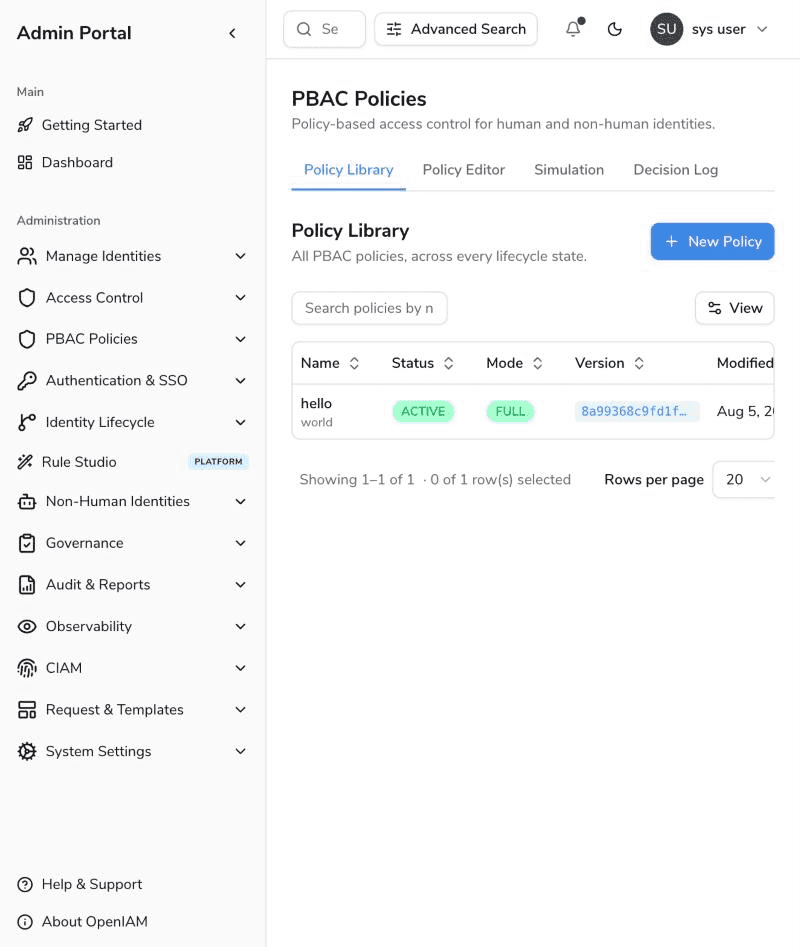
In the webconsole, open Administration > PBAC Policies. The module is organized into four tabs: Policy Library, Policy Editor, Simulation and Decision Log.
Key concepts
| Concept | Description |
|---|---|
| Policy | A named header (name, description, lifecycle status, enforcement mode) plus a history of versions. |
| Version | The Cedar text of a policy. Versions are immutable and append-only: every edit creates a new version, and rolling back means making an older version current again. |
| Status | DRAFT → ACTIVE → DEPRECATED. Only ACTIVE policies are loaded by the decision engine. |
| Enforcement mode | How much real traffic an ACTIVE policy governs: SHADOW (observed only), PARTIAL (a deterministic percentage of users) or FULL. See Enforcement modes. |
| Effect | Cedar's own permit / forbid keywords. If any applicable policy forbids a request, the request is denied (forbid wins); if nothing permits it, it is denied by default. |
| Priority | A number on each version used to order policies when the engine reports which policies determined a decision; lower values win. Defaults to 500. |
| Decision | ALLOW or DENY. Every live decision is recorded in the decision log. |
| Simulation | A dry run of a policy version — including uncommitted edits — against real users and resources, with no effect on real access. See Simulation. |
Sections in this guide
| Name | Description |
|---|---|
| Policy library | Browse, search and manage policies across every lifecycle state. |
| Policy editor | Author policies with the form builder or the Cedar text editor; manage versions. |
| Enforcement modes | Roll a policy out safely: shadow → partial → full. |
| Simulation | Test a policy against real principals and resources before enforcing it; stress-test throughput. |
| Decision log | Audit every authorization decision the engine has served. |
| Architecture and deployment | The pbac-manager service, its infrastructure dependencies, configuration and REST API. |