Policy library
The Policy Library tab lists every PBAC policy in the system, across all lifecycle states — drafts being authored, active policies being enforced, and deprecated policies kept for reference.
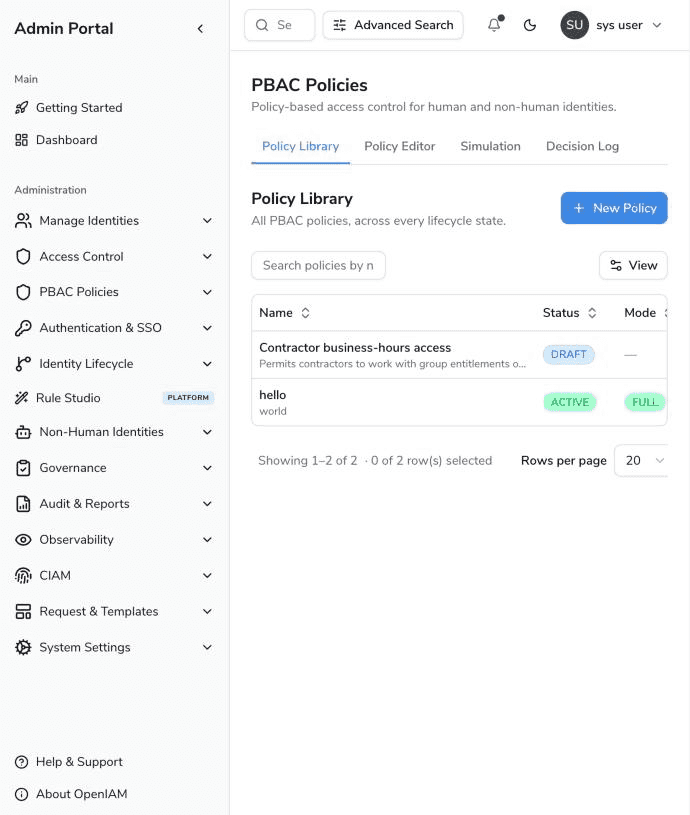
Columns
| Column | Description |
|---|---|
| Name | The policy name, with its description underneath. |
| Status | DRAFT (being authored, never evaluated), ACTIVE (loaded by the decision engine) or DEPRECATED (retired). |
| Mode | The enforcement mode of an active policy: SHADOW, PARTIAL (shown with its rollout percentage, e.g. PARTIAL 25%) or FULL. A dash means no mode has been recorded; such a policy is enforced as if it were FULL once it is ACTIVE. |
| Version | The identifier of the version currently in force. |
| Modified | When the policy header was last changed. |
| Actions | Edit (opens the policy editor) and delete. |
Use the search box to filter the list by policy name. Columns can be sorted, and the View menu controls which columns are visible.
Creating a policy
Click New Policy to open the policy editor in create mode.
Deleting a policy
Deleting a policy removes the policy header and all of its versions, and stops it from ever being evaluated again. Because this cannot be undone, the console always asks for confirmation:
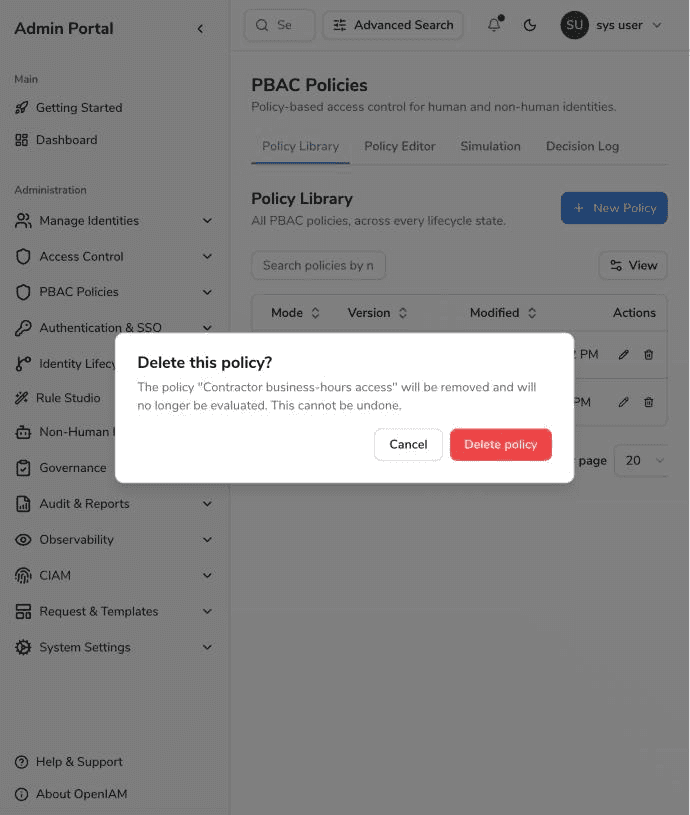
Completed simulation runs are not deleted with the policy — their results reference the policy version by identifier and remain readable on the Simulation tab. Usage counters recorded for billing also survive policy deletion.