> For the complete documentation index, see [llms.txt](https://docs.openiam.com/llms.txt). Markdown versions of documentation pages are available by appending `.md` to page URLs; this page is available as [Markdown](https://docs.openiam.com/troubleshooting/interface/overriding-app-properties.md).
# Overriding UI application properties
Changing the behaviour of the OpenIAM interface by overriding a UI application property, on each deployment type.
Some interface behaviour is governed by properties rather than by a screen. You change it by passing the property to the UI service as a `-D` argument — the mechanism is the same everywhere, and only the file you put it in differs.
## An example: the request form's mandatory fields
Two booleans control whether the SelfService request form demands a reason and a cost centre:
| Property | Default | Effect when `true` |
| ------------------------------------------------- | ------- | ----------------------------------- |
| `org.openiam.selfservice.request.reason.required` | `true` | **Reason for Request** is mandatory |
| `org.openiam.selfservice.cost.center.required` | `false` | **Cost Center** is mandatory |
Set either to `false` to make the field optional. The rest of this page uses the first one.
## Set the property
{% tabs %}
{% tab title="RPM" %}
{% stepper %}
{% step %}
**Open the unit file.** It is `openiam-ui.service` in `/etc/systemd/system`.
{% endstep %}
{% step %}
**Add the property** to the line beginning `CATALINA_OPTS`:
{% code overflow="wrap" %}
```bash
-Dorg.openiam.selfservice.request.reason.required=false
```
{% endcode %}
The unit sets the Tomcat paths and the Java options on separate `Environment=` lines, so there is one line to edit. This is the file before the change — add the property inside the `CATALINA_OPTS` quotes, at the end:
{% code title="/etc/systemd/system/openiam-ui.service" overflow="wrap" %}
```systemd
Environment="CATALINA_PID=/usr/local/openiam/ui.pid"
Environment="CATALINA_BASE=/usr/local/openiam/"
Environment="CATALINA_HOME=/usr/local/openiam/ui/"
Environment="CATALINA_OPTS=-Xmx2048M -server -XX:+UseParallelGC -Dlogging.level.root=ERROR -Dlogging.level.org.openiam=ERROR -Dconfpath=/usr/local/openiam -Dhttps.protocols=TLSv1.2 -Djdk.tls.client.protocols=TLSv1.2"
ExecStart=/usr/local/openiam/ui/bin/startup.sh
ExecStop=/usr/local/openiam/ui/bin/shutdown.sh
```
{% endcode %}
{% hint style="info" %}
**The flags already on that line vary by deployment** — heap size, garbage collector and TLS settings are set at installation. Append your property inside the closing quote and leave the rest alone.
{% endhint %}
{% endstep %}
{% step %}
**Reload the unit definitions and restart.**
```bash
systemctl daemon-reload
systemctl restart openiam-ui.service
```
{% endstep %}
{% endstepper %}
{% endtab %}
{% tab title="Kubernetes" %}
{% stepper %}
{% step %}
**Open `terraform.tfvars`** in the Kubernetes configuration directory.
{% endstep %}
{% step %}
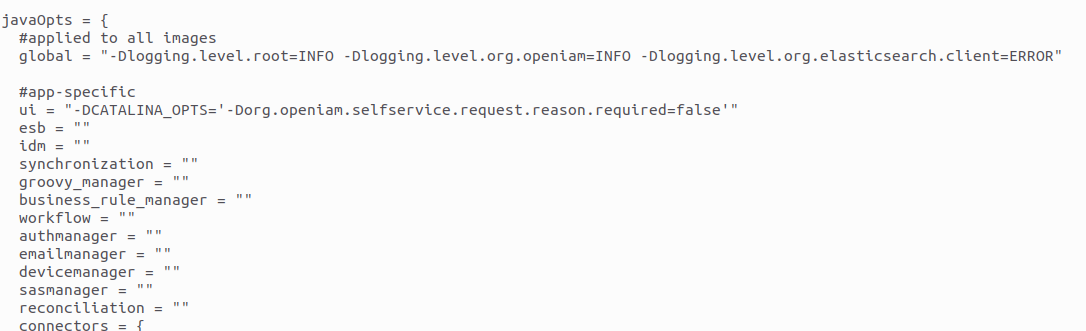
**Add the property** to the UI's entry under `javaOpts`, which holds one entry per service.
{% code overflow="wrap" %}
```bash
-Dorg.openiam.selfservice.request.reason.required=false
```
{% endcode %}
{% endstep %}
{% step %}
**Apply.**
```bash
terraform apply
```
{% endstep %}
{% endstepper %}
{% endtab %}
{% endtabs %}
## Confirm it took
**Submit a request without a reason.** That is what the property governs: with it `false`, a request carrying no reason is accepted; with it `true`, it is rejected. The check is the outcome of the submission, not the look of the form.
{% hint style="warning" %}
**The red asterisk is not the test.** On the service-catalog request form the asterisk beside **Reason for Request** is written into the screen rather than derived from this property, so it stays put whatever you set. An earlier version of this page told you to watch it disappear; it will not, and the override may still have worked.
{% endhint %}
{% hint style="info" %}
**If the behaviour does not change**, the service is reading the property from somewhere else. Four sources can supply one, and a container environment variable overrides what you just edited — see [System property reference](/administration-guide/reference/system-properties.md).
{% endhint %}
---
# Agent Instructions
This documentation is published with GitBook. GitBook is the documentation platform designed so that both humans and AI agents can read, navigate, and reason over technical content effectively. Learn more at gitbook.com.
## Querying This Documentation
If you need additional information that is not directly available in this page, you can query the documentation by asking a question.
Perform an HTTP GET request on the following URL with the `ask` and `goal` query parameters:
```
GET https://docs.openiam.com/troubleshooting/interface/overriding-app-properties.md?ask=&goal=
```
`ask` is the immediate question: it should be specific, self-contained, and written in natural language.
`goal` is what the user is ultimately trying to achieve, the reason they need the answer. Sharing it helps GitBook give you a better, more relevant answer. A goal is most helpful when it describes the outcome the user wants rather than restating the question. For example, with `ask=how do I create an API token`, a goal like `automate deployments from our CI pipeline` lets GitBook tailor the answer to that use case.
The response will contain a direct answer to the question and relevant excerpts and sources from the documentation.
Use this mechanism when the answer is not explicitly present in the current page, you need clarification or additional context, or you want to retrieve related documentation sections.