> For the complete documentation index, see [llms.txt](https://docs.openiam.com/llms.txt). Markdown versions of documentation pages are available by appending `.md` to page URLs; this page is available as [Markdown](https://docs.openiam.com/getting-started-guide/lifecycle/import-groups.md).
# Import AD groups
Import Active Directory groups into OpenIAM as entitlements.
**Goal:** the groups from your POC OU exist in OpenIAM. Read-only — nothing is written to AD.\
**Time:** 20–30 minutes.\
**Prerequisites:** managed system green ([Connect OpenIAM to Active Directory](/getting-started-guide/lifecycle/connect-to-ad.md)).
Groups come first because [Import users and group memberships](/getting-started-guide/lifecycle/import-users-and-memberships.md) imports users *with their group memberships* — the groups must already exist for memberships to attach.
{% stepper %}
{% step %}
**Clone the shipped example**
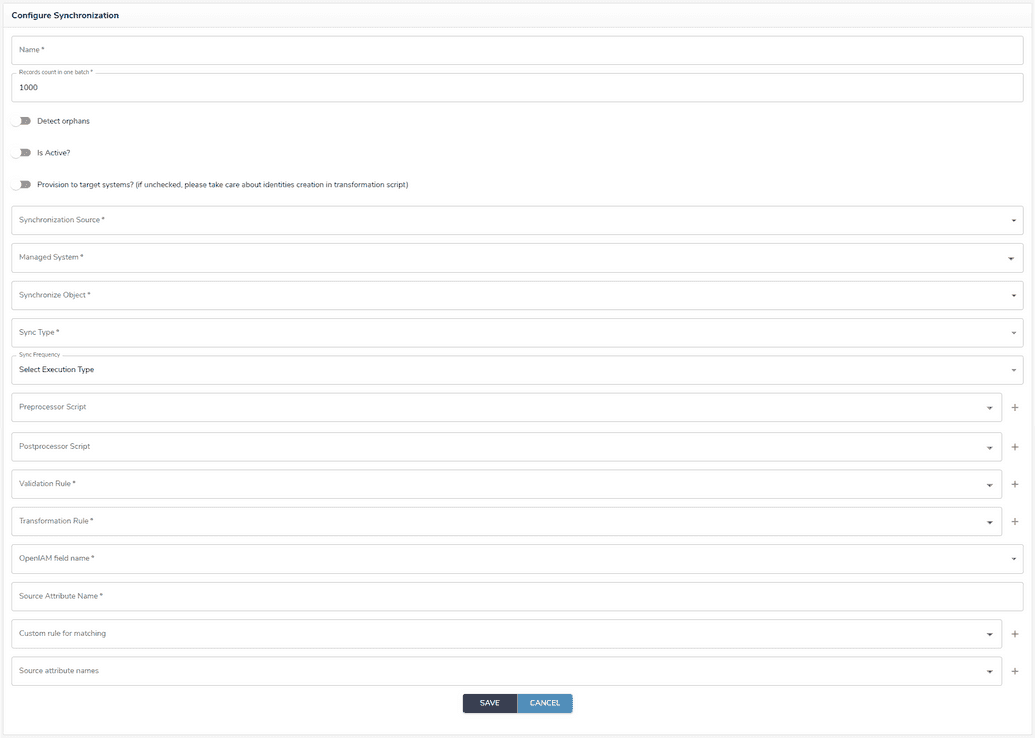
Go to **Provisioning → Synchronization** and locate **AD Powershell GROUP Example**. Use the copy/duplicate action if your build provides one; otherwise create a new configuration and enter the values below — **the Groovy paths must match character for character**, so copy-paste them from the example rather than typing. Either way the shipped example stays pristine as a reference. The settings that matter:
| Setting | Value |
| ------------------------------- | ----------------------------------------------------------------------------------------------------------------- |
| Synchronization source | CONNECTOR |
| Managed system | your AD managed system ([Connect OpenIAM to Active Directory](/getting-started-guide/lifecycle/connect-to-ad.md)) |
| Object / type | GROUP / FULL |
| Query | see step 2 |
| Validation rule | `/sync/group/ad/powershell/ADGroupSampleValidationScript.groovy` |
| Transformation | Transformation Script → `/sync/group/ad/powershell/ADGroupSampleTransformationScript.groovy` |
| Matching | IDM field `NAME` ↔ source attribute `Name` |
| Attribute names lookup | `/sync/group/ad/powershell/ADGroupSyncAttributes.groovy` |
| **Provision to target systems** | **No** — the group example ships with this off; keep it off |
The transformation script maps each AD group's name, description, scope (DomainLocal/Global/Universal), and category (Security/Distribution), and resolves `ManagedBy` to a group owner in OpenIAM.
{% endstep %}
{% step %}
**Scope the query**
The shipped query is `Get-ADGroup -Filter *` — the whole domain. Replace it with your OU:
{% code overflow="wrap" %}
```powershell
Get-ADGroup -Filter * -SearchBase 'OU=Groups,OU=OpenIAM-POC,DC=yourdomain,DC=local'
```
{% endcode %}
Queries are AD PowerShell cmdlet syntax, not LDAP filters. (If you've used the Java LDAP connector, `(objectClass=group)` is that world's equivalent; here the cmdlet itself selects groups.) Two useful rules: with `-Filter` and no `-SearchBase`, the managed system's SearchBaseDN is applied automatically; and `-Properties` adds attributes beyond the default set, e.g. `-Properties Description,ManagedBy`.
{% endstep %}
{% step %}
**Run it**
Save, then run the sync from the config's action menu. Watch progress:
{% code overflow="wrap" %}
```bash
openiam-cli log synchronization
```
{% endcode %}
{% endstep %}
{% step %}
**Verify**
In **Access Control → Groups** (Webconsole group search), confirm the count matches the POC OU:
{% code overflow="wrap" %}
```powershell
(Get-ADGroup -Filter * -SearchBase 'OU=Groups,OU=OpenIAM-POC,DC=yourdomain,DC=local').Count
```
{% endcode %}
Open one group and check its attributes (distinguishedName, scope, category). Run the sync a second time — the count must not change (matching on `Name` makes re-runs update, not duplicate).
{% endstep %}
{% endstepper %}
## If it failed
| Symptom | Likely cause |
| ---------------------- | ------------------------------------------------------------------------------------------------- |
| Zero results | Wrong `-SearchBase` DN, or the service account can't read the OU |
| Sync errors in the log | Typo in the query (test it verbatim in PowerShell on the connector host — it must run standalone) |
| Duplicates on re-run | Matching fields not set (`NAME` ↔ `Name`) |
## You know this worked when…
{% hint style="success" %}
Group count in OpenIAM equals the AD count, attributes look right, and a re-run is idempotent. Record the count.
{% endhint %}
Next: [Import users and group memberships](/getting-started-guide/lifecycle/import-users-and-memberships.md).
---
# Agent Instructions
This documentation is published with GitBook. GitBook is the documentation platform designed so that both humans and AI agents can read, navigate, and reason over technical content effectively. Learn more at gitbook.com.
## Querying This Documentation
If you need additional information that is not directly available in this page, you can query the documentation by asking a question.
Perform an HTTP GET request on the following URL with the `ask` and `goal` query parameters:
```
GET https://docs.openiam.com/getting-started-guide/lifecycle/import-groups.md?ask=&goal=
```
`ask` is the immediate question: it should be specific, self-contained, and written in natural language.
`goal` is what the user is ultimately trying to achieve, the reason they need the answer. Sharing it helps GitBook give you a better, more relevant answer. A goal is most helpful when it describes the outcome the user wants rather than restating the question. For example, with `ask=how do I create an API token`, a goal like `automate deployments from our CI pipeline` lets GitBook tailor the answer to that use case.
The response will contain a direct answer to the question and relevant excerpts and sources from the documentation.
Use this mechanism when the answer is not explicitly present in the current page, you need clarification or additional context, or you want to retrieve related documentation sections.