> For the complete documentation index, see [llms.txt](https://docs.openiam.com/llms.txt). Markdown versions of documentation pages are available by appending `.md` to page URLs; this page is available as [Markdown](https://docs.openiam.com/connector-configuration/freeipa.md).

# FreeIPA connector

This page describes how to configure a connector to integrate with FreeIPA integrated security information management solution

FreeIPA is an integrated Identity and Authentication solution for Linux/UNIX networked environments (combining Linux (Fedora), 389 Directory Server, MIT Kerberos, NTP, DNS, and Dogtag Certificate System). A FreeIPA server provides centralized authentication, authorization, and account information by storing data about users, groups, hosts, and other objects necessary to manage the security aspects of a network of computers. The FreeIPA (IPA) connector integrates OpenIAM with this platform over the IPA JSON API.

| Operation                   | Supported                       | IPA API method                             |
| --------------------------- | ------------------------------- | ------------------------------------------ |
| Create / update user (Save) | ✅                               | `user_add` / `user_mod`                    |
| Lookup single user          | ✅                               | `user_show`                                |
| Resume user                 | ✅                               | `user_enable`                              |
| Suspend user                | ✅                               | `user_disable`                             |
| Delete user                 | ✅                               | `user_del`                                 |
| Reset password              | ✅                               |                                            |
| Search users / groups       | ✅                               | `user_find` / `group_find`                 |
| Group membership changes    | ✅                               | `group_add_member` / `group_remove_member` |
| Group create/delete         | ❌ Search-only for group objects |                                            |
| Login                       | ❌ Not performed for users       |                                            |
| Test connection             | ✅                               | `POST /ipa/session/login_password`         |

## Use cases

* Full **user-lifecycle provisioning to FreeIPA / Red Hat Identity Management** — create, update, enable/disable, delete, and password reset.
* Driving **IPA group memberships** from OpenIAM entitlements.
* **Importing IPA users and groups** into OpenIAM via synchronization.

## Versions and compatibility

The end application is **FreeIPA**, the upstream of **Red Hat Identity Management**. The connector uses FreeIPA's own JSON-RPC interface rather than talking to its directory over LDAP, so it goes through the same API the `ipa` command-line tool uses and the server's own access controls apply.

<table><thead><tr><th width="221">Property</th><th>Value</th></tr></thead><tbody><tr><td><strong>Platform</strong></td><td>FreeIPA, and Red Hat Identity Management</td></tr><tr><td><strong>Interface</strong></td><td>JSON-RPC over HTTPS, at <code>/ipa/session/json</code></td></tr><tr><td><strong>Authentication</strong></td><td>Password login at <code>/ipa/session/login_password</code>, which returns a session cookie</td></tr><tr><td><strong>Host</strong></td><td>The managed system's URL</td></tr></tbody></table>

{% hint style="info" %}
Because the connector authenticates as a FreeIPA user rather than binding to the directory, what it can do is governed by that user's FreeIPA role and permissions — not by directory ACIs. An operation refused by the server appears as an API error rather than as an empty result.
{% endhint %}

## Prerequisites

* An IPA account with permission to manage the IPA service (used as the connector's service account).
* Network access from the connector host to the IPA instance (HTTPS).
* The connector must trust the IPA server's Transport Layer Security (TLS) certificate. If that certificate is issued by FreeIPA's own certificate authority (CA) — the default for a FreeIPA install — configure the CA as described in [Trusting the FreeIPA certificate](#trusting-the-freeipa-certificate).

## Trusting the FreeIPA certificate

*Applies to OpenIAM 2026.10.1 and later.*

The connector validates the IPA server's certificate chain and checks that the certificate matches the host in the managed system's **Host URL**. Earlier versions accepted any certificate; they no longer do. By default the connector trusts the CAs in the Java runtime's standard trust store, which covers certificates from public CAs. Most FreeIPA servers use a certificate issued by the FreeIPA CA, so you point the connector at that CA instead.

{% stepper %}
{% step %}
Copy the FreeIPA CA certificate to the connector host. On the IPA server it is `/etc/ipa/ca.crt`; you can also download it from the IPA server, replacing `<confpath>` with your OpenIAM configuration directory (for example `/data/openiam`):

{% code overflow="wrap" %}

```
curl -o <confpath>/conf/certs/ipa-ca.crt http://<ipa-host>/ipa/config/ca.crt
```

{% endcode %}
{% endstep %}

{% step %}
Check that the file holds the CA you expect before trusting it — compare its fingerprint with the one shown by `openssl x509 -in /etc/ipa/ca.crt -noout -fingerprint -sha256` on the IPA server:

{% code overflow="wrap" %}

```
openssl x509 -in <confpath>/conf/certs/ipa-ca.crt -noout -fingerprint -sha256
```

{% endcode %}
{% endstep %}

{% step %}
Add the property to the connector's override file, `<confpath>/conf/properties/ipa-connector-rabbitmq.properties`. The connector resolves `${confpath}` itself, so you can keep it in the value:

{% code overflow="wrap" %}

```
org.openiam.ipa.tls.ca-certificate=${confpath}/conf/certs/ipa-ca.crt
```

{% endcode %}
{% endstep %}

{% step %}
Restart the connector (see [Starting, stopping, and restarting](#starting-stopping-and-restarting)).
{% endstep %}
{% endstepper %}

<table><thead><tr><th width="211">Property</th><th width="129">Default</th><th>Purpose</th></tr></thead><tbody><tr><td><code>org.openiam.ipa.tls.ca-certificate</code></td><td><em>(empty)</em></td><td>Path to a PEM or DER file with the CA certificate(s) to trust for IPA connections. When set, the connector trusts only the certificates in this file for IPA; when empty, it uses the Java trust store</td></tr></tbody></table>

If the file is missing, unreadable, or holds no certificate, the connector fails at startup and logs the path it tried. The setting affects only the connector's IPA connections, not other HTTPS clients in the same process.

## Installing the connector

Deploy for your deployment type:

### Kubernetes

Enable the connector in your deployment configuration; no separate installation is required.

### RPM

Run the connector JAR or use the connector service unit (`openiam-connector@ipa-connector-rabbitmq`). To deploy on a separate host, see [Connectors via RPM](/installation/rpm/rpm-single-node/add-a-connector.md).

## Starting, stopping, and restarting

<table><thead><tr><th width="181">Deployment</th><th>Commands</th></tr></thead><tbody><tr><td>RPM (systemd)</td><td><code>systemctl start|stop|restart openiam-connector@ipa-connector-rabbitmq</code></td></tr><tr><td>Kubernetes</td><td><code>kubectl rollout restart</code> the connector deployment.</td></tr></tbody></table>

## Command-line parameters and properties

The connector is a Spring Boot application. Its defaults ship inside the jar, and you override them in either of two places:

* **An external property file**, read at `${confpath}/conf/properties/ipa-connector-rabbitmq.properties`. The file is optional, and `confpath` is itself a system property, set with `-Dconfpath=/data/openiam/`.
* **Directly on the command line**, as `-D` arguments, which win over the file.

{% code overflow="wrap" %}

```bash
java -Dconfpath=/data/openiam/ -Dlogging.level.root=INFO -Dorg.openiam.connector.queue=IPA_Connector_1_Request -jar ipa-connector-rabbitmq.jar
```

{% endcode %}

| Property                      | Default                   |
| ----------------------------- | ------------------------- |
| `org.openiam.connector.queue` | `IPA_Connector_1_Request` |
| `org.openiam.connector.name`  | `IPA`                     |

The connection details themselves are **not** set here — they are managed system parameters, covered under [Configuring the managed system](#configuring-the-managed-system).

## Verifying the connector is running

{% stepper %}
{% step %}
In the Webconsole, open the managed system — the **Running connector status** indicator must be green.
{% endstep %}

{% step %}
Click **Test Connection** — it must return success (`Success connection`).
{% endstep %}

{% step %}
In the RabbitMQ management console, confirm the `IPA_Connector_1_Request` queue exists and has a consumer.
{% endstep %}

{% step %}
Run the user sync with `*` and check **Synchronization History**.
{% endstep %}
{% endstepper %}

## Troubleshooting

| Symptom                                                                                                    | Likely cause                                                                      | Resolution                                                                                                                                                |
| ---------------------------------------------------------------------------------------------------------- | --------------------------------------------------------------------------------- | --------------------------------------------------------------------------------------------------------------------------------------------------------- |
| Test connection returns `No success connection`                                                            | Wrong Host URL or service-account credentials                                     | Verify the managed-system fields; confirm the account can log in at `https://<host>/ipa/session/login_password`.                                          |
| Test connection fails; the connector log shows `PKIX path building failed`                                 | The connector does not trust the IPA server's CA                                  | Set `org.openiam.ipa.tls.ca-certificate` to the FreeIPA CA certificate (see [Trusting the FreeIPA certificate](#trusting-the-freeipa-certificate)).       |
| Test connection fails; the connector log shows `No subject alternative` … `matching` or `No name matching` | The **Host URL** does not match a name in the IPA server's certificate            | Use the host name the certificate was issued for — usually the IPA server's fully qualified name — rather than an IP address or alias.                    |
| Connector does not start; log names the CA certificate path                                                | The file in `org.openiam.ipa.tls.ca-certificate` is missing, unreadable, or empty | Fix the path or the file, then restart the connector.                                                                                                     |
| Sync returns nothing                                                                                       | Filter syntax                                                                     | Use `*` first; combine options with `--` (see the filter pattern above and the [FreeIPA documentation](https://www.freeipa.org/page/Documentation.html)). |
| Group create/delete does nothing                                                                           | Group objects are search-only                                                     | Expected — the connector changes group *membership* (`group_add_member`/`group_remove_member`) but does not create/delete groups.                         |

See also: [general connector troubleshooting](/connector-configuration/4-troubleshootingconnector.md) and the [connector error-code reference](/connector-configuration/4-troubleshootingconnector.md#connector-error-codes).

## Registering the connector in OpenIAM

If registering manually under **Provisioning → Connectors**, the queue name must match exactly:

## Configuring the managed system

OpenIAM ships an out-of-the-box managed system named **`Red Hat Identity Management IPA`** (**Provisioning → Managed system**). It can be used as-is — the only changes needed are the **Host URL** (the instance URL), **Login ID**, and **Password** (credentials of the account that can manage the IPA service).

<figure><img src="https://2965242200-files.gitbook.io/~/files/v0/b/gitbook-x-prod.appspot.com/o/spaces%2F0uHWHRgcad6P03ehqgmX%2Fuploads%2Fgit-blob-9ac19b84ff4aac716aa1ec2fd9d7ef1a663653f8%2FfreeIPA-01-Managed-system.png?alt=media" alt="The Red Hat Identity Management managed system, Active switched on, Host URL ipa.example.com and Login Id admin, with a single attribute MEMBER_OF_ATTRIBUTE_NAME set to memberOf"><figcaption></figcaption></figure>

{% hint style="warning" %}
**The managed system needs one attribute, `MEMBER_OF_ATTRIBUTE_NAME`.** Its value is not a group — it is the *name of the policy map attribute* that carries group memberships, normally `memberOf`. The connector reads that name, then looks up the memberships filed under it. Leave the attribute blank or off the managed system and group handling is skipped silently: users are created and updated, and no group is ever added or removed.
{% endhint %}

### How the connection works

The test-connection operation makes the following API call with the managed-system credentials (`Content-Type: x-www-form-urlencoded`, where `myhost` is the IPA instance host):

```
call api https://myhost/ipa/session/login_password
```

The connector passes the managed-system parameters and receives a `Success connection` or `No success connection` response. Data operations are JSON calls to:

```
https://myhost/ipa/session/json
method : user_show
```

with the IPA method specified in the JSON payload (see the operations table above).

## Attribute mapping and policy map

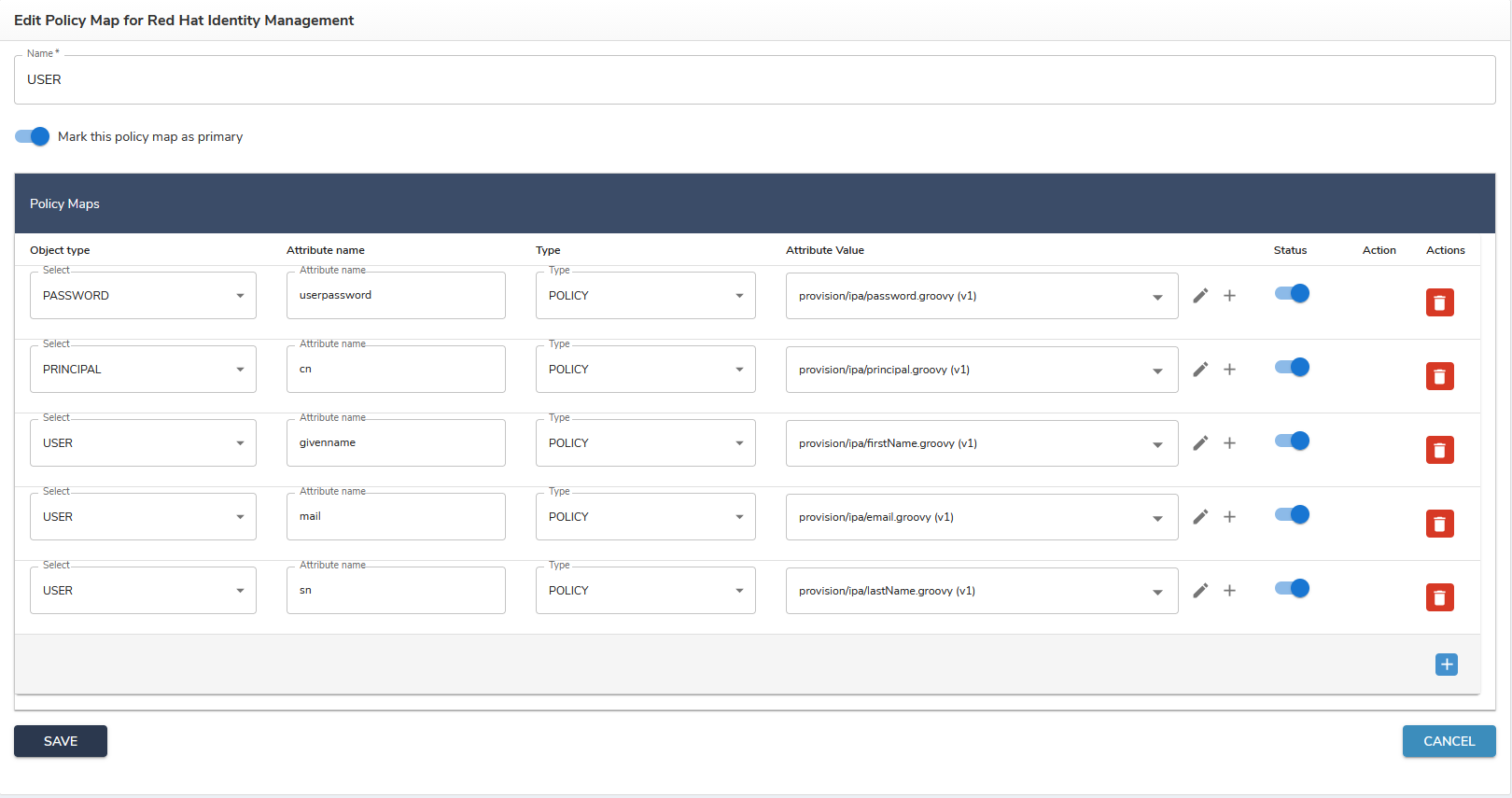
Open the **Policy map** tab from the managed-system page to see the policy map for user provisioning. It contains the required fields and can be expanded to cover the fields supported by the target system.

<figure><img src="https://2965242200-files.gitbook.io/~/files/v0/b/gitbook-x-prod.appspot.com/o/spaces%2F0uHWHRgcad6P03ehqgmX%2Fuploads%2Fgit-blob-216846ab11b2142a7625d603572d0d2155756b5d%2FfreeIPA-02-policy-map.png?alt=media" alt="The USER policy map for Red Hat Identity Management, with five active mappings - userpassword, cn, givenname, mail and sn - each resolved by a Groovy script under provision/ipa"><figcaption></figcaption></figure>

OpenIAM can receive the following attributes from the IPA system:

{% code overflow="wrap" expandable="true" %}

```
"objectclass":
"cn":
"gecos":
"ipauniqueid":
"krblastpwdchange":
"krbpasswordexpiration":
"krbextradata":
"sn":
"givenname":
"gidnumber":
"loginshell":
"nsaccountlock":
"uidnumber":
"homedirectory":
"uid":
"krbprincipalname":
"has_password":
"has_keytab":
"preserved":
"memberof_group":
"dn":
```

{% endcode %}

## Reconciliation and synchronization

OpenIAM provides two pre-configured synchronization options for FreeIPA (search for `Red Hat Identity Management IPA` under **Provisioning → Synchronization**), both with example transformation scripts:

1. **User synchronization** — matches users by `employee ID` and `employee ID number`.
2. **Group synchronization** — matches groups by `name` and `cn`.

Search filters follow this pattern:

* `*` — find all objects.
* `option1=value1_opt` — filter on one option.
* `option1=value1_opt--option2=value2_opt` — several filters combined with `--`.

Allowed options are covered in the [FreeIPA documentation](https://www.freeipa.org/page/Documentation.html).


---

# Agent Instructions
This documentation is published with GitBook. GitBook is the documentation platform designed so that both humans and AI agents can read, navigate, and reason over technical content effectively. Learn more at gitbook.com.

## Querying This Documentation
If you need additional information that is not directly available in this page, you can query the documentation by asking a question.

Perform an HTTP GET request on the following URL with the `ask` and `goal` query parameters:

```
GET https://docs.openiam.com/connector-configuration/freeipa.md?ask=<question>&goal=<user_goal>
```

`ask` is the immediate question: it should be specific, self-contained, and written in natural language.
`goal` is what the user is ultimately trying to achieve, the reason they need the answer. Sharing it helps GitBook give you a better, more relevant answer. A goal is most helpful when it describes the outcome the user wants rather than restating the question. For example, with `ask=how do I create an API token`, a goal like `automate deployments from our CI pipeline` lets GitBook tailor the answer to that use case.

The response will contain a direct answer to the question and relevant excerpts and sources from the documentation.

Use this mechanism when the answer is not explicitly present in the current page, you need clarification or additional context, or you want to retrieve related documentation sections.