> For the complete documentation index, see [llms.txt](https://docs.openiam.com/llms.txt). Markdown versions of documentation pages are available by appending `.md` to page URLs; this page is available as [Markdown](https://docs.openiam.com/administration-guide/reports/system-templates.md).
# System templates
The report templates OpenIAM ships — what a system template is, the shipped list with the entity each reads, how to clone one into a report you own, and what an upgrade does to them.
## What this is, and when you need it
A system template is a finished report OpenIAM ships: new hires, terminated users, password expiration, inactive logins, orphaned accounts, the audit log of the last day. Start here before you build a report from scratch; most routine questions have a template, and a template you clone is a report you own, with the fields, filters and calculated fields already in place.
You are in the wrong place if you want the **shipped reports** of the older reporting engine, which are a different set, listed in [Shipped reports](/administration-guide/reference/shipped-reports.md).
## At a glance
| Fact | Value |
| ------------------ | ----------------------------------------------------------------------------------------- |
| Where | Webconsole → **Audit & Reports** → **Reports** → **Reports**, tab **System templates** |
| How many ship | 18 in 2026.10.1 |
| Owner | The system user; the **System** badge marks them in every list |
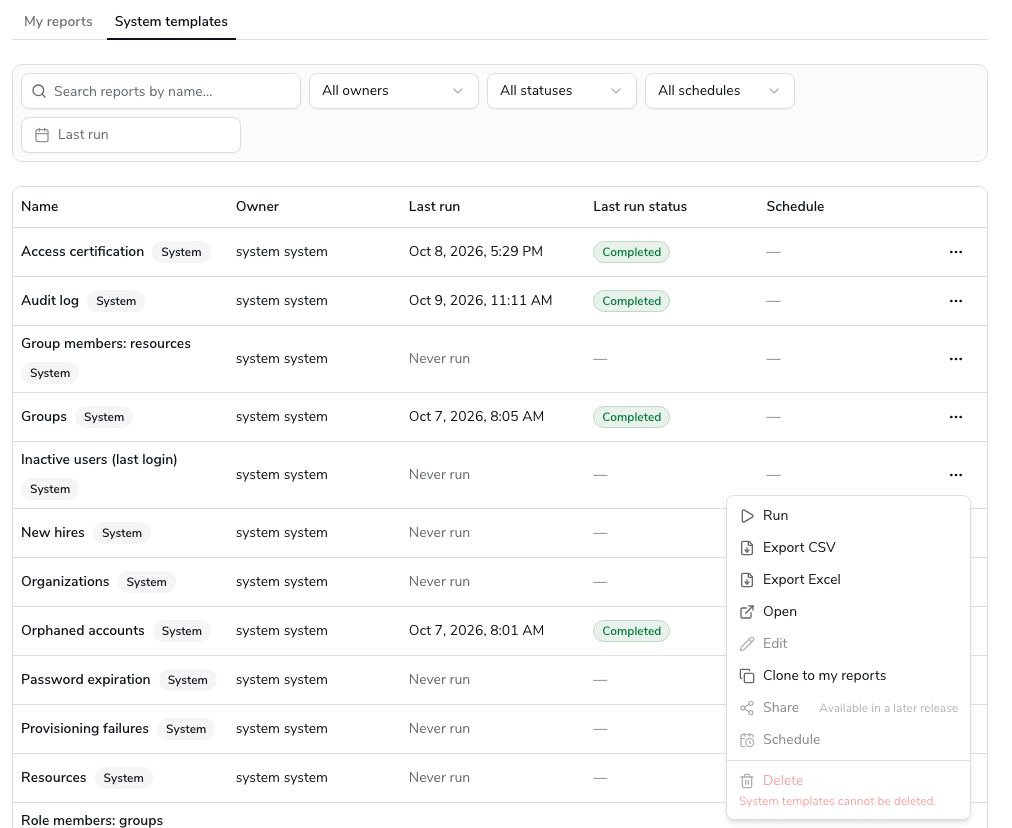
| What you can do | **Run**, **Export CSV** / **Export Excel**, open and **Preview**, **Clone to my reports** |
| What nobody can do | **Edit**, **Delete**, **Schedule**, super administrators included |
| How to change one | Clone it; the copy is an ordinary report you own |
| On upgrade | A template is never overwritten; new ones are added |
## What a template is
A template is a report whose owner is the system user and whose **System** flag is set. It has its own inline data source, a layout, a file name pattern and a retention period like any other report, and the same page shows its details, data model and preview. What differs is the rights:
* everyone can see it, open it, preview it, run it and export it;
* nobody can edit it, delete it or schedule it. The row menu and the details page do not offer those actions, the designer opens it with the notice **This is a system template and cannot be edited** and a **Clone to edit** button, and the report service refuses the writes if anything bypasses the screens.
A run of a template behaves like any run: it lands in your Run history and the Download center under your name, with the template's retention. Because a template cannot be scheduled, a template's files are never e-mailed; schedule a clone instead.
## The shipped templates
The list below is the shipped state of 2026.10.1, from the catalog seed; the live list is the **System templates** tab. Every template reads one main entity; the database ones join the related entities named, the OpenSearch ones have no joins.
| Template | Main entity | Backend | Also joins | Asks for |
| --------------------------- | --------------------- | -------------------------- | ----------------------------------------------------------------- | --------------------------------- |
| New hires | User | Database | Login, Email address | Days back (1) |
| Terminated users | User | Database | Login, Managed system | Days back (1) |
| Password expiration | Login | Database | User, Email address | Days ahead (14) |
| Inactive users (last login) | Login | Database | User | Inactive for (days) (90) |
| Users | User | Database | Login, Email address, User organization affiliation, Organization | — |
| User role access | User role membership | Database | User, Role, Managed system | — |
| User group access | User group membership | Database | User, Group, Managed system | — |
| Orphaned accounts | Orphan account | OpenSearch | — | — |
| Roles | Role | Database | Managed system | — |
| Groups | Group | Database | Managed system | — |
| Resources | Resource | Database | Managed system | — |
| Organizations | Organization | Database | — | — |
| Access certification | Certification item | Database (`certification`) | Certification campaign | Campaign name contains (optional) |
| Provisioning failures | Provisioning result | OpenSearch | — | Days back (1) |
| Audit log | Audit event | OpenSearch | — | Days back (1) |
| Role members: groups | Role | Database | Group role membership, Group, Managed system | — |
| Role members: resources | Role | Database | Role resource entitlement, Resource, Managed system | — |
| Group members: resources | Group | Database | Group resource entitlement, Resource, Managed system | — |
**Asks for** is the template's parameter with its default. A template with a default runs with it; the details page's **Preview** lets you try another value, and a clone lets you change the default. Three details worth knowing:
* **Terminated users**, **Password expiration** and **Inactive users (last login)** carry calculated fields (Days since last date, Days to expiry with an Expired / expiring label, Days since last login) that you can copy into your own reports from the clone's designer.
* **Users** groups every row and collects the person's organizations into one column with a semicolon-separated list; it is the shipped example of a grouped report.
* **Orphaned accounts** and **Provisioning failures** show a managed system **ID** rather than its name, because the name lives in the database and the event in OpenSearch, which a report cannot join. See [the overview](/administration-guide/reports/overview.md#rules-one-backend).
The **Inactive users (last login)** template includes the **Last login IP** field, which is marked as personal data, so its files, and the files of any clone that keeps the field, expire after at most 7 days. See [Retention](/administration-guide/reports/run-and-download.md#retention-pii).
## Clone a template into a report you own
{% stepper %}
{% step %}
Go to Webconsole → **Audit & Reports** → **Reports** → **Reports** and open the **System templates** tab.
{% endstep %}
{% step %}
Open the row menu of the template and choose **Clone to my reports**. The same item is on the details page, and the designer offers **Clone to edit** when you open a template there.
{% endstep %}
{% step %}
In the **Clone report** dialog, type the name of the copy, or leave it blank to get **Copy of** followed by the template's name. Choose **Clone**.
{% endstep %}
{% step %}
The copy opens on its details page under **My reports**, with you as its owner. Use **Edit fields & layout** to change it, **Schedule** to schedule it.
{% endstep %}
{% endstepper %}
What the clone copies: the data source (entities, joins, filters, parameters and calculated fields), the layout (fields, headings, sort, grouping, totals), the file format, the file name pattern and the retention period. What it does not copy: a schedule (a template has none) and the template's **System** flag. A clone is an ordinary report; cloning it again gives another ordinary report.
Dana Okafor clones **Inactive users (last login)** as **Inactive users**, opens **Edit fields & layout**, and on the **Data source** tab changes the condition on **Days since last login** from the parameter with its default of 90 to the value 60. She removes the **Last login IP** column on the **Fields** tab so that the files keep for the 30 days she set rather than the 7-day personal data cap, saves, and schedules the copy for Monday mornings. The template itself is unchanged; another analyst cloning it still gets 90 days.
## What an upgrade does
Templates are rows in the `reporting` database, inserted by the release's conf migrations with fixed IDs. Each row is inserted only when its ID is absent, so:
* a re-run of the migrations adds nothing twice;
* an upgrade never overwrites a template, even one whose definition the new release improved; the improved definition reaches you only as a new template under a new ID, if the release ships one;
* your clones are untouched; they are ordinary reports with their own IDs;
* templates a release adds appear on the **System templates** tab after the migration runs, with no restart of the Webconsole.
A template references catalog entities and fields by key, never tables or columns, so the same definition ships for all four database dialects, and a template is only as usable as the catalog on your stack: see [when it goes wrong](#when-it-goes-wrong).
## Verification
* The **System templates** tab lists 18 rows, each with the **System** badge, and its row menu offers **Run**, **Export CSV**, **Export Excel**, **Open** and **Clone to my reports**, nothing else.
* **Preview** on **Users** returns rows with an **Organizations** column holding a semicolon-separated list.
* After **Clone to my reports**, the copy is on **My reports** with you as **Owner** and offers **Edit fields & layout**, **Schedule** and **Delete**.
## When it goes wrong
| Symptom | Likely cause |
| -------------------------------------------------------------------------- | ------------------------------------------------------------------------------------------------------------------------------------------------------------------------------------------------------------------------------------------------------------------- |
| **Edit**, **Schedule** and **Delete** are missing on a template | Expected: templates are read-only for everyone. Clone it. |
| A template's run fails with **Source unavailable** | The entity's source is not on this stack: `certification` is not in `report.source.databases` for **Access certification**, or the OpenSearch index is absent. A stack without `audit-log-manager` has no `auditlog` index, so **Audit log** fails there by design. |
| **Orphaned accounts** runs but shows only IDs in the managed system column | Expected: see [the shipped templates](#template-list). |
| A template is missing from the tab after an upgrade | The `reporting` migrations did not run, or the template was deleted directly in the database and its fixed ID is gone. Re-running the migrations re-inserts a missing row. |
| **Inactive users** files expire after 7 days although retention says 30 | The clone kept the **Last login IP** column, which is personal data. Remove the column, or accept the 7 days. See [Retention](/administration-guide/reports/run-and-download.md#retention-pii). |
| Two templates with the same name | A clone named without changing the default keeps **Copy of** in front; a template itself is never duplicated. Rename the clone on its details page. |
## Related
* [Manage reports](/administration-guide/reports/manage-reports.md) — the Reports list, the tabs, cloning and deleting
* [Design a report](/administration-guide/reports/design-a-report.md) — changing the clone
* [Run a report and download the file](/administration-guide/reports/run-and-download.md) — running a template, retention
* [Access and permissions](/administration-guide/reports/access-and-permissions.md) — why a template is read-only for everyone
* [Shipped reports](/administration-guide/reference/shipped-reports.md) — the older engine's reports, a different set
---
# Agent Instructions
This documentation is published with GitBook. GitBook is the documentation platform designed so that both humans and AI agents can read, navigate, and reason over technical content effectively. Learn more at gitbook.com.
## Querying This Documentation
If you need additional information that is not directly available in this page, you can query the documentation by asking a question.
Perform an HTTP GET request on the following URL with the `ask` and `goal` query parameters:
```
GET https://docs.openiam.com/administration-guide/reports/system-templates.md?ask=&goal=
```
`ask` is the immediate question: it should be specific, self-contained, and written in natural language.
`goal` is what the user is ultimately trying to achieve, the reason they need the answer. Sharing it helps GitBook give you a better, more relevant answer. A goal is most helpful when it describes the outcome the user wants rather than restating the question. For example, with `ask=how do I create an API token`, a goal like `automate deployments from our CI pipeline` lets GitBook tailor the answer to that use case.
The response will contain a direct answer to the question and relevant excerpts and sources from the documentation.
Use this mechanism when the answer is not explicitly present in the current page, you need clarification or additional context, or you want to retrieve related documentation sections.