> For the complete documentation index, see [llms.txt](https://docs.openiam.com/llms.txt). Markdown versions of documentation pages are available by appending `.md` to page URLs; this page is available as [Markdown](https://docs.openiam.com/administration-guide/reports/manage-reports.md).
# Manage reports
The Reports list and the report details page — find a report, read its cards, clone it, delete it, and reach everything else from its row menu.
## What this is, and when you need it
**Audit & Reports → Reports → Reports** is the front door of the report builder: a list of the reports you own and of the templates OpenIAM ships, and behind each row a details page with the report's settings, its run history and a live preview. This page explains both screens and the two actions that live only here — **Clone** and **Delete**. Everything else the row menu offers has its own page: building ([Create a report](/administration-guide/reports/create-a-report.md), [Design a report](/administration-guide/reports/design-a-report.md)), running ([Run a report and download the file](/administration-guide/reports/run-and-download.md)) and scheduling ([Schedule and deliver a report](/administration-guide/reports/schedule-and-deliver.md)).
You are in the wrong place if you cannot see the report you are looking for and you did not create it: a report is visible to its owner and to super administrators only, and there is no sharing in this release ([Access and permissions](/administration-guide/reports/access-and-permissions.md#access-report-rights)).
## The Reports list
The page is titled **Reports** (*Build, run and schedule reports on identity and access data*) and has two header buttons: **Downloads**, which opens the [Download center](/administration-guide/reports/run-and-download.md#downloads), and **New report**, which starts the [wizard](/administration-guide/reports/create-a-report.md).
### Tabs
| Tab | Shows |
| ---------------- | ------------------------------------------------------------------------------------------------------------------------------------------- |
| My reports | The reports you own. A super administrator sees everyone's reports here, each with its owner. |
| System templates | The read-only reports OpenIAM ships. Run, preview or clone them; see [System templates](/administration-guide/reports/system-templates.md). |
A third label, *Shared with me*, exists in the product but is not offered: sharing is not part of this release.
### Search and filters
| Control | What it does |
| ----------------------- | --------------------------------------------------------------------------------------- |
| Search reports by name… | Searches names on the server, as you type (after a short pause). |
| Owner | One owner, from the owners present on the loaded page. |
| Last run status | Completed, Running, Failed or Cancelled — the outcome of each report's most recent run. |
| Schedule | Daily, Weekly or Monthly. |
| Last run | A date range the most recent run must fall in. |
| Reset | Appears while any filter is set; clears them all. |
The search goes to the server; the four filters narrow the page that is already loaded, which holds 20 reports at a time. A report on a later page does not appear until you page to it or search for it. *No reports match these filters* is the empty state of a filtered list; *No reports yet* with a **New report** button is the empty state of a new installation.
### Columns
| Column | Content |
| --------------- | ------------------------------------------------------------------------------------------------------------------------------------------------------------------------------------------------------------------------------------ |
| Name | The report name. A **System** badge marks a shipped template; the badge *Not subject to field and row filters* marks a report over an [SQL data source](/administration-guide/reports/access-and-permissions.md#access-sql-sources). |
| Owner | The user who owns the report — the requester of its runs and the sender of its schedule. |
| Last run | When the most recent run started, or *Never run*. |
| Last run status | The badge of the most recent run: Queued, Running, Completed, Failed or Cancelled ([statuses](/administration-guide/reports/run-and-download.md#history-statuses)). |
| Schedule | A one-line summary — *Weekly on Monday at 08:00 (Europe/Rome)* — or *Not scheduled*; *Paused* when the schedule is switched off. |
Click anywhere on a row to open the details page.
### The row menu
The last column holds a menu per row. Which items are enabled follows the report's rights ([Access and permissions](/administration-guide/reports/access-and-permissions.md#access-report-rights)): `canRun`, `canEdit`, `canSchedule`, `canDelete` as the facade reports them, with a system template forced to run, preview and clone only.
| Item | Does | Shown when |
| --------------------------- | ----------------------------------------------------------------------------------------------------------------------------------------------------------------------------------------------------------------------------------------------------------------------------- | ---------------------------------------------------------------------- |
| Run | Queues a run in the report's own format and shows *"…" run started — You'll see it in Run history when it finishes.* If the report has an active schedule a dialog asks first ([already scheduled](/administration-guide/reports/run-and-download.md#run-already-scheduled)). | You may run it |
| Export CSV / Export Excel | Queues one run in that format, whatever the report's own format ([Export](/administration-guide/reports/run-and-download.md#run-export)). | You may run it |
| Open | The details page. | Always |
| Edit | The [designer](/administration-guide/reports/design-a-report.md#designer-open). | You may edit it |
| Clone / Clone to my reports | A copy you own; the second label appears on a system template ([below](#clone-a-report)). | Always |
| Share | Disabled, *Available in a later release* ([sharing](/administration-guide/reports/access-and-permissions.md#access-sharing)). | Always, never enabled |
| Schedule | The details page with the [schedule sheet](/administration-guide/reports/schedule-and-deliver.md#schedule-sheet) open. | You may schedule it |
| Delete | The confirmation dialog ([below](#delete-a-report)). | You may delete it; the item shows the blocking reason inline otherwise |
Two toasts can follow Run: *The report cannot run until its definition is fixed* when the saved definition no longer validates (open the designer, the summary names the problem), and *The run could not be started* when the report service did not answer.
## The details page
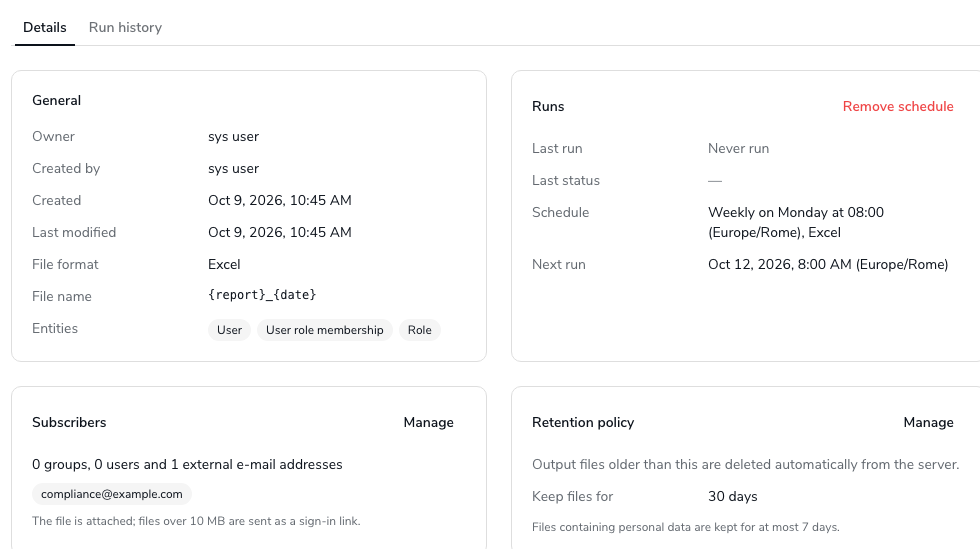
`/webconsole-v2/audit/reports/`. Two tabs, **Details** and **Run history** (`?tab=runs` opens the second directly), under a header that repeats the row menu as buttons.
### Header
Left to right:
| Button | Shown when |
| --------------------------------------- | -------------------------------------------------------------------------------------------------------------- |
| Delete | You may delete it and it is not a system template; disabled with the reason as a tooltip while a run is active |
| Clone / Clone to my reports | Always |
| Schedule / Edit schedule | You may schedule it; the second label once a schedule exists |
| Edit fields & layout | You may edit it — opens the [designer](/administration-guide/reports/design-a-report.md#designer-open) |
| Run | You may run it |
| Export (menu: Export CSV, Export Excel) | You may run it |
There is no Share button here either.
### The Details tab
Four cards in two columns, then the data model and the preview.
#### General
| Row | Content |
| ---------------------------------- | ------------------------------------------------------------------------------------------------------------------------------------------------- |
| Owner | The report's owner. |
| Created by, Created, Last modified | Who created it and when; when it was last saved. |
| File format | CSV or Excel — the format of Run and of scheduled runs ([File type](/administration-guide/reports/design-a-report.md#designer-naming-file-type)). |
| File name | The [file name pattern](/administration-guide/reports/output-file-names.md#naming-pattern), or the default rendered as a summary. |
| Entities | Chips for the entities the report reads: *User*, *User role membership*, *Role*. For a view, the view's entities. |
#### Runs
| Row | Content |
| ----------- | ----------------------------------------------------------------------------------------------------------------------------------------------------------------------------------------------------------------------------------------------------------------------------- |
| Last run | When the most recent run started, or *Never run*. |
| Last status | Its status badge. |
| Schedule | The schedule summary, or *Not scheduled*. |
| Next run | The next planned time in the schedule's zone; **Paused** when the schedule is switched off; **Not planned yet** when the scheduler has not picked the schedule up ([why](/administration-guide/reports/schedule-and-deliver.md#schedule-first-fire)); *—* without a schedule. |
The card's action, **Remove schedule**, appears when a schedule exists and you may schedule the report ([Remove a schedule](/administration-guide/reports/schedule-and-deliver.md#schedule-remove)).
#### Delivery
Where the file goes after each scheduled run. For e-mail: the subscribers, as *N groups, M users and K external e-mail addresses* with the addresses as chips, plus whether the file is attached or linked, or *The scheduled file is not sent by e-mail.* For SFTP: *Uploads to …* with the delivery targets. Without a schedule the card says *No delivery. Add a schedule to e-mail this report or upload it to SFTP servers.* **Manage** opens the schedule sheet on its Delivery section ([Delivery](/administration-guide/reports/schedule-and-deliver.md#delivery)).
#### Retention policy
*Keep files for: N days*, *Installation default (365 days)* or *Kept forever (never deleted)*, and the note *Files containing personal data are kept for at most 7 days.* **Manage** (owner or super administrator, not on a template) opens the retention sheet ([Retention](/administration-guide/reports/run-and-download.md#retention-policy)).
#### Data model
*The Entities this report reads, the Fields it uses and how the Entities are linked.* A read-only diagram: the main entity marked **Starting Entity**, one card per related entity with the fields the report uses (**Show all Fields** when there are more), edges labelled with the join field, and *N conditions on this Entity* where join conditions exist. It is the same drawing the [builder's Diagram mode](/administration-guide/reports/views-and-sql-sources.md#builder-diagram) edits. The card is hidden for a report over an SQL data source, which has no model to draw.
#### Preview
A live sample of 10, 50 or 100 rows, read from the sources on demand and stored nowhere. It is the one place that asks for a parameter value. Described on [Run a report and download the file](/administration-guide/reports/run-and-download.md#preview).
### The Run history tab
Every run of the report, newest first, with its trigger, status, output file, days left and a **Download** or **View error** action. Described on [Run a report and download the file](/administration-guide/reports/run-and-download.md#history).
## Clone a report
**Clone** (or **Clone to my reports** on a system template) opens a one-field dialog:
{% stepper %}
{% step %}
Choose **Clone** in the row menu, or **Clone** in the details header.
{% endstep %}
{% step %}
In **Clone report**, type a **Name of the copy**, or leave it blank for *Copy of* .
{% endstep %}
{% step %}
Choose **Clone**. The toast *Report cloned* confirms, and the copy appears in **My reports** with you as owner.
{% endstep %}
{% endstepper %}
What the copy gets: the definition (data source, fields, calculated fields, filters, sort, grouping, totals), the retention days, the file name pattern and the file format. A clone of a report over an inline source gets its own inline source; a clone of a report over a view reads the same view. What it never gets: the schedule, its subscribers, the run history, and the *System* flag — a cloned template is an ordinary report. The audit entry is `REPORT_CLONE`.
Cloning is the only way to change a shipped template: see [System templates](/administration-guide/reports/system-templates.md#template-clone).
## Delete a report
{% stepper %}
{% step %}
Choose **Delete** in the row menu, in the details header, or in the designer footer.
{% endstep %}
{% step %}
Read the dialog: *"" and its schedule are removed. Generated files stay in the Download Center until they expire.*
{% endstep %}
{% step %}
Choose **Delete**. The toast *Report deleted* confirms.
{% endstep %}
{% endstepper %}
Deleting removes the report, its inline data source (unless another report still reads it), its schedule and the schedule's batch task. The files its runs produced stay in the [Download center](/administration-guide/reports/run-and-download.md#downloads) until their retention date, and the run rows stay in the history store until the nightly purge removes them at twelve months. The audit entry is `REPORT_DELETE`.
Delete is refused, with the reason shown in the menu item or as a tooltip, in two cases:
| Reason | Message | What to do |
| --------------- | -------------------------------------------------------------------------------------- | ------------------------------------------------------------------------------------------------------- |
| A run is active | *A run of this report is queued or running. Wait for it to finish or cancel it first.* | Wait, or cancel the run in the [Job Monitor](/administration-guide/reports/job-monitor.md#jobs-cancel). |
| System template | *System templates cannot be deleted.* | Nothing; templates are part of the product. |
When the state changed between opening the dialog and confirming — a scheduled run started meanwhile — the confirmation fails with the same reason, and the report stays.
## The running example
Dana searches for *Contractor* on **My reports** and opens **Contractor role access**. The **General** card shows Excel, the pattern `{report}_{date}`, and the chips *User*, *User role membership* and *Role*. The **Runs** card shows last Monday's scheduled run as Completed and next Monday 08:00 (Europe/Rome) as the next run. She clones the report as **Contractor role access — EMEA** to add a location filter for a colleague, and the copy appears above the original with no schedule and *Never run*.
## Verification
* A new or cloned report is on **My reports** with you as **Owner** and *Never run*.
* The details page's **General** card shows the format, file name and entities you expect.
* After a delete, the row is gone from **My reports**, the schedule's batch task *Report:* is gone from the batch task list, and the files are still listed in **Downloads**.
## When it goes wrong
| Symptom | Likely cause |
| ------------------------------------------------------------------------------------- | ------------------------------------------------------------------------------------------------------------------------------------------------------------------------------------ |
| A report somebody else built is not in the list | Reports are visible to their owner and super administrators only. Ask the owner to clone it for you, or a super administrator to change the owner. |
| *Could not load reports* | The report service did not answer; **Retry**. If it persists, see [Operate the report service](/administration-guide/reports/operate-the-report-service.md#operate-troubleshooting). |
| *This report does not exist or was deleted* / *You do not have access to this report* | A stale link, or a report you do not own. |
| **Delete** is disabled or fails | A run is queued or running, or the report is a system template. |
| The filters show fewer reports than exist | They filter the loaded page of 20. Search by name instead. |
| **Share** is greyed out | Not available in this release. |
| **Run** says *The report cannot run until its definition is fixed* | The saved definition fails validation — a field was locked, a view changed. Open the designer. |
## Related
* [Create a report](/administration-guide/reports/create-a-report.md) — the **New report** button
* [Design a report](/administration-guide/reports/design-a-report.md) — **Edit** and **Edit fields & layout**
* [Run a report and download the file](/administration-guide/reports/run-and-download.md) — Run, Export, Preview, Run history, Downloads
* [Schedule and deliver a report](/administration-guide/reports/schedule-and-deliver.md) — the Runs and Delivery cards, Remove schedule
* [System templates](/administration-guide/reports/system-templates.md) — the second tab
* [Access and permissions](/administration-guide/reports/access-and-permissions.md) — who sees which rows and which menu items
---
# Agent Instructions
This documentation is published with GitBook. GitBook is the documentation platform designed so that both humans and AI agents can read, navigate, and reason over technical content effectively. Learn more at gitbook.com.
## Querying This Documentation
If you need additional information that is not directly available in this page, you can query the documentation by asking a question.
Perform an HTTP GET request on the following URL with the `ask` and `goal` query parameters:
```
GET https://docs.openiam.com/administration-guide/reports/manage-reports.md?ask=&goal=
```
`ask` is the immediate question: it should be specific, self-contained, and written in natural language.
`goal` is what the user is ultimately trying to achieve, the reason they need the answer. Sharing it helps GitBook give you a better, more relevant answer. A goal is most helpful when it describes the outcome the user wants rather than restating the question. For example, with `ask=how do I create an API token`, a goal like `automate deployments from our CI pipeline` lets GitBook tailor the answer to that use case.
The response will contain a direct answer to the question and relevant excerpts and sources from the documentation.
Use this mechanism when the answer is not explicitly present in the current page, you need clarification or additional context, or you want to retrieve related documentation sections.