> For the complete documentation index, see [llms.txt](https://docs.openiam.com/llms.txt). Markdown versions of documentation pages are available by appending `.md` to page URLs; this page is available as [Markdown](https://docs.openiam.com/administration-guide/reports/data-catalog.md).
# Browse the Data Catalog
Browse the entities and views reports can read — the cards and their access badges, the Database and OpenSearch backends, the entity sheet with fields and relationships, and how to start a view from a
## What this is, and when you need it
The Data Catalog is the list of everything a report can be about. Open it when you are deciding what a report should read, when a wizard step greys an entity out and you want to know why, or when you want to build a view that several reports will share. It is read-only: nothing here changes data, and an entity you cannot use is still listed so that you can ask for access.
Skip this page if you already know the entities you need; the wizard shows the same cards on its **Data source** step. Go to [Create a report](/administration-guide/reports/create-a-report.md) instead.
## At a glance
| Setting or fact | Value |
| ------------------- | -------------------------------------------------------------------------------------------------------------- |
| Where | Webconsole → **Audit & Reports** → **Reports** → **Data Catalog**, route `/webconsole-v2/audit/report-catalog` |
| Tabs | **Entities**, with a count, and **Views** |
| Filters on Entities | Search, Backend, Category, Access, Reset |
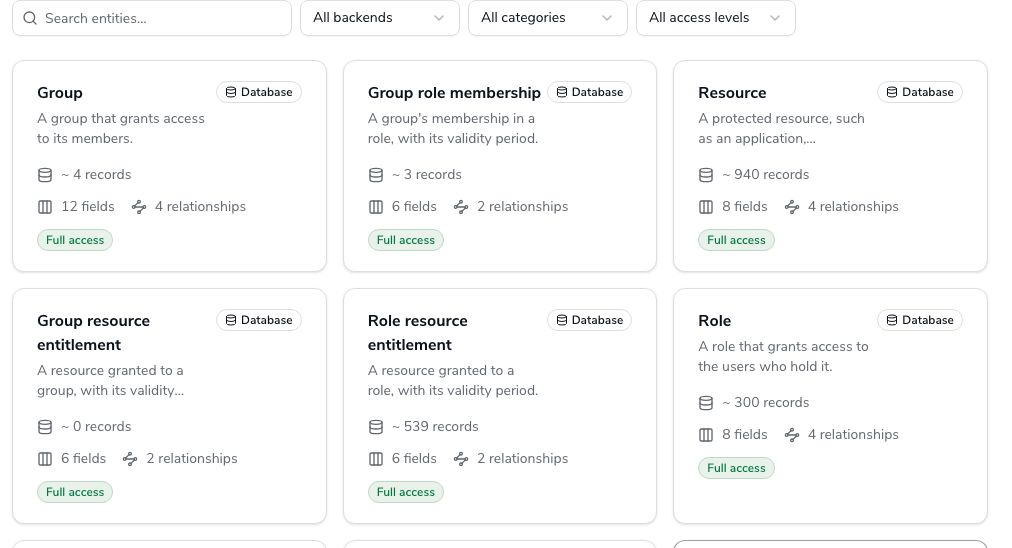
| What a card shows | Name, description, backend chip, approximate record count, number of fields and relationships, access badge |
| Field types | Text, Number, Yes/No, Date, Date and time |
| Who sees it | Anyone who can open the v2 Webconsole; what you may use is decided per entity |
## Browse the entities
Go to Webconsole → **Audit & Reports** → **Reports** → **Data Catalog**. The page opens on the
\*\*Entities\*\* tab with one card per entity.
### The Entities tab
The tab heading carries the number of entities after the filters, **Entities (21)** on a stock installation. The cards are the entities OpenIAM ships: about twenty, across the `openiam` and `certification` databases and four OpenSearch indexes. A later release, or an upgrade, can add more; the live list is this tab.
#### What a card shows
| On the card | Meaning |
| ---------------------------------- | -------------------------------------------------------------------------------------------------------------------------------------------------------------------------------- |
| Name and description | The entity's display name, such as **User role membership**, and one sentence on what a record is, such as "A user's membership in a role, with its validity period and origin." |
| Backend chip | **Database** or **OpenSearch**; see [the backend chip](#catalog-backend-chip) |
| **\~ 12,400 records** | The approximate number of records, or **Record count not available yet**; see [record counts](#catalog-record-counts) |
| **18 fields**, **3 relationships** | How many fields the entity has and how many other entities it can be joined to |
| Access badge | **Full access**, **Partial: 2 fields locked** or **No access**; see [the access badge](#catalog-access-badge) |
Click a card to open [the entity sheet](#the-entity-sheet).
#### The backend chip
Every entity reads from one of two backends, and the chip is the first thing to check when you plan to combine entities, because a report cannot join across them.
| Chip | What it means | Shipped entities |
| -------------- | -------------------------------------------------------------------------------------------------------------- | -------------------------------------------------------------------------------------------------------------------------------------------------------------------------- |
| **Database** | The entity is a facade over a table in a relational source database, read through the read-only reporting user | User, Email address, Login, Organization, Managed system, Role, Group, Resource, the memberships and entitlements between them, Certification campaign, Certification item |
| **OpenSearch** | The entity is a facade over a search index | Audit event, Provisioning result, SoD violation, Orphan account |
A Database entity also belongs to one source database. The certification entities are in the `certification` database, everything else shipped on the Database backend is in `openiam`, and entities in different databases cannot be joined either. The entity sheet's **Relationships** tab says which relationships are usable.
#### The access badge
| Badge | Meaning | What you can do |
| ---------------------------- | --------------------------------------------------------------------------------------------------------------------- | ------------------------------------------------------------------------------------------------ |
| **Full access** | You hold the entity's data permission and may use every field | Use it anywhere |
| **Partial: N fields locked** | You hold the entity's data permission, but N fields need a further permission, typically the personal-data permission | Use the entity; the locked fields are shown but cannot be selected |
| **No access** | You do not hold the entity's data permission | The card stays visible; **Request access** opens a SelfService access request for the permission |
The badge is computed from the permissions sent with the request. In this release the Webconsole sends none and the service is configured to treat unknown permissions as open, so every card reads **Full access** and **Request access** never appears. The mechanism, and the ticket that turns it on, are on [Access and permissions](/administration-guide/reports/access-and-permissions.md#access-open-when-unknown).
### Narrow the list
The filter bar above the cards has four controls and a **Reset** that appears while any of them is set. Search matches the name and the description of the loaded cards.
#### Backend
**All backends**, **Database** or **OpenSearch**. Filter on the backend before you plan a report with several entities: everything you intend to join must show the same chip.
#### Category
Every entity has one category. The categories are fixed; which entities fall in each is the catalog's choice.
| Category | What it holds | Examples |
| -------------- | ---------------------------------------------------------------------------------------- | -------------------------------------------------------------------------------------------------------------------- |
| **Identity** | People and the records attached to them | User, Email address, Login, Organization, Managed system |
| **Access** | Roles, groups and resources, and the memberships and entitlements between them and users | Role, Group, Resource, User role membership, User group membership, Group role membership, Role resource entitlement |
| **Governance** | Certification and segregation-of-duties data | Certification campaign, Certification item, SoD violation, Orphan account |
| **Audit** | Event streams from OpenSearch | Audit event, Provisioning result |
| **Requests** | Reserved for access-request data | No shipped entity yet; the filter value exists so that a later release needs no UI change |
#### Access
**All access levels**, **Full access**, **Partial** or **No access**, matching the badge on the cards.
## The entity sheet
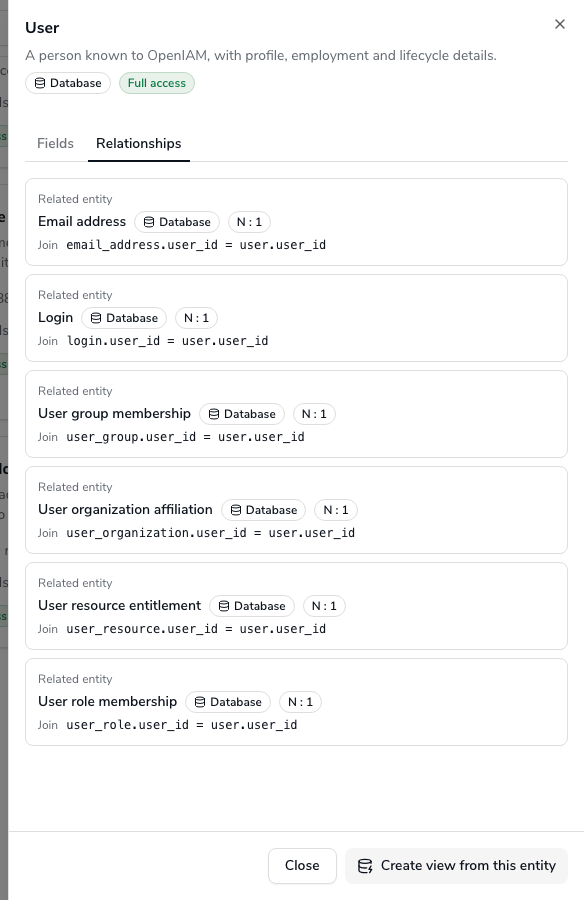
Clicking a card opens a sheet on the right with the entity's name, backend chip and access badge in the header, two tabs, and a footer with **Close** and **Create view from this entity**.
### Fields
One row per field: **Field**, its display name; **Type**; and a **Locked** marker when the field needs a permission you do not hold. The fields are in the order the wizard and the designer list them.
#### Field types
The type decides which filter operators a field accepts and which calculations it allows.
| Type | Examples | Filters | Calculations |
| ----------------- | --------------------------------------------- | --------------------------------------------------------------------------------------------------------------------- | ----------------------------- |
| **Text** | First name, Login, Status, Origin | equals, not equals, in list, not in list, contains, starts with, is empty, is not empty | Count, Min, Max |
| **Number** | Risk score, Password grace period ends | equals, not equals, greater than, at least, less than, at most, in list, not in list, between, is empty, is not empty | Count, Sum, Average, Min, Max |
| **Yes/No** | Is default (on Email address) | equals, not equals, is empty, is not empty | Count |
| **Date** | Start date, Last date, Date of birth | equals, not equals, greater than, at least, less than, at most, between, in the last N days, is empty, is not empty | Count, Min, Max |
| **Date and time** | Created, Last updated, Last login, Event time | the same as Date | Count, Min, Max |
The operators are described one by one in [Filters and parameters](/administration-guide/reports/filters-and-parameters.md#filter-operators).
### Relationships
One row per entity this one can be joined to: **Related entity**, **Join** (the field on each side the join follows), and a **Locked** marker when you lack the related entity's permission. Every shipped relationship is many-to-one: a membership points to one User and one Role, a Login to one User and one Managed system, a Certification item to one Certification campaign.
A relationship whose other end is on the other backend reads **Cannot be joined: different backend**. It is listed because the model has it, and so that you know why the wizard will not offer the join; the rule is explained in [the overview](/administration-guide/reports/overview.md#rules-one-backend).
### Create view from this entity
The footer button opens the view builder at `/webconsole-v2/audit/report-views/new` with this entity already chosen as the primary entity. It is disabled while the sheet is loading and when your access to the entity is **No access**. Everything after the click is on [Views and SQL data sources](/administration-guide/reports/views-and-sql-sources.md#view-create-from-entity).
Dana Okafor starts her **Contractor role access** report here: she opens **User role membership**, checks on **Relationships** that it joins to **User** and **Role** on the same backend, and chooses **Create view from this entity** so that the Compliance team can reuse the joined source later.
## The Views tab
The **Views** tab lists the named data sources people have built: a card per view with its name, backend chip, description, and a **Not subject to field and row filters** badge on an SQL data source, with the database it runs against. **New view** opens the view builder empty. Clicking a card opens the view for editing when you own it, read-only otherwise.
An empty tab reads **No views yet** and points you at **New view** or at the entity sheet's footer button. Views are explained on [Views and SQL data sources](/administration-guide/reports/views-and-sql-sources.md).
## How record counts are made
The **\~ N records** figure is an estimate, never a `COUNT(*)`: a Database entity reads the database's own table statistics, an OpenSearch entity reads the index document count. The report service refreshes every entity's count every six hours (`report.catalog.count-refresh.cron`, shipped as `0 0 */6 * * *`) and once at startup, under a lock so that one node of a cluster does the work. Until the first refresh has run a card says **Record count not available yet**.
The same figure feeds the row estimate in the view builder's **Validate** section. Treat both as an order of magnitude.
## What the catalog is made of
For the operator: the catalog is data in the `reporting` database, seeded by the conf Flyway migrations of the release (tables `RPT_CATALOG_OBJECT`, `RPT_CATALOG_PROPERTY`, `RPT_CATALOG_ASSOCIATION`). Each entity records its backend, its source database (for Database entities) or index, the table or index it reads, its category, the permission it requires, and an approximate record count. Each field records the column or document path it reads, its type, whether it is filterable, sortable and groupable, and the permission it requires, if any. Display names are not in the database: they are message keys, `openiam.ui.report.catalog.` and `openiam.ui.report.catalog..`, translated in the Webconsole's 18 locales.
Which Database entities are usable depends on which source databases the service is configured to read (`report.source.databases`, shipped as the six platform databases). An entity whose database is not in the list is hidden. The configuration is on [Operate the report service](/administration-guide/reports/operate-the-report-service.md#operate-databases).
## Verification
* The **Entities** tab heading shows a count and the cards carry **\~ N records** figures rather than **Record count not available yet**: the service has run its count refresh at least once.
* The **User** card shows the **Database** chip and the **Audit event** card the **OpenSearch** chip; **User** → **Relationships** lists **Login**, **Email address** and the membership entities with their join fields.
* **Create view from this entity** on **User role membership** opens the view builder with **User role membership** in **Primary entity**.
## When it goes wrong
| Symptom | Likely cause |
| -------------------------------------------------------------------------------------- | ------------------------------------------------------------------------------------------------------------------------------------------------------------------------------------------------------------------------------------------------------------------------------------------------------ |
| An entity you expect is missing, such as Certification item | Its source database is not in `report.source.databases`, or the service could not resolve that database's URL at startup. Check the report service log and the datasource properties; see [Operate the report service](/administration-guide/reports/operate-the-report-service.md#operate-databases). |
| Every card reads **Record count not available yet** | The count refresh has not run: the service is just up, or no instance could take the refresh lock. Wait for the on-startup refresh or the next six-hour cron. |
| An OpenSearch entity is listed but every run over it fails with **Source unavailable** | The index does not exist on this stack. A stack without `audit-log-manager` has no `auditlog` index, for example, and the catalog does not probe indexes. |
| Every card reads **Full access**, including entities you believe are restricted | Expected in this release: permissions are not sent with the request, and the service treats unknown permissions as open. See [Access and permissions](/administration-guide/reports/access-and-permissions.md#access-open-when-unknown). |
| A relationship reads **Cannot be joined: different backend** | The two entities live on different backends; a report cannot combine them. Pick the entity on the same backend, or two reports. |
| The **Views** tab is empty although colleagues built views | Views are listed for everyone; an empty tab means none has been saved. Check with the owner that the save succeeded. |
## Related
* [Report builder overview](/administration-guide/reports/overview.md) — entities, backends and the rules that follow from them
* [Create a report](/administration-guide/reports/create-a-report.md) — the wizard's **Data source** step shows the same cards
* [Views and SQL data sources](/administration-guide/reports/views-and-sql-sources.md) — what **Create view from this entity** leads to
* [Access and permissions](/administration-guide/reports/access-and-permissions.md) — the badges, the permissions behind them, and what is not enforced yet
* [Operate the report service](/administration-guide/reports/operate-the-report-service.md) — source databases, the count refresh and the seeds
---
# Agent Instructions
This documentation is published with GitBook. GitBook is the documentation platform designed so that both humans and AI agents can read, navigate, and reason over technical content effectively. Learn more at gitbook.com.
## Querying This Documentation
If you need additional information that is not directly available in this page, you can query the documentation by asking a question.
Perform an HTTP GET request on the following URL with the `ask` and `goal` query parameters:
```
GET https://docs.openiam.com/administration-guide/reports/data-catalog.md?ask=&goal=
```
`ask` is the immediate question: it should be specific, self-contained, and written in natural language.
`goal` is what the user is ultimately trying to achieve, the reason they need the answer. Sharing it helps GitBook give you a better, more relevant answer. A goal is most helpful when it describes the outcome the user wants rather than restating the question. For example, with `ask=how do I create an API token`, a goal like `automate deployments from our CI pipeline` lets GitBook tailor the answer to that use case.
The response will contain a direct answer to the question and relevant excerpts and sources from the documentation.
Use this mechanism when the answer is not explicitly present in the current page, you need clarification or additional context, or you want to retrieve related documentation sections.