> For the complete documentation index, see [llms.txt](https://docs.openiam.com/llms.txt). Markdown versions of documentation pages are available by appending `.md` to page URLs; this page is available as [Markdown](https://docs.openiam.com/administration-guide/nhi/request-and-approval.md).
# Request and approve registration
Send a Draft non-human identity through an approval workflow — how a request is routed to an approver, and how an approver reviews the identity and approves or rejects it.
## What this is, and when you need it
Instead of activating a non-human identity (NHI) directly, you can send it through an **approval workflow**: the Draft moves to **Pending Approval**, a request is routed to the approver configured for its environment and type, and only when that approver approves does the identity go **Active**. Use this path when registering an NHI should be reviewed by someone other than the person creating it — which is the norm for production and high-risk identities.
The workflow reuses OpenIAM's standard request-and-approval engine, so an approver reviews the request on the same **Pending Approvals** screen they use for access requests. Who approves is set in [approver routing](/administration-guide/nhi/approver-routing.md); this page is about running the request and acting on it.
## Before you begin
* The Draft satisfies the [activation requirements](/administration-guide/nhi/lifecycle.md#activation-requirements) — owner, expiry, and any related human or backup owner its type and environment demand. These are checked when you request approval, not only at activation, so an approved request can never fail to go live.
* An [approver route](/administration-guide/nhi/approver-routing.md) exists for the identity's environment and type, or a default route is configured. With no route and no default, the request **auto-approves** and the identity activates immediately.
## Send a Draft for approval
{% stepper %}
{% step %}
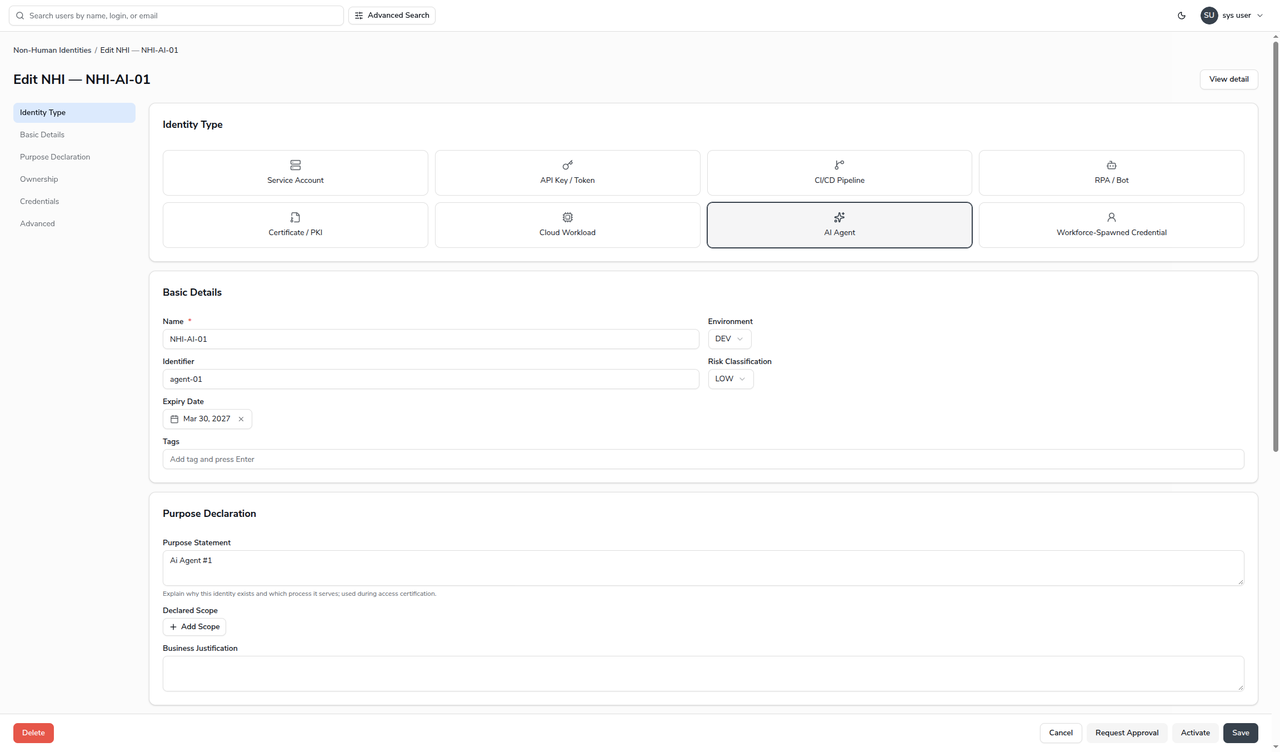
Open the Draft and choose **Edit**.
{% endstep %}
{% step %}
In the footer, choose **Request Approval**.
{% endstep %}
{% step %}
The identity moves to **Pending Approval**, and a notification confirms the submission. Behind the scenes the workflow starts, resolves the approver, and emails the request.
{% endstep %}
{% endstepper %}
### How the request is routed
The workflow picks the approver by the identity's **environment** and **type**, choosing the most specific route configured and falling back through less specific ones. It looks, in order, for a route matching the exact environment and type, then the environment alone, then the type alone, then the global default — and uses the first one it finds. See [Configure approver routing](/administration-guide/nhi/approver-routing.md) for how these routes are defined.
An approver route may name a **user, a group, or a role**. A group or role is expanded to its members at the moment the request is submitted — a snapshot — so later membership changes do not alter a request already in flight.
{% hint style="info" %}
If the person who requests approval is also the resolved approver, the request **auto-approves** — there is no point asking someone to approve their own request. This is why a Draft you both create and are the approver for can activate the instant you request approval.
{% endhint %}
## Approve or reject a request
An approver finds the request on **SelfService → Pending Approvals** (`/selfservice-v2/task-review`), alongside any other approvals waiting on them.
{% stepper %}
{% step %}
Choose **View** on the row to open the task. The task page shows a **NHI Registration Request** panel with the identity's name, type, environment and owner, so the approver can see exactly what they are approving without leaving the page.
{% endstep %}
{% step %}
Review the request and the approver list, then choose **APPROVE** or **REJECT**. **DELEGATE** hands the decision to someone else.
{% endstep %}
{% endstepper %}
* **Approve** moves the identity from Pending Approval to **Active**, and both the requester and the approvers are emailed.
* **Reject** moves it back to **Draft** so it can be corrected and resubmitted.
Where routing defines more than one approval **level**, approving at one level advances the request to the next; the identity stays Pending until the final level approves.
## Verification
Open the identity's detail page and read the **Audit Trail** tab. A completed approval shows three lifecycle events in order: the registration (`CREATED`), the submission (`APPROVAL_REQUESTED`, Draft → Pending), and the decision (`APPROVAL_APPROVED`, Pending → Active, or `APPROVAL_REJECTED`, Pending → Draft). The decision event records the approver as its actor.
## When it goes wrong
| Symptom | Likely cause |
| ------------------------------------------------------------------------------------ | ----------------------------------------------------------------------------------------------------------------------------------------------------------------------------------------------------------------------- |
| **Request Approval** reports a missing owner, expiry, related human or backup owner. | An [activation invariant](/administration-guide/nhi/lifecycle.md#activation-requirements) is unmet. Fix it and resubmit. |
| A request activates immediately instead of waiting for an approver. | Either no route and no default approver are configured, or the requester is also the resolved approver — both cause auto-approval. |
| The approval email never arrives. | The `NHI_REG_REQUEST_NOTIFY`, `NHI_REG_REQUEST_APPROVED` and `NHI_REG_REQUEST_REJECT` mail templates must be seeded, and the mail server configured. The in-product task still appears on Pending Approvals regardless. |
| The wrong person receives the request. | Check the [approver routes](/administration-guide/nhi/approver-routing.md) for that environment and type, and remember the most-specific route wins. |
## Related
* [Configure approver routing](/administration-guide/nhi/approver-routing.md) — decide who approves, by environment and type.
* [Lifecycle and status](/administration-guide/nhi/lifecycle.md) — the statuses either side of an approval.
* [Access policies for NHIs](/administration-guide/nhi/access-policies.md) — the separate question of who may request or activate.
---
# Agent Instructions
This documentation is published with GitBook. GitBook is the documentation platform designed so that both humans and AI agents can read, navigate, and reason over technical content effectively. Learn more at gitbook.com.
## Querying This Documentation
If you need additional information that is not directly available in this page, you can query the documentation by asking a question.
Perform an HTTP GET request on the following URL with the `ask` and `goal` query parameters:
```
GET https://docs.openiam.com/administration-guide/nhi/request-and-approval.md?ask=&goal=
```
`ask` is the immediate question: it should be specific, self-contained, and written in natural language.
`goal` is what the user is ultimately trying to achieve, the reason they need the answer. Sharing it helps GitBook give you a better, more relevant answer. A goal is most helpful when it describes the outcome the user wants rather than restating the question. For example, with `ask=how do I create an API token`, a goal like `automate deployments from our CI pipeline` lets GitBook tailor the answer to that use case.
The response will contain a direct answer to the question and relevant excerpts and sources from the documentation.
Use this mechanism when the answer is not explicitly present in the current page, you need clarification or additional context, or you want to retrieve related documentation sections.
![The Pending Approvals list with one row: task type NHI Registration Request, short description reading NHI registration request: NHI-SVC-04 [type SERVICE_ACCOUNT] [env PROD], and Approve, Reject and View actions](https://2965242200-files.gitbook.io/~/files/v0/b/gitbook-x-prod.appspot.com/o/spaces%2F0uHWHRgcad6P03ehqgmX%2Fuploads%2Fgit-blob-5a24d069778274acfec84963a12df2022bb65298%2Fnhi-pending-approvals.png?alt=media)
