> For the complete documentation index, see [llms.txt](https://docs.openiam.com/llms.txt). Markdown versions of documentation pages are available by appending `.md` to page URLs; this page is available as [Markdown](https://docs.openiam.com/administration-guide/nhi/register-an-nhi.md).
# Register a non-human identity
Create a non-human identity as a Draft — choose its type, name a human owner, set an expiry, declare its purpose, and fill the fields the type requires.
## What this is, and when you need it
Registering a **non-human identity (NHI)** creates the governed record for a service account, key, bot, workload or agent — its type, owner, purpose and expiry. Registration always produces a **Draft**: nothing is live until the Draft is activated, either directly or through an approval workflow. Use this page when you are bringing a new machine identity under governance by hand. To bring many in at once from a file, see [Synchronize from a data source](/administration-guide/nhi/csv-synchronization.md) instead.
## Before you begin
* You are signed in to the Webconsole with the right to create a non-human identity. If the **Register NHI** button is missing or a save is refused, an [access policy](/administration-guide/nhi/access-policies.md) is denying you.
* You know who the **owner** will be — an accountable human — and, for a production or high-risk identity, a **backup owner**.
* You know the identity's **expiry date**. Every activated NHI needs one.
## Register the identity
Open **Webconsole → Non-Human Identities → Inventory** and choose **Register NHI**.
{% hint style="info" %}
**Registering an agent that uses the MCP server?** Choose **Register agent** instead. From 2026.10.2 that wizard creates the AI Agent identity, its OAuth client and, for an agent that acts with no person behind it, its service user together — see [Register an agent that acts alone](/administration-guide/federation/mcp-server/mcp-agents.md#register-an-agent-that-acts-alone). A Claude client needs no registration at all: the identity provider creates its record on the first sign-in.
{% endhint %}
{% stepper %}
{% step %}
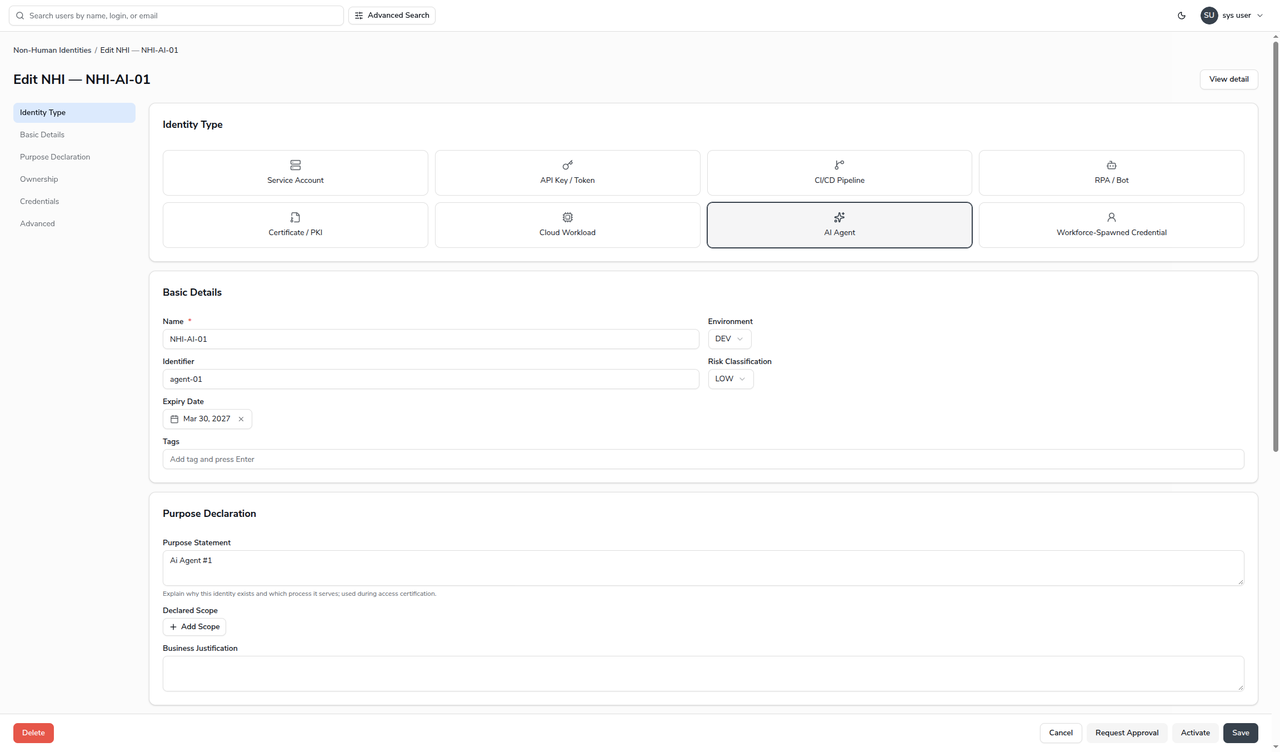
Under **Identity Type**, choose one of the eight tiles. The type decides which extra fields appear later, so choose it first.
{% endstep %}
{% step %}
Fill in **Basic Details** — at minimum a **Name**. Set the **Environment**, **Risk Classification** and **Expiry Date** now; they drive what activation will later require.
{% endstep %}
{% step %}
Under **Purpose Declaration**, write a plain-language **Purpose Statement**, and — where you can — add one or more **Declared Scope** entries. A scope entry is machine-readable and later feeds drift detection; a purpose with no structured scope costs the identity health points.
{% endstep %}
{% step %}
Under **Ownership**, set the **Owner**. Add a **Backup Owner** for anything in production or classified High or Critical.
{% endstep %}
{% step %}
Fill any **type-specific** fields the form now shows (see the table below), add credentials under **Credentials** if the identity has any to record, and choose **Save**. The record is created as a **Draft**.
{% endstep %}
{% endstepper %}
### The fields
| Field | Description |
| ---------------------- | ------------------------------------------------------------------------------------------------------------------------------------------------------------------------------------------------------------------------------------------------------------------------------------------------------------------------------------------- |
| Identity Type | Service Account, API Key / Token, CI/CD Pipeline, RPA / Bot, Certificate / PKI, Cloud Workload, AI Agent, or Workforce-Spawned Credential. |
| Name | The display name. Required. |
| Environment | Dev, Test, Staging or Prod. A Prod identity requires a backup owner to activate. |
| Identifier | The technical identifier — login, client id, or certificate fingerprint. |
| Risk Classification | Low, Medium, High or Critical. High or Critical requires a backup owner to activate. |
| Expiry Date | When the identity expires. Required before activation; enforced by governance. |
| Tags | Free-form labels for grouping and search. |
| Purpose Statement | Why the identity exists and which process it serves; shown during certification. |
| Declared Scope | Machine-readable entries — a resource type paired with an access right — describing what the identity may touch. An AI Agent's declared MCP tools are entries of type `MCP_TOOL`, which this form's type list does not offer, so they show here with an empty type: leave them as they are, and change declared tools on the **Agent** tab. |
| Business Justification | The business reason, for audit and review. |
| Owner | The accountable human. Required before activation. |
| Backup Owner | A second accountable human. Required for Prod, High or Critical. |
### Type-specific fields
Choosing a type reveals extra fields:
| Type | Extra fields |
| ---------------------------- | --------------------------------------------------------------------------------------------------------------------------------------------------------------------------------------- |
| AI Agent | **AI Agent Sponsor** (required accountable human), Invoking System, Task Scope. From 2026.10.2 the bound MCP client and the declared tools, on the **Agent** tab of the saved identity. |
| Workforce-Spawned Credential | **Originating Human** (required accountable human), and the credential's context. |
| Cloud Workload | Cloud Provider, Cloud Account, Cloud Role. |
Any type can also carry free-form **Custom Metadata** key/value pairs under the type-specific section.
## Verification
After **Save**, the identity appears in the inventory with a **Draft** badge, and its detail page shows the values you entered plus a health score. Because a Draft is not yet governed by an expiry or activation, its health score reflects what is still missing — for example, a purpose with no machine-readable scope shows a small penalty on the **Purpose** dimension.
## When it goes wrong
| Symptom | Likely cause |
| --------------------------------------------------------------------------------------------------------------- | ---------------------------------------------------------------------------------------------------------------------------------------------------------------------------------------------------------------------------- |
| **Save** is refused with an access error. | An [access policy](/administration-guide/nhi/access-policies.md) denies you the create or update action. |
| **Activate** or **Request Approval** reports that owner, expiry, a related human or a backup owner is required. | The activation invariants are not met — see [Lifecycle and status](/administration-guide/nhi/lifecycle.md#activation-requirements). Saving as a Draft is always allowed; those rules apply only when the identity goes live. |
## Related
* [Lifecycle and status](/administration-guide/nhi/lifecycle.md) — how a Draft becomes Active.
* [Request and approve registration](/administration-guide/nhi/request-and-approval.md) — sending the Draft for approval.
* [Browse the inventory](/administration-guide/nhi/inventory.md) — find the record you just created.
* [Govern AI agents as non-human identities](/administration-guide/federation/mcp-server/mcp-agents.md) — registering an agent that uses the MCP server.
---
# Agent Instructions
This documentation is published with GitBook. GitBook is the documentation platform designed so that both humans and AI agents can read, navigate, and reason over technical content effectively. Learn more at gitbook.com.
## Querying This Documentation
If you need additional information that is not directly available in this page, you can query the documentation by asking a question.
Perform an HTTP GET request on the following URL with the `ask` and `goal` query parameters:
```
GET https://docs.openiam.com/administration-guide/nhi/register-an-nhi.md?ask=&goal=
```
`ask` is the immediate question: it should be specific, self-contained, and written in natural language.
`goal` is what the user is ultimately trying to achieve, the reason they need the answer. Sharing it helps GitBook give you a better, more relevant answer. A goal is most helpful when it describes the outcome the user wants rather than restating the question. For example, with `ask=how do I create an API token`, a goal like `automate deployments from our CI pipeline` lets GitBook tailor the answer to that use case.
The response will contain a direct answer to the question and relevant excerpts and sources from the documentation.
Use this mechanism when the answer is not explicitly present in the current page, you need clarification or additional context, or you want to retrieve related documentation sections.