> For the complete documentation index, see [llms.txt](https://docs.openiam.com/llms.txt). Markdown versions of documentation pages are available by appending `.md` to page URLs; this page is available as [Markdown](https://docs.openiam.com/administration-guide/nhi/lifecycle.md).
# Lifecycle and status
The five statuses a non-human identity moves through — Draft, Pending Approval, Active, Suspended, Decommissioned — the transitions allowed between them, and what an identity must have before it can g
## What this is, and when you need it
Every non-human identity (NHI) has a **status**, and it may only move between statuses along a fixed set of transitions. This page explains the five statuses, which moves are allowed, what a record must have before it can go **Active**, and where you drive each transition. Read it before activating, suspending or decommissioning an identity, or when a transition you expected is refused.
## The five statuses
| Status | Meaning |
| ---------------- | -------------------------------------------------------------------------------------------------------- |
| Draft | Newly registered or edited; not governed and not usable. The only status you can freely edit and delete. |
| Pending Approval | Submitted for approval and waiting on an approver's decision. |
| Active | Live and governed. Subject to expiry, health scoring and certification. |
| Suspended | Temporarily disabled — by an administrator, or automatically when it expires. Can be activated again. |
| Decommissioned | Retired permanently. A terminal status: nothing moves out of it. |
## Allowed transitions
An identity moves only along these paths; any other move is refused.
| From | May move to | How |
| ---------------- | ---------------- | ------------------------------------------------------------------------------------------------------------------------------------ |
| Draft | Pending Approval | **Request Approval** — starts the [approval workflow](/administration-guide/nhi/request-and-approval.md). |
| Draft | Active | **Activate** — direct activation, for administrators who hold the activation right. |
| Pending Approval | Active | An approver **approves** the request (or an activation right holder activates directly). |
| Pending Approval | Draft | An approver **rejects** the request. |
| Active | Suspended | **Suspend**, automatic suspension at expiry, or, for an AI Agent, automatic suspension when its sponsor is no longer an active user. |
| Active | Decommissioned | **Decommission**. |
| Suspended | Active | **Activate**. |
| Suspended | Decommissioned | **Decommission**. |
| Decommissioned | — | Terminal; no transitions. |
{% hint style="info" %}
**Draft** and **Pending Approval** are only ever reached through registration and the approval flow — you cannot jump an identity straight into them. Direct status changes drive only Active, Suspended and Decommissioned.
{% endhint %}
## Activation requirements
Whenever an identity moves to **Active** — whether directly, or when an approval is granted — it must satisfy these invariants. The same checks run up front when you **Request Approval**, so a request can never be approved and then fail to activate.
| Requirement | Applies to |
| ------------------------------------------------------------------------------------------------------------------------------------------------------------------------- | --------------------------------------------------------------------------------- |
| An **owner** is set. | Every identity, always. |
| An **expiry date** is set. | Every identity, always. |
| A **related human** is set — the AI agent's sponsor or the workforce-spawned credential's originating human. | AI Agent and Workforce-Spawned Credential types. |
| A **backup owner** is set. | Any identity in the **Prod** environment, or classified **High** or **Critical**. |
| A **service user** exists, created when the client was bound — see [Govern AI agents as non-human identities](/administration-guide/federation/mcp-server/mcp-agents.md). | An AI Agent bound to an OAuth client on the client-credentials flow (2026.10.2). |
{% hint style="warning" %}
Saving a **Draft** never triggers these checks — you can save an incomplete record and finish it later. The invariants apply only at the moment the identity goes live. If **Activate** or **Request Approval** reports a missing owner, expiry, related human or backup owner, fill it in and try again.
{% endhint %}
An identity adopted from before the module existed can carry a **legacy** flag, which exempts it from the related-human and backup-owner rules (owner and expiry are still required) so that migrating an estate does not demand a full metadata backfill up front.
## Drive a transition
A Draft, or an identity waiting for approval, moves on the **edit form**. Open an identity and choose **Edit**; the footer offers the moves that are legal from its current status:
* **Save** — persist edits without changing status.
* **Request Approval** — Draft → Pending Approval (see [Request and approve registration](/administration-guide/nhi/request-and-approval.md)).
* **Activate** — Draft, Pending Approval or Suspended → Active. This button appears only when you hold the activation right; the server stays authoritative even if it is shown.
A live identity moves from the header of its **detail** page: **Suspend** and **Decommission** on an Active identity, **Activate** and **Decommission** on a Suspended one. These buttons act at once, with no confirmation, and each move is recorded as a `SUSPENDED`, `ACTIVATED` or `DECOMMISSIONED` lifecycle event. A decommission cannot be undone. For an AI Agent bound to an MCP client, the **Agent** tab also offers **Suspend agent**, which asks for confirmation first.
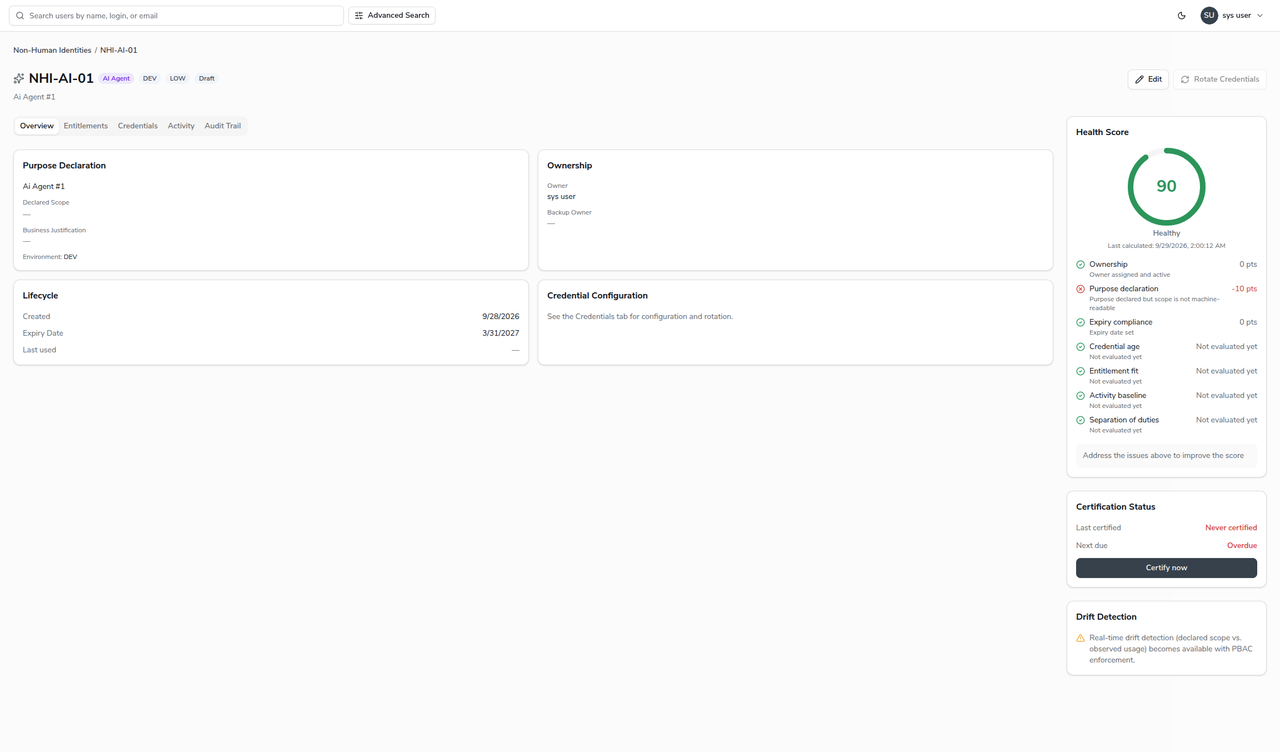
The **detail** page also shows the current status, the health breakdown, and the full history:
## What a status change does to an MCP agent
For an AI Agent identity bound to the OAuth client of an assistant or agent that uses the MCP server, described in [Govern AI agents as non-human identities](/administration-guide/federation/mcp-server/mcp-agents.md), the transitions above reach beyond the record from 2026.10.2:
| Transition | What also happens |
| ----------------------- | ----------------------------------------------------------------------------------------------------------------------------------------------------------------------------------------------------------------------------------------------------------------------------------------------------------------------------------------------------------------------------------------- |
| Active → Suspended | Every token of the bound client is revoked, the identity's service user is disabled where it has one, and the identity provider refuses new tokens and sign-ins for the client. The MCP server refuses the client within 60 seconds. Each step is a lifecycle event, `TOKENS_REVOKED`, `TOKEN_REVOKE_FAILED` or `SERVICE_USER_UPDATE_FAILED`; a failed step is reported, not rolled back. |
| → Decommissioned | The same, the service user is deleted, and the binding is cleared so the client can be deleted. |
| Suspended → Active | The service user is re-enabled. Revoked tokens are not restored: an agent signs in again, a person consents again. |
| Draft, Pending Approval | The identity provider refuses the client's token requests and sign-ins, and the MCP server refuses any token it holds, until the identity is Active. |
An AI Agent whose sponsor has left is suspended by the orphaned-sponsor governance job, with a `SUSPENDED` lifecycle event whose comment reads `Auto-suspended: sponsor inactive`; set a new sponsor before you **Activate** it, or activation fails the related-human requirement above.
## Delete an identity
Only a **Draft** or a **Decommissioned** identity can be deleted. An Active, Suspended or Pending identity must first be decommissioned — deletion is refused otherwise, so that a live identity's history is never lost. Retiring a governed identity by decommissioning it (rather than deleting it) preserves its audit trail.
## When it goes wrong
| Symptom | Likely cause |
| ------------------------------------------ | ---------------------------------------------------------------------------------------------------------------------------------------------------------------------- |
| A transition is refused as not allowed. | The move is not on the table above — for example Active → Draft, or anything out of Decommissioned. |
| **Activate** is missing on the edit form. | You do not hold the activation right; ask an approver to approve the request instead, or see [Access policies for NHIs](/administration-guide/nhi/access-policies.md). |
| Activation is refused for a missing field. | An [activation invariant](#activation-requirements) is unmet — owner, expiry, related human, or backup owner. |
| A delete is refused. | The identity is Active, Suspended or Pending. Decommission it first. |
## Related
* [Request and approve registration](/administration-guide/nhi/request-and-approval.md) — the Draft → Pending → Active path.
* [Register a non-human identity](/administration-guide/nhi/register-an-nhi.md) — where the required fields are set.
* [Health and governance](/administration-guide/nhi/governance.md) — automatic suspension at expiry.
* [Govern AI agents as non-human identities](/administration-guide/federation/mcp-server/mcp-agents.md) — the kill switch for an agent that uses the MCP server.
---
# Agent Instructions
This documentation is published with GitBook. GitBook is the documentation platform designed so that both humans and AI agents can read, navigate, and reason over technical content effectively. Learn more at gitbook.com.
## Querying This Documentation
If you need additional information that is not directly available in this page, you can query the documentation by asking a question.
Perform an HTTP GET request on the following URL with the `ask` and `goal` query parameters:
```
GET https://docs.openiam.com/administration-guide/nhi/lifecycle.md?ask=&goal=
```
`ask` is the immediate question: it should be specific, self-contained, and written in natural language.
`goal` is what the user is ultimately trying to achieve, the reason they need the answer. Sharing it helps GitBook give you a better, more relevant answer. A goal is most helpful when it describes the outcome the user wants rather than restating the question. For example, with `ask=how do I create an API token`, a goal like `automate deployments from our CI pipeline` lets GitBook tailor the answer to that use case.
The response will contain a direct answer to the question and relevant excerpts and sources from the documentation.
Use this mechanism when the answer is not explicitly present in the current page, you need clarification or additional context, or you want to retrieve related documentation sections.