> For the complete documentation index, see [llms.txt](https://docs.openiam.com/llms.txt). Markdown versions of documentation pages are available by appending `.md` to page URLs; this page is available as [Markdown](https://docs.openiam.com/administration-guide/nhi/governance.md).
# Health and governance
How a non-human identity's health score is calculated, what the scheduled governance jobs do — auto-suspend at expiry, dormancy and expiry warnings, critical-health alerts — and where to read an ident
## What this is, and when you need it
Once a non-human identity (NHI) is Active, OpenIAM governs it without anyone having to watch it: it scores the identity's **health**, warns owners as expiry approaches, suspends identities that have expired, and flags ones that have gone quiet or turned critical. This page explains the health score, what each scheduled job does, and where the history lives. Read it to interpret a health score, or to know what will happen to an identity you leave alone.
## The health score
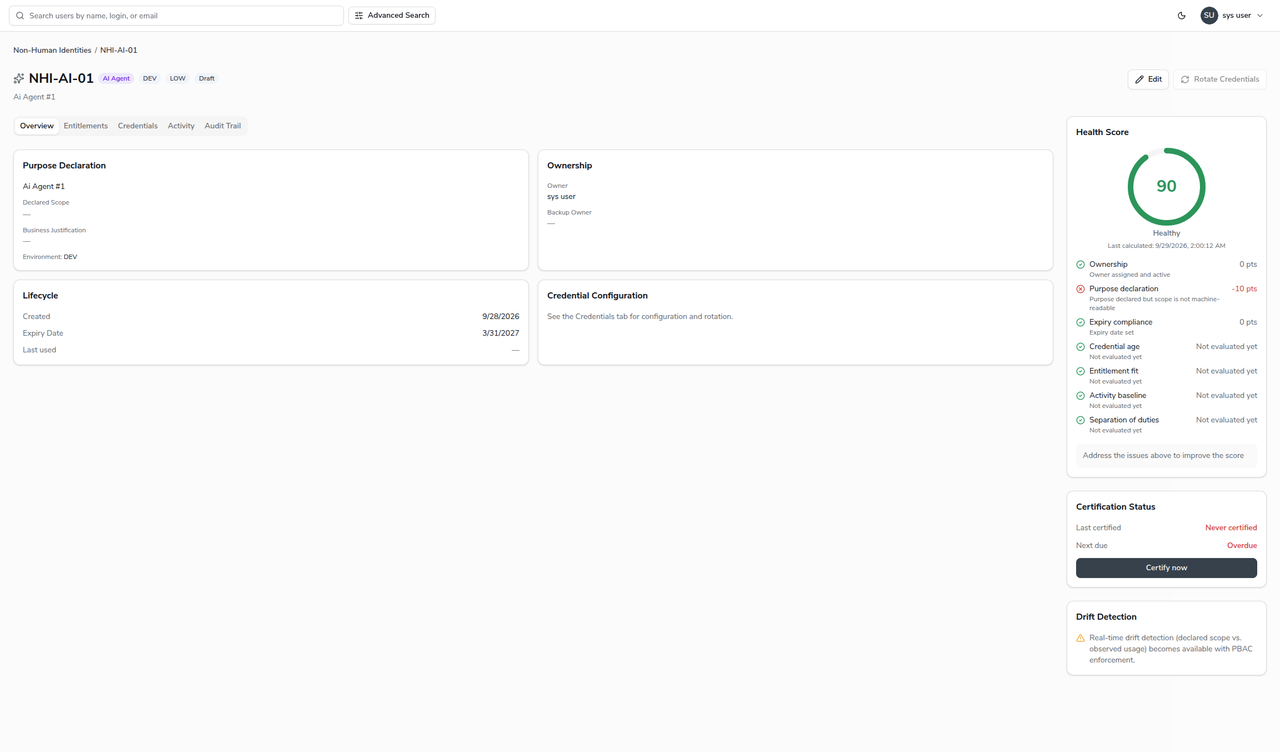
Every identity carries a **health score** from 0 to 100, recomputed whenever the identity is saved, changes status or is bound to an OAuth client, and again nightly. A drift finding raised or resolved by the tool-drift job changes the score only at the next rescore. The score starts at 100 and subtracts penalties, then falls into a band:
| Band | Score |
| -------- | ------------ |
| Healthy | 85 and above |
| At Risk | 60 to 84 |
| Critical | below 60 |
The score rolls up eight dimensions, shown broken out on the detail page:
| Dimension | What it checks |
| -------------------- | ----------------------------------------------------------------------------------------------------------------------------------------------------------------------------------------------------------------------------------------------------------------------------------------------------- |
| Ownership | An owner is set and active; a backup owner where one is required. |
| Purpose | A purpose is declared, and — for full marks — its scope is machine-readable. |
| Expiry | An expiry date is set and not imminent. |
| Credential age | How long since the credential was last rotated. Not scored until a credential has been rotated at least once. |
| Activity | How long since the identity was last used. Not scored until usage is recorded. |
| Entitlement fit | Whether granted access matches declared scope. From 2026.10.2 evaluated for an AI Agent bound to an MCP client: 5 points per open drift finding, at most 20. Not evaluated for other types yet. |
| Denial rate | For an AI Agent bound to an MCP client, from 2026.10.2: 10 points when more than a fifth of its tool calls over the drift window were refused by a policy. An agent that is refused often is misconfigured or probing. Not evaluated until the agent has made a call, and not scored for other types. |
| Separation of duties | Conflicting-access checks for NHIs. Not evaluated yet. |
{% hint style="info" %}
A dimension marked **not evaluated** contributes no penalty — it is neutral, not a failure. Credential age and activity begin scoring once there is rotation or usage data; entitlement fit and denial rate score only an AI Agent bound to an MCP client; separation of duties is reserved for a later stage and is always neutral today.
{% endhint %}
## What the scheduled jobs do
The governance jobs run on a schedule across the whole inventory:
| Job | What it does |
| ------------------------------------ | -------------------------------------------------------------------------------------------------------------------------------------------------------------------------------------------------------------------------------------------------------------------------------------------------------------------------------------------------------------------------------------------------------------------------------------------------------------------------------------------------------------------------------------------------------------------------------------------------------------------------------------------------------------------------- |
| Auto-suspend at expiry | Moves any Active identity whose expiry date has passed to **Suspended**. This is the enforcement behind the expiry date — it is why every activated identity must have one. |
| Expiry warnings | Emails the owner at 30, 14 and 7 days before expiry, so it can be renewed before it is suspended. |
| Dormancy warnings | Emails the owner when an Active identity has gone unused for 90 days. A warning only — the identity is not changed. |
| Health rescore and critical alert | Rescoring the whole fleet nightly, and emailing the owner once when an identity first drops into the Critical band (re-armed if it recovers and falls again). |
| Declared-scope drift | Compares declared scope against observed usage. |
| Tool drift (`TOOL_DRIFT`) | From 2026.10.2, for an AI Agent bound to an MCP client: compares the tools the agent declared with the tools it called over the last 30 days (`org.openiam.nhi.drift.window.days`). A tool used but not declared is a drift finding, and a tool declared but not used for 90 days (`org.openiam.nhi.drift.unused.days`) a hygiene finding. Findings reach the owner by the `NHI_SCOPE_DRIFT` mail and the identity's **Drift Detection** panel — see [Drift findings and health](/administration-guide/federation/mcp-server/mcp-agents.md#drift-findings-and-health). The record of a Claude client declares no tools, so every tool people call through it is a finding. |
| Orphaned sponsor (`ORPHANED_AGENTS`) | From 2026.10.2: suspends every AI Agent whose sponsor is no longer an active user, records a `SUSPENDED` lifecycle event with the comment `Auto-suspended: sponsor inactive`, and mails the owner on the `NHI_SPONSOR_INACTIVE` template. For an agent bound to an MCP client the suspension also revokes the client's tokens. |
{% hint style="warning" %}
**The two 2026.10.2 jobs ship without a batch task.** `TOOL_DRIFT` and `ORPHANED_AGENTS` run only once you schedule them, or when an administrator runs one on demand, as described in [Schedule the jobs](/administration-guide/federation/mcp-server/mcp-agents.md#schedule-the-jobs); the other jobs in this table are seeded. The same on-demand call with `job=HEALTH` runs the rescore.
{% endhint %}
Auto-suspend and the rescore run as the system, so they are not blocked by the [access policies](/administration-guide/nhi/access-policies.md) that gate interactive actions.
{% hint style="warning" %}
The warning and alert emails depend on mail templates being seeded in the environment — `NHI_EXPIRY_WARNING`, `NHI_DORMANCY_WARNING`, `NHI_CRITICAL_HEALTH_ALERT`, `NHI_SCOPE_DRIFT` and, for the orphaned-sponsor job, `NHI_SPONSOR_INACTIVE`, which 2026.10.2 does not seed — on a working mail server, and on the owner having an e-mail address. The status changes (auto-suspend) happen regardless of email.
{% endhint %}
## Read the audit trail
Every governed change is recorded. Open an identity and choose the **Audit Trail** tab to see its history — creation, approval requested/approved/rejected, activation, suspension, owner changes, credential rotations and re-scopes — each with its actor and timestamp. This is the record a certification or an investigation reads. Retiring an identity by **decommissioning** it (rather than deleting it) keeps this trail intact.
## When it goes wrong
| Symptom | Likely cause |
| --------------------------------------------------------------------------- | -------------------------------------------------------------------------------------------------------------------------------------------------------------------------------------------------------- |
| An Active identity became Suspended on its own. | It reached its expiry date and auto-suspend moved it. Renew the expiry and activate it again. For an AI Agent, the orphaned-sponsor job may have suspended it: the lifecycle event's comment says which. |
| A health score is lower than expected. | Read the per-dimension breakdown on the detail page — a missing backup owner, a non-machine-readable scope, or an imminent expiry each cost points. |
| A health score did not change after a drift finding was raised or resolved. | The tool-drift job does not rescore. The score follows at the nightly rescore, or at once when an administrator runs it on demand. |
| A dimension shows "not evaluated". | It is neutral — either it needs data (a credential rotation, a usage record) or it is reserved for a later stage. |
| Warning emails never arrive. | The governance mail templates are not seeded, the mail server is not configured, or the owner has no e-mail address. The status changes still happen. |
## Related
* [Lifecycle and status](/administration-guide/nhi/lifecycle.md) — the statuses these jobs drive.
* [Register a non-human identity](/administration-guide/nhi/register-an-nhi.md) — where owner, expiry and scope are set.
* [Access policies for NHIs](/administration-guide/nhi/access-policies.md) — why system jobs are not gated.
* [Govern AI agents as non-human identities](/administration-guide/federation/mcp-server/mcp-agents.md) — usage, drift findings and health for an agent that uses the MCP server.
---
# Agent Instructions
This documentation is published with GitBook. GitBook is the documentation platform designed so that both humans and AI agents can read, navigate, and reason over technical content effectively. Learn more at gitbook.com.
## Querying This Documentation
If you need additional information that is not directly available in this page, you can query the documentation by asking a question.
Perform an HTTP GET request on the following URL with the `ask` and `goal` query parameters:
```
GET https://docs.openiam.com/administration-guide/nhi/governance.md?ask=&goal=
```
`ask` is the immediate question: it should be specific, self-contained, and written in natural language.
`goal` is what the user is ultimately trying to achieve, the reason they need the answer. Sharing it helps GitBook give you a better, more relevant answer. A goal is most helpful when it describes the outcome the user wants rather than restating the question. For example, with `ask=how do I create an API token`, a goal like `automate deployments from our CI pipeline` lets GitBook tailor the answer to that use case.
The response will contain a direct answer to the question and relevant excerpts and sources from the documentation.
Use this mechanism when the answer is not explicitly present in the current page, you need clarification or additional context, or you want to retrieve related documentation sections.