> For the complete documentation index, see [llms.txt](https://docs.openiam.com/llms.txt). Markdown versions of documentation pages are available by appending `.md` to page URLs; this page is available as [Markdown](https://docs.openiam.com/administration-guide/nhi/approver-routing.md).
# Configure approver routing
Decide who approves a non-human identity registration, by environment and type — add, edit and delete approver routes, and set the default that catches everything else.
## What this is, and when you need it
**Approver routing** decides who reviews a non-human identity (NHI) registration when it is [sent for approval](/administration-guide/nhi/request-and-approval.md). A route maps an **environment** and an **NHI type** to an approver — a user, a group or a role — so that, for example, every production identity goes to a security manager while development identities go to a team lead. Use this screen to set those routes up and keep them current.
Reach it from **Webconsole → Non-Human Identities → Inventory → Approver Routing** (`/webconsole-v2/nhi/approver-routes`). There is no permanent menu item — the **Approver Routing** button on the inventory is the way in.
## Before you begin
* You are signed in with the right to administer approver associations.
* You know which environment/type combinations need their own approver, and who the approver is. Anything without a specific route falls through to the default.
## How a route is chosen
When a request is submitted, the workflow reads the identity's environment and type and looks for the **most specific** route that matches, falling back through less specific ones. It uses the first route it finds, in this order:
| Order | Route matches | Example key |
| ----- | --------------------------------------- | --------------- |
| 1 | The exact environment **and** type | `PROD:AI_AGENT` |
| 2 | The environment, any type | `PROD:*` |
| 3 | The type, any environment | `*:AI_AGENT` |
| 4 | The default — any environment, any type | `*:*` |
So a specific `PROD:AI_AGENT` route beats a `PROD:*` route, which beats the `*:*` default. Set **Any** for environment or type to build the wildcard rows.
{% hint style="warning" %}
Keep a default route (**Any / Any**) in place. With no matching route and no default, a submitted request has no approver and **auto-approves** — the identity activates with no review.
{% endhint %}
## Manage routes
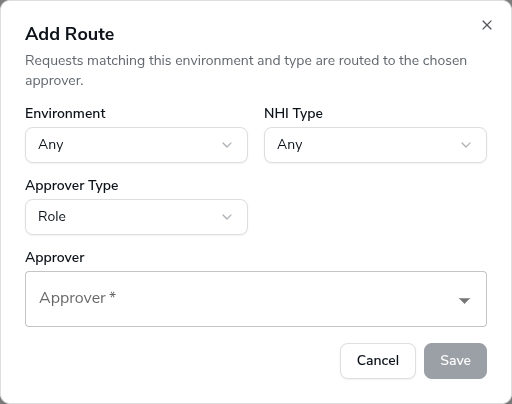
The table lists every route, with **Edit** and **Delete** on each row. To add one, choose **Add Route**.
{% stepper %}
{% step %}
Choose **Add Route**.
{% endstep %}
{% step %}
Set **Environment** and **NHI Type** — pick a specific value, or **Any** for a wildcard.
{% endstep %}
{% step %}
Choose an **Approver Type** — **User**, **Group** or **Role** — then pick the **Approver**. The picker searches the directory for the type you chose.
{% endstep %}
{% step %}
Choose **Save**. The new route appears in the table and takes effect on the next request submitted.
{% endstep %}
{% endstepper %}
| Field | Description |
| ------------- | --------------------------------------------------------------------------------------------------------- |
| Environment | Dev, Test, Staging, Prod, or **Any**. |
| NHI Type | One of the eight types, or **Any**. |
| Approver Type | Whether the approver is a User, a Group or a Role. |
| Approver | The specific user, group or role. A group or role is expanded to its members when a request is submitted. |
To change the default, edit the **Any / Any** row and pick a different approver. To route a combination somewhere new, add a more specific row rather than editing the default.
## Verification
Submit a test registration for the environment and type you routed, then open the resulting task's **Approvers** list (or check who was emailed): the approver should be the one your most-specific matching route names. See [Request and approve registration](/administration-guide/nhi/request-and-approval.md#verification).
## When it goes wrong
| Symptom | Likely cause |
| --------------------------------------- | -------------------------------------------------------------------------------------------------------------------------------- |
| A request went to the wrong approver. | A more specific route matched than you expected — check for an `ENV:TYPE` or `ENV:*` row that outranks the one you meant to use. |
| A request auto-approved with no review. | No route matched and no default exists. Add an **Any / Any** route. |
| The approver picker returns nobody. | The Approver Type and the directory disagree — confirm the user, group or role exists for the type you chose. |
## Related
* [Request and approve registration](/administration-guide/nhi/request-and-approval.md) — how a route is used at submission time.
* [Access policies for NHIs](/administration-guide/nhi/access-policies.md) — the separate control over who may request or activate.
---
# Agent Instructions
This documentation is published with GitBook. GitBook is the documentation platform designed so that both humans and AI agents can read, navigate, and reason over technical content effectively. Learn more at gitbook.com.
## Querying This Documentation
If you need additional information that is not directly available in this page, you can query the documentation by asking a question.
Perform an HTTP GET request on the following URL with the `ask` and `goal` query parameters:
```
GET https://docs.openiam.com/administration-guide/nhi/approver-routing.md?ask=&goal=
```
`ask` is the immediate question: it should be specific, self-contained, and written in natural language.
`goal` is what the user is ultimately trying to achieve, the reason they need the answer. Sharing it helps GitBook give you a better, more relevant answer. A goal is most helpful when it describes the outcome the user wants rather than restating the question. For example, with `ask=how do I create an API token`, a goal like `automate deployments from our CI pipeline` lets GitBook tailor the answer to that use case.
The response will contain a direct answer to the question and relevant excerpts and sources from the documentation.
Use this mechanism when the answer is not explicitly present in the current page, you need clarification or additional context, or you want to retrieve related documentation sections.