> For the complete documentation index, see [llms.txt](https://docs.openiam.com/llms.txt). Markdown versions of documentation pages are available by appending `.md` to page URLs; this page is available as [Markdown](https://docs.openiam.com/administration-guide/nhi.md).
# Manage non-human identities
Manage non-human identities — service accounts, API keys, bots, cloud workloads and AI agents — in one governed inventory: register them, give each a human owner and an expiry, take them through an ap
## What this is, and when you need it
A **non-human identity (NHI)** is any account that authenticates without a person behind the keyboard — a service account, an application programming interface (API) key or token, a continuous-integration/continuous-delivery (CI/CD) pipeline credential, a robotic-process-automation (RPA) bot, a machine certificate, a cloud workload, or an artificial-intelligence (AI) agent. Most estates hold far more of these than anyone expects, and they are the one population with no natural end condition: nobody onboards or offboards them, so they accumulate, outlive their owners, and keep their access forever.
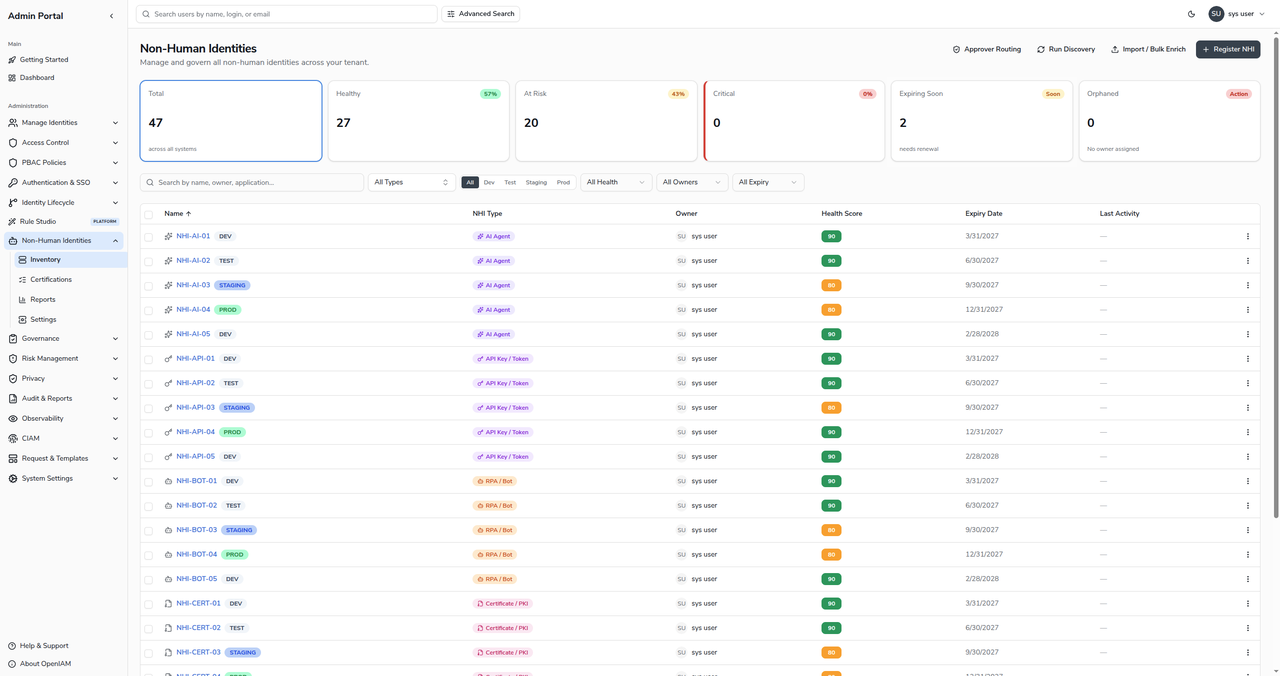
The **Non-Human Identities** module gives every one of them the same governance a person's account gets: a single inventory, a named human owner, a declared purpose, an expiry date, a health score, an approval workflow before it goes live, and an audit trail. This guide is for the administrator or identity-and-access-management (IAM) engineer who registers non-human identities, decides who approves them, and keeps the inventory healthy.
If you are looking after a *person's* account — an employee, contractor or partner — you are in the wrong place; see [Manage identities](/administration-guide/identities.md) instead. If you only need to let a workload sign in to a connected application, that is provisioning, not NHI governance — see [Connect applications and automate lifecycle](/administration-guide/lifecycle.md).
{% hint style="info" %}
The module is a redesigned area of the Webconsole. Reach it at **Webconsole → Non-Human Identities → Inventory**, or directly at `/webconsole-v2/nhi/inventory`.
{% endhint %}
## Choose your outcome
| I want to… | Go to |
| ---------------------------------------------------------------------------------------------------- | ----------------------------------------------------------------------------------------------------- |
| Browse, search and filter every non-human identity in the tenant | [Browse the inventory](/administration-guide/nhi/inventory.md) |
| Register a new non-human identity and describe what it is for | [Register a non-human identity](/administration-guide/nhi/register-an-nhi.md) |
| Understand the statuses an NHI moves through, and what activation requires | [Lifecycle and status](/administration-guide/nhi/lifecycle.md) |
| Send an NHI for approval, and approve or reject a request | [Request and approve registration](/administration-guide/nhi/request-and-approval.md) |
| Decide who approves NHIs, by environment and type | [Configure approver routing](/administration-guide/nhi/approver-routing.md) |
| Load or enrich many non-human identities from a file | [Synchronize from a data source](/administration-guide/nhi/csv-synchronization.md) |
| Control who may register, activate or change an NHI | [Access policies for NHIs](/administration-guide/nhi/access-policies.md) |
| Read the health score, watch for drift, and let expiry govern itself | [Health and governance](/administration-guide/nhi/governance.md) |
| Give an AI assistant or agent that uses the MCP server its record, declare its tools, and suspend it | [Govern AI agents as non-human identities](/administration-guide/federation/mcp-server/mcp-agents.md) |
## The model
Every non-human identity carries the same core record, whatever its kind:
* **A type.** One of eight: service account, API key / token, CI/CD pipeline, RPA / bot, certificate / public-key infrastructure (PKI), cloud workload, AI agent, or workforce-spawned credential. The type decides which extra fields the record asks for — an AI agent names its sponsor, a cloud workload names its provider and account. From 2026.10.2 an AI agent can be bound to the OAuth client of an assistant or agent that uses the MCP server, which makes the record that client's governed identity: see [Govern AI agents as non-human identities](/administration-guide/federation/mcp-server/mcp-agents.md).
* **A human owner.** Every NHI must name an accountable person before it can go live, and production or high-risk identities also name a backup owner. Ownership is what makes an NHI governable — it is who a certification asks, and who a warning email reaches.
* **A purpose and a declared scope.** A plain-language reason the identity exists, and — increasingly — a machine-readable list of what it is allowed to touch, which later feeds drift detection.
* **An expiry date.** Every active NHI has one. Expiry is enforced: an identity past its date is suspended automatically.
* **A status.** The record moves through a small state machine — Draft, Pending Approval, Active, Suspended, Decommissioned — described in [Lifecycle and status](/administration-guide/nhi/lifecycle.md).
* **A health score.** A 0–100 score, recomputed on every change and nightly, that rolls up ownership, purpose, expiry, credential age and activity into one number and a Healthy / At Risk / Critical band.
## Related
* [Browse the inventory](/administration-guide/nhi/inventory.md) — the day-to-day landing page for the module.
* [Connect AI assistants through the MCP server](/administration-guide/federation/mcp-server.md) — connecting an AI assistant that acts for a signed-in person.
* [Govern AI agents as non-human identities](/administration-guide/federation/mcp-server/mcp-agents.md) — the AI Agent record every MCP client has, and agents that act on their own behalf through a service user.
* [One person, many accounts](/solution-architecture/identity/one-person-many-accounts.md) — where non-human identities sit among the tenant's populations.
* [Glossary](/glossary.md) — service account, machine identity, and related terms.
---
# Agent Instructions
This documentation is published with GitBook. GitBook is the documentation platform designed so that both humans and AI agents can read, navigate, and reason over technical content effectively. Learn more at gitbook.com.
## Querying This Documentation
If you need additional information that is not directly available in this page, you can query the documentation by asking a question.
Perform an HTTP GET request on the following URL with the `ask` and `goal` query parameters:
```
GET https://docs.openiam.com/administration-guide/nhi.md?ask=&goal=
```
`ask` is the immediate question: it should be specific, self-contained, and written in natural language.
`goal` is what the user is ultimately trying to achieve, the reason they need the answer. Sharing it helps GitBook give you a better, more relevant answer. A goal is most helpful when it describes the outcome the user wants rather than restating the question. For example, with `ask=how do I create an API token`, a goal like `automate deployments from our CI pipeline` lets GitBook tailor the answer to that use case.
The response will contain a direct answer to the question and relevant excerpts and sources from the documentation.
Use this mechanism when the answer is not explicitly present in the current page, you need clarification or additional context, or you want to retrieve related documentation sections.