> For the complete documentation index, see [llms.txt](https://docs.openiam.com/llms.txt). Markdown versions of documentation pages are available by appending `.md` to page URLs; this page is available as [Markdown](https://docs.openiam.com/administration-guide/identities/page-templates-and-custom-fields.md).
# Build a page template
Build a page template so a screen captures the fields one population actually needs, bind it to the right URI pattern, and avoid the competing-template trap.
## What this is, and when you need it
The same user object is created and edited from several places. An administrator creates one at **User Admin → Create New User** and edits it from the user's record. A delegated administrator creates and edits one from **SelfService → Access Management → Manage User** and **SelfService → Access Management → New User**. A person edits their own details from the profile icon in SelfService. Self-registration builds one from a public page with nobody signed in at all.
It is a normal requirement for those screens to differ — by user type, by organization, or simply by audience. Faculty are captured with fields a contractor is never asked for. A delegated administrator in a subsidiary should see that subsidiary's fields, not the parent's. The SelfService profile screen should expose a much smaller set than an administrator's create screen, some of it read-only. The public registration form should expose less again.
Page templates get you those differences without a code change: a named field list with its own conditional rules, validation script and data model, bound to the URI patterns of the screens it should govern. Without them the alternatives are forking the product's user screens per audience and re-forking them at every upgrade, or shipping one maximal screen that asks everybody for everything and enforcing the differences by training. Templates replace both.
A **page template** decides which fields appear on a screen, in what order, and under what conditions; a **custom field** is a field definition templates can include. Templates attach to the product through **URI patterns**, not to routes directly, and that is the single most important thing here: a template applies to whatever paths it is bound to, and **a path can render only one template**.
## At a glance
| | |
| ------------------------ | ------------------------------------------------------------------------------------------------------------------------------- |
| **You will end up with** | A named template holding the fields one population needs, bound to one URI pattern, rendering on the real screen |
| **Where** | `/webconsole/pageTemplates` — **Administration → Page Template** |
| **You need first** | The template type, the URI pattern the screen resolves to, and every custom field already created |
| **Takes** | 30 minutes for a dozen fields; longer if fields have to be created first |
| **Reversible** | Yes — unbind the pattern and the previous rendering returns. Except narrowed valid values, which silently drop stored user data |
## Before you begin
* **The template type you are extending.** It decides which catalogue of built-in fields the template draws from, and a template saved without one fails with `TEMPLATE_TYPE_REQUIRED`.
* **Every custom field you need, already created** at `/webconsole/newCustomField` — a field that does not exist is not offered, and one never added to a template renders nowhere.
* **The URI pattern the target screen resolves to**, from **Access Control → Content Providers**. Installation already binds the shipped user template to a set of patterns, so you will usually be taking one away from it.
* **For a Groovy data model or validator**, a script already in Groovy Manager, so it has an ID.
## Worked example: a faculty user template
A university captures faculty differently from students and from contractors: a department, a faculty ID, a tenure status. This is the whole build, from an empty list to fields appearing on the create-user screen.
{% stepper %}
{% step %}
### Open Page Templates and start a new template
Select **Administration** from the top menu, then **Page Template**.
On the list screen choose **Create New Template** — `/webconsole/newPageTemplate`.
{% endstep %}
{% step %}
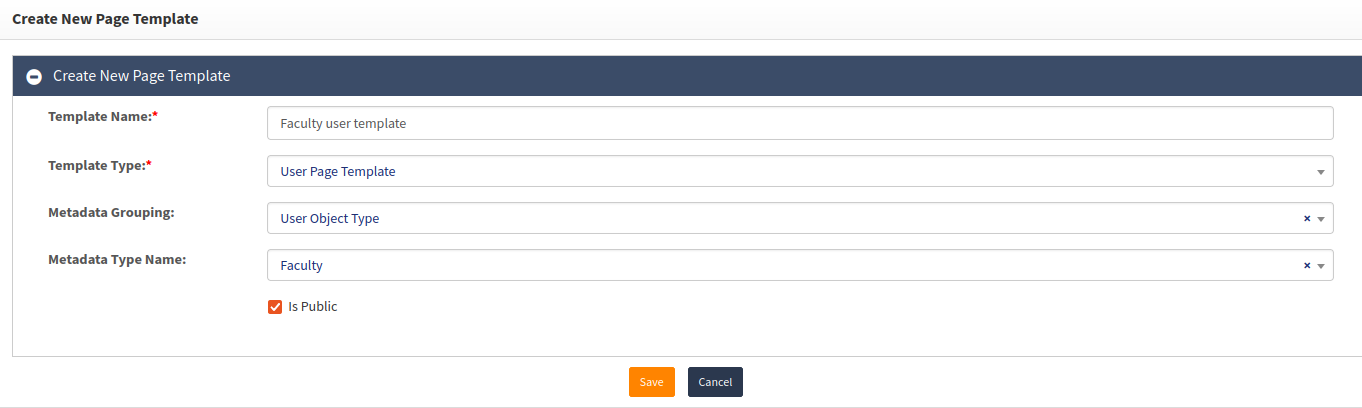
### Name it and choose the User Page Template type
* **Template Name** — the label you will see everywhere afterwards. Name it for the population it captures, not for the screen: `Faculty User Template`.
* **Template Type** — **User Page Template**. This is the `USER_TEMPLATE` row of `UI_TEMPLATE_TYPE`, and it decides which catalogue of built-in fields the template can draw from. Leave it unset and the save fails with `TEMPLATE_TYPE_REQUIRED`.
* **Metadata Grouping** and **Metadata Type Name** classify the template itself. On a 4.2.2.0 or later build, pick the grouping that holds the page template types and the **User page template type** entry in it — that is the `METADATA_TYPE_ID` described in [The four template types](/administration-guide/identities/page-templates-and-custom-fields/page-template-reference.md#the-four-template-types), a separate axis from **Template Type**.
Click **Save**. Saving creates the template *and* a `UI_TEMPLATE` resource named `Faculty User Template_`, which is what makes the template entitleable — search resources for that name if you want to see it.
{% endstep %}
{% step %}
### Add the fields
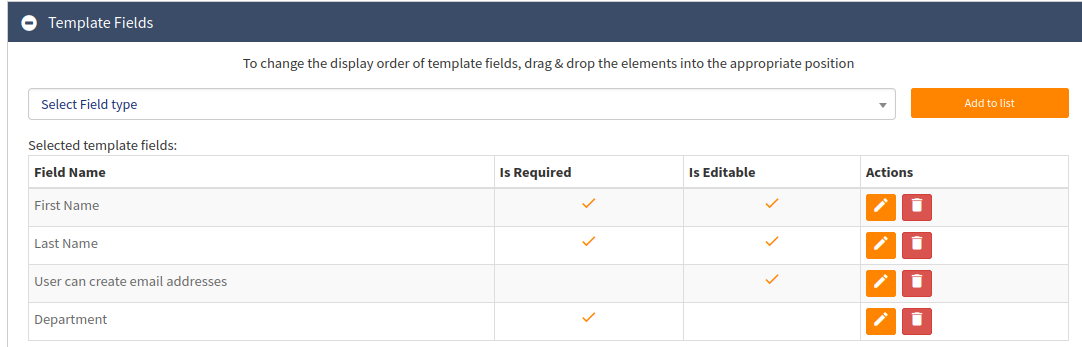
The **Template Fields** section is where the form is assembled.
From **Select Field Type**, choose a field and click **Add to list** to its right. Repeat for each field the faculty form needs, then **Save**. Only after that save do the fields appear on every screen bound to this template.
Fields you do not find in the drop-down do not exist yet — create them first as custom fields (`/webconsole/newCustomField`, see [Custom fields and their data model](/administration-guide/identities/page-templates-and-custom-fields/page-template-reference.md#custom-fields-and-their-data-model)), then come back and add them here. A custom field created but never added to a template renders nowhere.
{% endstep %}
{% step %}
### Make Department read-only through the Actions column
Faculty may see their department but not change it. In the **Actions** column of the Department row, click the pencil icon. In the dialog, click the plus sign to the right of **Actions**, and under **Rule** choose the action — **Deactivate** in a current build, labelled *Disable* in older ones, which is the `disable` action type and means "make this field read-only". Click the plus sign to the right of **Rule** to give the rule its condition, and the plus sign beside **Actions** again for a second rule on the same field.
Click **Save** to commit.
Two things to know before you get here. A rule is an *action plus a condition on another field*, so the rule editor does not render at all until the template holds at least one field besides this one — add the fields in the previous step first. And if the field should be read-only unconditionally, clear the field's own **Editable** flag rather than writing a rule that is always true. The full action list, the four operators and the stored JSON are in [Conditional rules](/administration-guide/identities/page-templates-and-custom-fields/page-template-reference.md#conditional-rules).
{% endstep %}
{% step %}
### Bind it to a URI pattern, then confirm on the real screen
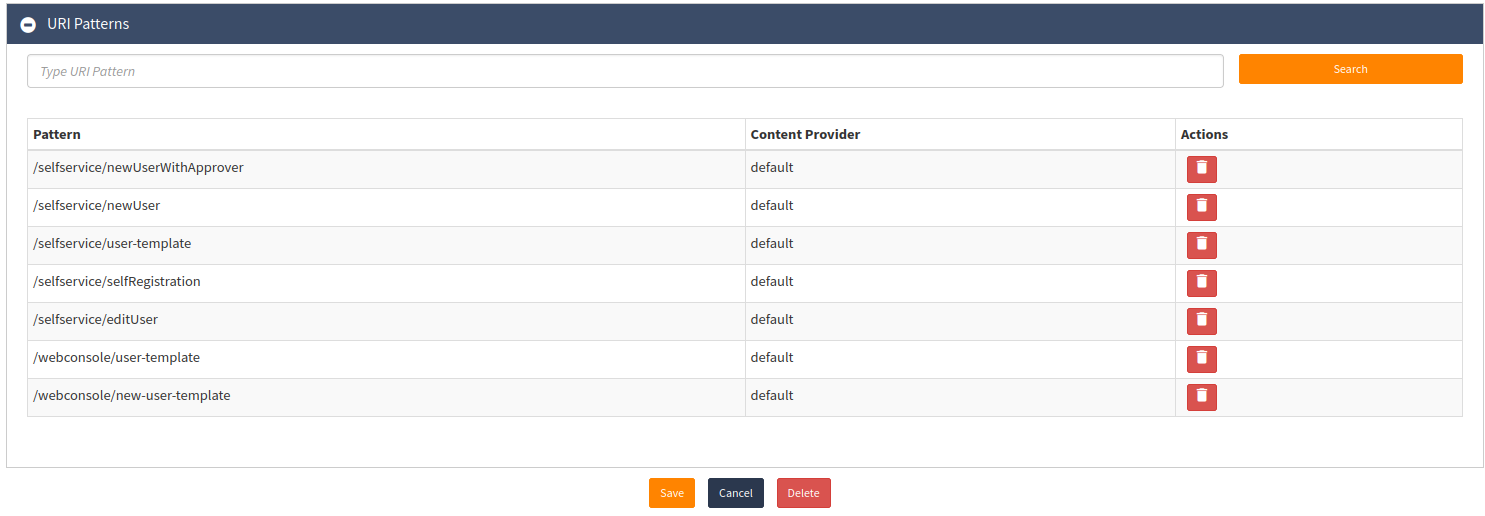
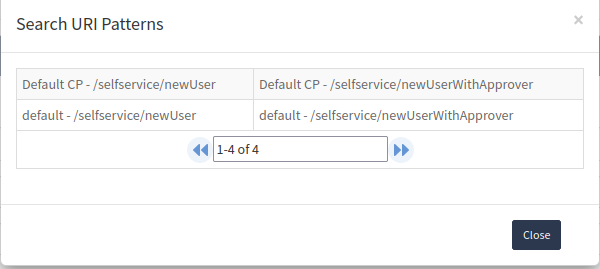
A template governs nothing until it is bound. In the **URI Patterns** section, type part of the pattern name into the text field and click **Search** on the right.
Choose the URI pattern you want this template to render on, and **Save**.
{% hint style="warning" %}
If the pattern is still bound to the shipped user template, unbind it there first. Two templates on one pattern is the single most common failure in this whole feature — see [Binding, and the competing-template trap](#binding-and-the-competing-template-trap).
{% endhint %}
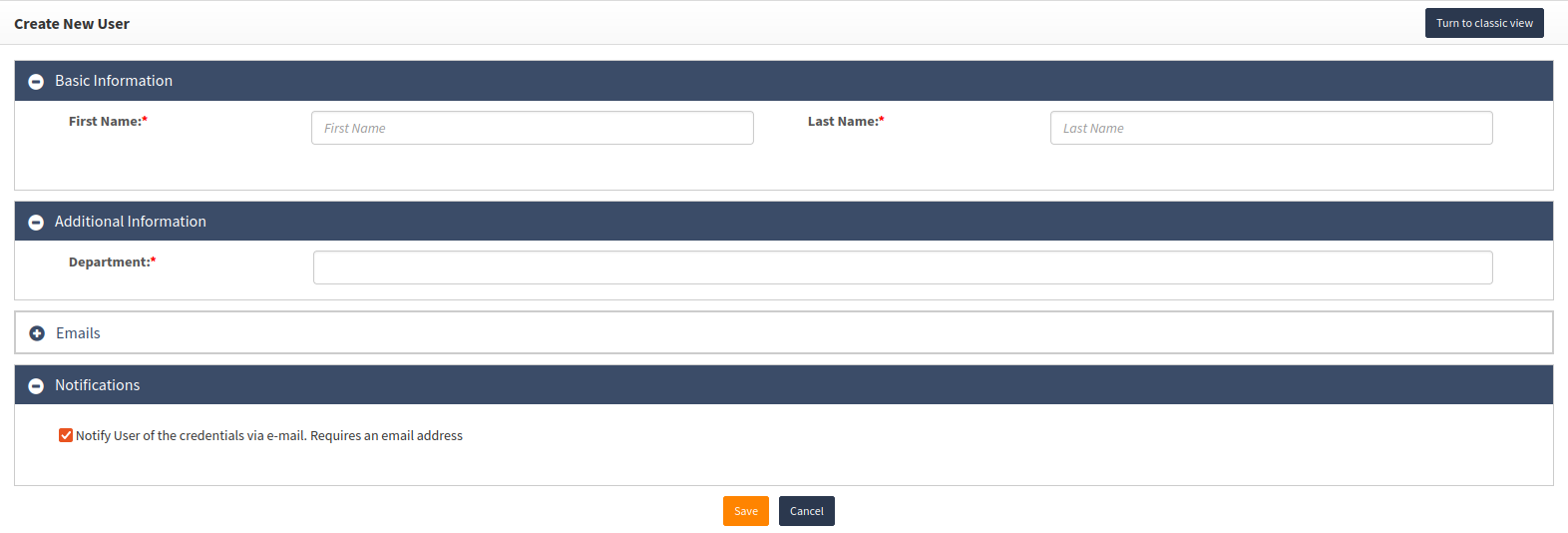
Now create a faculty user on the real screen. The fields, the order and the read-only Department are the ones you configured:
{% endstep %}
{% endstepper %}
## The templates that already ship
Installation does not leave you with an empty list. Several product screens are themselves built on page templates, and a fresh deployment generates a default user page template **for each content provider**. Know what you are about to modify or compete with before you create anything:
| Shipped template | The screens it renders |
| ------------------------------------------------------------------------------- | ----------------------------------------------------------------------------------------------------------------------------------------------- |
| **User template for *****\*** — one per content provider | Create a new user and edit existing users, from the Webconsole and from SelfService. The self-registration URI patterns are bound to it as well |
| **Default Role Template** | Create a new role, and edit an existing role |
| **Default Group Template** | Create a new group, and edit an existing group |
| **Templates for various managed systems** | Create a new managed system, and edit an existing managed system |
You can modify a shipped template in place or create your own alongside it. Modifying in place changes every screen bound to it — for the user template that is more screens than you probably intend, and it includes a public one. Creating your own means taking a URI pattern away from the shipped template first; see [Binding, and the competing-template trap](#binding-and-the-competing-template-trap).
{% hint style="info" %}
In earlier versions of OpenIAM the per-content-provider user template was named **Default Template for *****\***. Older runbooks, tickets and screenshots use that name. It is the same object under a new label — do not go looking for a second template.
{% endhint %}
## Binding, and the competing-template trap
A template governs nothing until it is bound to a URI pattern, and **a pattern can render only one template**. Bindings live on the template's own **URI Patterns** section (`/webconsole/editPageTemplate?id=`), each one a `METADATA_URI_XREF` row. That section is the current set — there is nowhere else to look, and no view that lists every binding across all templates at once, which is why the competing-template trap below is hard to spot.
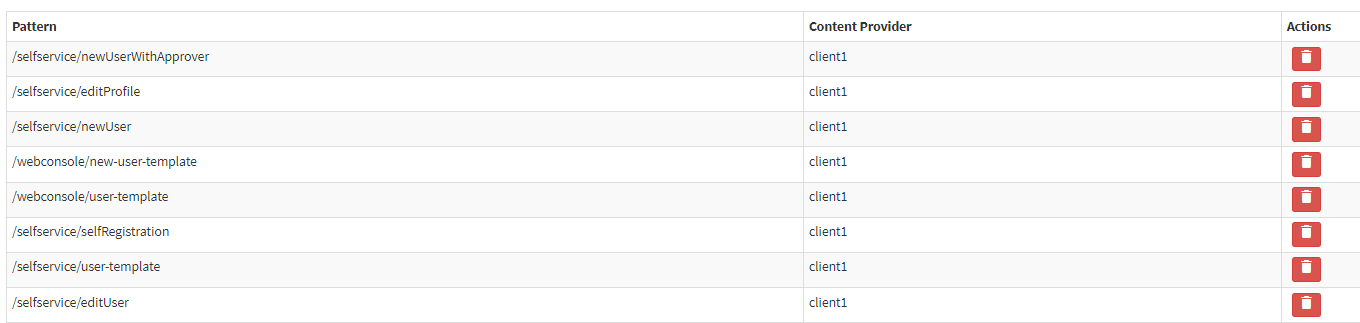
Installation binds the per-content-provider user template to a set of URI patterns, and the self-registration patterns are among them:
Open that template — **Administration → Page Template → User Template** for the managed system in question, then **Edit** — find the pattern in its **URI Patterns** section, and remove the binding with the trash icon. Save. Do this before you add the pattern to your own template, or immediately after — the binding on your template achieves nothing while the old one is still in place.
Skip this and there is no error to read. Your template is saved, correct and bound; the pattern is simply still held by the old one, and **the screen silently fails to render**. This is the console-level view of [the competing-template trap](/administration-guide/identities/self-registration.md#why-the-shipped-template-must-be-split): there it is two `METADATA_URI_XREF` rows for one pattern, shipped that way, which is why a new self-registration template appears to do nothing until `SELFREG_PATTERN` is taken off `NEW_USER_TEMPLATE`. Same fault, same fix, whichever end you look at it from.
The shipped data already contains a case where one template is bound to two patterns — see [Self-registration](/administration-guide/identities/self-registration.md#why-the-shipped-template-must-be-split), which is the same fault seen from the other end. To test your own binding, load the real route: for a user template that is `/webconsole/new-user-template`, with the user type chosen. If your fields do not appear, the pattern you bound does not match this route.
### How the product picks the template for a request
Worth reading before you design anything role-dependent, because the resolution order is not what most people assume.
The screen tells OpenIAM the request URL, the URI pattern the request resolved to, the target object ID, the requester ID and a metadata type ID. OpenIAM then tries three lookups, in this order, and takes the first that returns a row:
1. URI pattern **and** metadata type
2. URI pattern alone
3. metadata type alone
Each lookup refuses to guess. If it finds two candidate templates it raises `PAGE_MULTIPLIED_TEMPLATE` rather than picking one, and logs `Pattern mapped to multiple templates - can't fetch template.` — or, for the first lookup, `Pattern with MetadataType mapped to multiple templates - can't fetch template.` The operator sees the message behind the key `openiam.ui.page.multiplied.template`, whose English text is **"This page is linked to more than one template. Each page must be linked to exactly one template."**
Two things follow that are worth stating explicitly.
**Entitling a template to a role does not select between templates.** The entitlement check happens *after* resolution, on the single template the lookup returned: OpenIAM renders that template if it is public, or the request is administrative, or the requester is entitled to it. So entitlement is a gate, not a selector — pass it and you get that template, fail it and you get **no template**. Binding two templates to one URI pattern and entitling them to two different roles therefore does not produce a role-dependent form; it produces an ambiguous lookup that fails for everybody, which is the trap described at the top of this section.
**The metadata type is the one axis on which a pattern may carry more than one template.** Because the first lookup keys on pattern *and* metadata type, two templates can legitimately share a URI pattern when they carry different metadata types and the screen passes one. That is how a form varies by the type of the object being edited — a user type, a group type, a role type. It is **not** a way to vary the form by the *operator's* role: the metadata type on the request describes the object, not the person editing it.
To vary a form by who is using it, give each audience its own URI pattern with its own template and its own SelfService menu item, and entitle the menu item — see [Add a custom user page to SelfService](/administration-guide/identities/add-a-selfservice-user-page.md).
### A pattern with no template renders a blank screen, not an error
When no lookup matches, nothing is thrown. OpenIAM retries once against a normalised `Referer`, logs one line at **debug** level only —
{% code overflow="wrap" %}
```
Page template was null. Perhaps, this page was rewritten into React.
```
{% endcode %}
— and then returns the page metadata with no template on it. The screen loads with no fields.
{% hint style="warning" %}
This is the usual cause of **a screen that is suddenly blank after an upgrade**, and it needs no configuration change on your part to appear: an upgrade that introduces a new route introduces a new URI pattern, and a new pattern starts life bound to nothing. `/selfservice/editProfile` — the URL of the shipped SelfService **Edit Profile** menu item, present since 2026.6.1 — is the one reported most often: *Edit your profile* opens and displays nothing at all, with no error in the browser and only a debug line in the log.
Check the pattern under **Access Control → Content Providers**, then bind it to a user page template in that template's **URI Patterns** section. Any template with the right fields will do; there is nothing special about which one.
{% endhint %}
## Verification
| What you did | Evidence |
| ---------------------------- | ------------------------------------------------------------------------------------------------------------------------------------------------------------------- |
| Saved a template | Audit event described "Save page template"; then reopen the template and read back its **Template Type**, data model script, custom validation script and custom JS |
| Saved a custom field | Audit event described "Save custom field"; the field's **Linked Page Templates** section lists every template using it — check this before deleting a field |
| Attached a validator | The template **saved at all**. The instantiation on save is the compile check |
| Attached a data model script | The field's valid values on the rendered form, not the stored script id |
| Added a rule | Reopen the rule editor on that field's row. A rule that does not load left invalid JSON behind — see the failure below |
| Bound a URI pattern | The pattern in the template's **URI Patterns** section; then load the real route and count the fields |
## When it goes wrong
| Symptom | Cause | Fix |
| ---------------------------------------------------------------------------------------------------------------------------------------------------------------------------------------------- | ------------------------------------------------------------------------------------------------------------------------------------------------------------ | ------------------------------------------------------------------------------------------------------------------------------------------------------------------------------------------------------------------------------------------------------------------------------------------------------------------------ |
| Template will not save | No template type set — `TEMPLATE_TYPE_REQUIRED` | Set **Template Type** to one of the four `UI_TEMPLATE_TYPE` rows |
| Template will not save after attaching a validator | The script could not be instantiated as a validator — `CANNOT_INSTANTIATE_GROOVY_CLASS`. Usually the class does not implement `IPageTemplateCustomValidator` | Fix the class declaration — `implements IPageTemplateCustomValidator` |
| Validator reports `CANNOT_INSTANTIATE_GROOVY_CLASS` at runtime, not a validation error | Your validator raised something other than a `BasicDataServiceException`, and everything else is reported as an instantiation failure | Guard nulls; throw only `BasicDataServiceException` |
| Validator rejects but the operator sees no message | The error token value is not one of the UI's message keys | Use a real message key, e.g. `openiam.ui.common.field.validation.error` |
| Configured fields do not appear on the route | The template is not bound to a URI pattern that matches the route, or a different template is bound to it | Read your template's **URI Patterns** section, then check no other template holds the same pattern |
| A custom SelfService page renders the default user fields, or nothing | The `entityEditUrlExtension` value in the menu URL does not match the `user-template-` pattern the template is bound to | Make the keyword identical in both places — [Add a custom user page to SelfService](/administration-guide/identities/add-a-selfservice-user-page.md) |
| A new template is correct and bound, and the screen still does not render | The shipped user template is still bound to the same pattern; the default was never unbound with the trash icon | Remove the pattern from the shipped template, then reload the route |
| A select's stored values vanished from the form | Stored user values were filtered against a narrowed valid-value list | Widen the valid values, or migrate the data first |
| A multi-checkbox ignores its default value | `MULTI_CHECKBOX` never receives a default value | Use `MULTI_SELECT`, or set the value rather than the default |
| A select has valid values you did not configure | With an empty valid-value list, OpenIAM back-fills it from existing user values | Configure the valid values explicitly |
| Rule editor does not render for a field | No other field is available to test against | Add at least one other field to the template |
| `errorMessage` on a non-validation rule is ignored | The input is only collected for a `validation` rule | Use `validation` for messages |
| Rules do not load | The `rules` column is not `{"rules":[...]}` — a bare array will not parse | Rewrite the JSON as an object with a `rules` array; the default is `{"rules":[]}` |
| Field switched to Static still runs its script | The data model type is cleared on save, but the script id is only cleared when moving away from `groovy` | Reopen the field and confirm both are cleared |
| Templates appear in resource search unexpectedly | Every template creates a `UI_TEMPLATE` resource named `_` | Expected; `UI_TEMPLATE` is `SEARCHABLE` |
| A custom field you have just created is not offered under **Select Field Type** | The template has no template type; the field is already on the template; or its field type has not yet been swept into the Webconsole's metadata cache | Set the template type; read the **Template Fields** grid to the bottom; wait `org.openiam.metadata.cache.sweeptime` (shipped 2 min) and reload — [all three causes](/administration-guide/identities/page-templates-and-custom-fields/page-template-reference.md#why-a-custom-field-is-missing-from-the-field-drop-down) |
| A custom field is on the template and still does not render | The field is neither public nor entitled to the requester | Mark the field public, or entitle its resource to the people who use that screen |
| **Required** on *User can define his organizational structure* is ignored — the required check covers the template's **custom** fields only, and `USER_SHOW_ORGANIZATIONS` is a built-in field | Enforce it in a custom validator | [Enforcing required on a built-in template field](/administration-guide/identities/page-templates-and-custom-fields/page-template-reference.md#enforcing-required-on-a-built-in-template-field) |
| `This page is linked to more than one template. Each page must be linked to exactly one template.` | Two templates resolve for the same URI pattern and metadata type — `PAGE_MULTIPLIED_TEMPLATE` | Unbind the pattern from all but one template, or distinguish the two by metadata type |
| The log warns `Pattern mapped to multiple templates - can't fetch template.` | Same cause, seen from the service side | As above. Open each candidate template's **URI Patterns** section to find which ones hold the pattern |
| A validator fires on create but never on an edit | The screen you edited on is not driven by a page template, and template validation is skipped entirely on a screen that has none | Test the validator on a template-driven route — `/webconsole/user-template` or `/webconsole/new-user-template` — not on the classic user form. Do not move the validation into the approver-association script |
| **Edit your profile** in SelfService is blank after an upgrade | The `/selfservice/editProfile` URI pattern is bound to no template. Nothing is thrown; only a debug line `Page template was null.` is logged | Bind that pattern to a user page template |
| A multi-select custom field reaches the managed system with only its first value | The shipped policy-map idiom reads the first value and adds one | Edit the transformation script to loop the values and add each one; changing the field type does not help — [multi-value fields](/administration-guide/identities/page-templates-and-custom-fields/page-template-reference.md#multi-value-fields-managed-systems-and-user-search) |
| A dependent drop-down script has no effect on the form | The selector uses `uifieldname`, which only the legacy renderer emits; the React screens carry an `id` instead | Inspect the rendered markup of that specific screen — [dependent drop-downs](/administration-guide/identities/page-templates-and-custom-fields/page-template-reference.md#dependent-drop-downs) |
## Roll it back
**Template and field edits** — reversible. Record the previous field list, rule JSON and script IDs.
**Deleting a custom field** — read the field's **Linked Page Templates** section first. Deleting a field used by templates removes it from those templates; the values already captured against the underlying metadata element are a data question, not a configuration one.
**URI pattern bindings** — reversible, and the fastest way to back out a template change entirely: unbind the pattern and the previous rendering returns.
**Narrowed valid values** — not reversible for the data. Widening the list again does not restore user values that were dropped from a form and then persisted by a save.
## Related
* [Page template reference](/administration-guide/identities/page-templates-and-custom-fields/page-template-reference.md) — the objects and their tables, the four template types, the eleven field types, the eight rule actions, the custom-field data model and the three Groovy contracts
* [Add a custom user page to SelfService](/administration-guide/identities/add-a-selfservice-user-page.md) — a purpose-built page on its own URI pattern, restricted by role
* [Configure self-registration](/administration-guide/identities/self-registration.md) — the competing-template trap as it ships, on a public pattern
* [Create a user](/administration-guide/identities/create-a-user.md) — the two routes a user template can render on
*Applies to OpenIAM 2026.8.1. Last reviewed 7 August 2026.*
---
# Agent Instructions
This documentation is published with GitBook. GitBook is the documentation platform designed so that both humans and AI agents can read, navigate, and reason over technical content effectively. Learn more at gitbook.com.
## Querying This Documentation
If you need additional information that is not directly available in this page, you can query the documentation by asking a question.
Perform an HTTP GET request on the following URL with the `ask` and `goal` query parameters:
```
GET https://docs.openiam.com/administration-guide/identities/page-templates-and-custom-fields.md?ask=&goal=
```
`ask` is the immediate question: it should be specific, self-contained, and written in natural language.
`goal` is what the user is ultimately trying to achieve, the reason they need the answer. Sharing it helps GitBook give you a better, more relevant answer. A goal is most helpful when it describes the outcome the user wants rather than restating the question. For example, with `ask=how do I create an API token`, a goal like `automate deployments from our CI pipeline` lets GitBook tailor the answer to that use case.
The response will contain a direct answer to the question and relevant excerpts and sources from the documentation.
Use this mechanism when the answer is not explicitly present in the current page, you need clarification or additional context, or you want to retrieve related documentation sections.