> For the complete documentation index, see [llms.txt](https://docs.openiam.com/llms.txt). Markdown versions of documentation pages are available by appending `.md` to page URLs; this page is available as [Markdown](https://docs.openiam.com/administration-guide/gateway/request-and-response-transformations.md).
# Advanced request and response transformations
Change what the browser gets back from an application behind the Access Gateway — rewrite absolute URLs, map upstream errors, redirect a path elsewhere, fix where users land after signing in, and bran
## What this is, and when you need it
Getting the application proxied is one job; making the pages it sends back behave as if they had always lived at your address is another. This page covers the response side of the gateway: rewriting absolute URLs, mapping upstream errors, redirecting a path instead of proxying it, fixing where a user lands after authentication, and branding the screens OpenIAM renders in front of it. All of it lives on the URI pattern or the content provider. The request side is [Give the application the authenticated identity](/administration-guide/gateway/inject-identity.md).
## At a glance
| | |
| ------------------------ | -------------------------------------------------------------------------------------------------------------------------------------------------------------------------------------------------------------- |
| **You will end up with** | Proxied pages whose links, redirects and error screens all stay inside the gateway, wearing your branding |
| **Where** | **HTML Substitution List**, **Error Mappings**, **Redirect URL** and **UI Theme** on a URI pattern; **UI Theme** on the content provider; **UI Themes** at `/webconsole/uiThemes` |
| **You need first** | An application already proxying cleanly; the page source of the screen that misbehaves; a stylesheet URL, if you are branding |
| **Takes** | 20–30 minutes per change, plus five minutes of cache wait |
| **Reversible** | Yes — delete the substitution row, the redirect or the theme. Saving a static **Redirect URL** permanently clears the pattern's redirect Groovy script, which is not undone by clearing the static value again |
### Which transformation do you need?
| The symptom | Go to |
| --------------------------------------------------------------------- | --------------------------------------------------------------------------------------- |
| A link on a proxied page leaves the gateway | [URL rewriting](#url-rewriting) |
| The application's own `500` page is what users see | [Error Mappings](#url-rewriting) |
| One path should be sent somewhere else instead of proxied | [Per-pattern redirects](#per-pattern-redirects) |
| Users authenticate and then land on the wrong page, or on a `404` | [Where the user lands after authenticating](#where-the-user-lands-after-authenticating) |
| The sign-in and error pages in front of the application are unbranded | [Brand the pages OpenIAM renders](#brand-the-pages-openiam-renders-for-this-site) |
## URL rewriting
The symptom: a user working inside the proxied application clicks a link and lands outside the gateway entirely — the application's real hostname, with none of the authorization, injection or auditing the rest of the session had. Or a page loads unstyled because its stylesheet was requested from an address the browser cannot reach. The cause is always the same: the application was written to run at one address and is being reached at another, so every URL it writes into its own HTML with a hostname in it points at the wrong place.
**Diagnose it from the page source, not from the address bar** — the address bar only tells you where you ended up, not which element sent you. On the demonstration page published at `http://vm.openiam.com/test.html`, the link **More information...** leads to `www.iana.org`, a different host outside the gateway completely.
Request the proxied URL and view source — in Firefox, right-click and choose **View Page Source**; other browsers are equivalent. The offending element is plain in the markup:
{% code overflow="wrap" %}
```html
```
{% endcode %}
The fix is a substitution on the URI pattern that serves the page.
{% stepper %}
{% step %}
### Add the substitution to the URI pattern
Go to **Access Control → Content Providers → URI Patterns** for the pattern that serves the page — here `/*` — and click **Edit**.
Scroll to **HTML Substitution List** and click **Add**:
| Field | For this case | What it does |
| ------------------ | ------------------------ | -------------------------------------------------------------------------- |
| **Text Query** | `https://www.iana.org/` | The text to find in the response body |
| **Replace With** | `http://vm.openiam.com/` | What to put there instead |
| **Is Exact Match** | clear | Whether the query must match exactly rather than as a fragment |
| **Is Fast Search** | clear | Selects the faster scan; leave it clear unless you are tuning a large page |
Rows run in the order they appear in the list, and you reorder them by dragging. Order matters when one substitution can produce text that a later one also matches — put the most specific row first. An empty list reads *"This pattern has no HTML substitution records."*
{% endstep %}
{% step %}
### Wait out the cache and follow the link again
Wait about five minutes for the caches to refresh, reload the proxied page, and follow the link. It should now stay on your gateway hostname. If the old absolute URL is still in the page source, the substitution is on a pattern that did not serve this page.
{% endstep %}
{% endstepper %}
Substitution is a response-body rewrite, so it reaches HTML and anything else served as text, and it does **not** reach a URL that JavaScript assembles from parts at run time in the browser. That is the limit worth knowing before you commit to the gateway for an application: a page or two of absolute URLs is maintenance, an application that builds every URL in script is not a candidate. See [Can your application be proxied?](/administration-guide/gateway/access-gateway.md#can-your-application-be-proxied).
**Error Mappings**, further down the same screen, is the neighbouring facility: it maps an upstream **HTTP Code** to a **Redirect URL**, so a `500` from the application can land the user on a page you control rather than on the application's own error output. One row per code.
## Per-pattern redirects
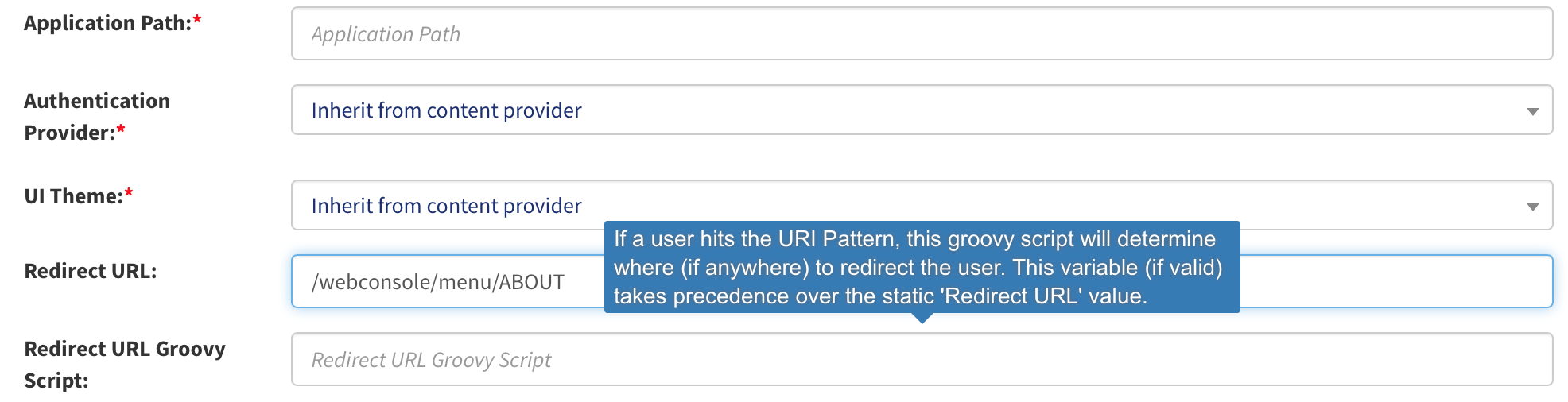
The other per-pattern facility is a redirect declared on the pattern itself, and it is the one to reach for when you want a matching request sent somewhere else rather than proxied upstream. It is not metadata: these are two fields near the top of the **URI Pattern** screen, immediately below **UI Theme**.
**Redirect URL** is a static value — an absolute or a relative URL. Every request that matches the pattern is redirected there, with no evaluation of who is making it. Its help text on screen reads *"When a user accesses the URI Pattern above, they will be redirected to this URL. The URL can be relative (to the Content Provider) or absolute."*
**Redirect URL Groovy Script** is a Groovy script that returns the URL to redirect to, evaluated per request. Use it when the destination depends on the user, the session or something about the request that a fixed string cannot express.
**The static value wins, and it does more than win — it deletes the other one.** If **Redirect URL** holds anything at all when you save the pattern, OpenIAM clears the **Redirect URL Groovy Script** selection as part of that save, and at request time the static URL is the one used. Older OpenIAM documentation states the opposite precedence; do not rely on it. Two consequences: filling in both fields is not a way to express a fallback, and the check is easy — save the pattern, reopen it, and look at **Redirect URL Groovy Script**. If it is empty, a static **Redirect URL** cleared it.
**Redirect URL** is validated on save. It must begin with `/`, `http` or `https`, and anything else is refused with *"The redirect URL for this pattern is invalid. It must begin with '/', 'http', or 'https'."* The Groovy script is validated too: it must be a script the Groovy Manager can find and instantiate as a redirect-URL processor, and if it is not, the save fails naming the class your script has to extend.
{% hint style="info" %}
There is a fourth route, used mostly internally, that you can also drive yourself. The gateway checks for a header with the special name `OIAM_EULA_TEST_CH`; if that header is set, the gateway redirects to the URL held in its value. Set it with a **Set Header** metadata entry like any other header. This is documented in the older OpenIAM material as an internal mechanism that is nonetheless usable directly, and that wording is preserved here deliberately: confirm the behaviour on your own release before building anything on it.
{% endhint %}
## Where the user lands after authenticating
Every "it authenticated me and then sent me to the wrong place" report comes back to one value: the **postback URL**. It is the path the IdP returns the browser to once authentication — and every interstitial screen along the way — has finished. Three things can supply it, and the last is a fallback you rarely want:
| Source | Where it is set | Detail |
| ---------------------------------- | --------------------------------------------------------------- | -------------------------------------------------------------------------------------------------------------------------------- |
| The postback URL request parameter | The gateway appends it to the redirect it sends to `/idp/login` | The parameter *name* is per content provider and defaults to `postbackUrl` through `org.openiam.postback.url.param.name.default` |
| A default URL on the proxy | The proxy's own configuration, per protected location | A deployment setting — see the [Installation Guide](/installation/installation.md) |
| `/selfservice/` | The IdP's own fallback when the parameter is blank | Reached silently — nothing logs that the fallback was used, which is why this is diagnosed by elimination |
**An application published at the root of a hostname needs its landing path stated explicitly.** The fallback is a *path*, so when nothing carries a postback URL the browser is sent to a path under whatever host it is already on — which, for an application that has no context path of its own, is a path inside the OpenIAM UI rather than the application, and a `404`. Ask the deployment owner to set the proxy's default URL for the protected location to the application's real entry path. Then test the value through every interstitial screen, not just the password prompt: one-time-password entry, secret-word capture, terms acceptance and forced password change each perform their own redirect, and each redirect is a chance for the value to be dropped. OpenIAM issues those interstitial redirects itself, after authentication has succeeded, which is why the failure shows up as a wrong landing page rather than a failed sign-in.
**A postback URL that fails validation produces a `401`, not a redirect.** OpenIAM validates the postback URL strictly and the IdP refuses the request outright rather than sanitising it, logging:
{% code overflow="wrap" %}
```
WARN o.o.ui.idp.web.mvc.LoginController : Postback URL '/app/login.action?os_destination=/pages/view.action?a=b' not valid - doesn't start with a '/' - XSS detected. Returning 401
```
{% endcode %}
The same check and the same message guard six other IdP entry points, so this line can appear on a request that is not the initial sign-in. The rules the validator applies are listed in [Access Gateway reference](/administration-guide/gateway/access-gateway-reference.md#postback-url-validation).
{% hint style="warning" %}
**A parameter whose value is itself a URL must be percent-encoded, including its `?` and `&`.** This is the commonest way to trip those rules, and it is not an OpenIAM defect. Once `?next=/a/b.action?k=v&title=X` is decoded there is no way for anything downstream — the gateway, the IdP or the browser — to know whether `&title=X` belongs to the outer URL or to the inner one, so the outer parse wins and the inner URL arrives truncated. The application that generates the link must encode the inner URL: `?next=%2Fa%2Fb.action%3Fk%3Dv%26title%3DX`. The same applies one layer down at OpenIAM, which fails the whole authorization call with `INVALID_URI` and logs `URI Syntax Exception:` at ERROR when the URL is not a legal URI at all — a `500` rather than a `401`, and the pair of log lines is how you tell the two layers apart.
{% endhint %}
{% hint style="warning" %}
**Keep `org.openiam.ui.password.change.url` a relative path.** Its shipped value resolves to `/idp/changePassword`, and OpenIAM uses it verbatim — as the redirect target for the **Change password** link, and with the postback parameter appended when a password change is forced at sign-in. Put a full `http://…` URL there and you have hard-coded a scheme, which behind a TLS-terminating proxy is an HTTPS-to-HTTP downgrade and, to the user, a **Change password** link that lands on the default page instead. Left relative, the absolute URL is derived per request from the forwarded scheme and port headers. The key has no row on **Administration → System Configuration**, so you can neither read nor change it from the Webconsole — it comes from the UI artifact's own configuration, which makes an override the deployment owner's to apply; see the [Installation Guide](/installation/installation.md). Confirm the result the way the user meets it: click **Change password** in SelfService *through the gateway* rather than directly, and check the scheme and host you land on.
{% endhint %}
## Brand the pages OpenIAM renders for this site
Even when the application behind the gateway is entirely someone else's, OpenIAM renders pages in front of it: the sign-in screen, whatever interstitial screens the authentication demands, the error pages. A **UI theme** attaches your stylesheet and your logos to those pages, per content provider or per URI pattern.
A theme is one object holding a stylesheet URL and a set of uploaded images. Create it at **UI Themes** (`/webconsole/uiThemes`) → **New**:
| Field | What to set |
| --------------------------------------------------------------------- | ---------------------------------------------------------------------------------------------------------------------------------------- |
| **UI Theme Name** | A name unique across themes — `Northwind`. Saving a duplicate name is refused |
| *The URL of the stylesheet for this theme* — the field below the name | One CSS file, as an absolute or relative URL: `https://brand.example.com/openiam/northwind.css`. Required, and limited to 300 characters |
| **Upload Login and Self-Registration Logo** | The large logo, recommended 270x100 |
| **Upload Application Logo** | The small logo, recommended 110x40 |
| **Upload Favicon (…)** | One favicon per size — but see below |
The favicon fields carry their own instruction on screen: *"You do not need to upload each favicon size separately. Upload one favicon (the largest size) using any favicon uploader, and OpenIAM will automatically resize it for all required dimensions."* Uploading the largest and accepting the offer to replicate is the whole job.
Then attach it. On the content provider, the **UI Theme** drop-down applies the theme to every page OpenIAM renders for that host, and the empty option is **Use Default Theme**. On a URI pattern the same drop-down applies to that path only. **The pattern's theme wins where it is set; otherwise the content provider's theme applies.** So the normal arrangement is one theme on the content provider, and a pattern-level theme only where one path must look different — a partner-facing sign-in on the same host, for instance.
### What the stylesheet can and cannot change
The stylesheet is added as an extra `` in the head of the page, **after** OpenIAM's own stylesheets. It layers over the shipped styling rather than replacing it, which is the single most useful thing to know about it: you write only the rules you want to change, and everything you do not mention keeps working.
That layering is also the guard. Three things stop a bad value breaking the sign-in page: a theme cannot be saved without a name and a stylesheet URL, so there is no half-configured theme; a URL longer than 300 characters is refused on save with *"UI Theme URL is too long. Maximum length: 300 characters."*; and a stylesheet URL that is wrong produces a `404` for that one request and nothing else, so the page renders unbranded rather than unstyled and nobody is locked out.
What it will not do is restyle a screen that does not consume it. The override reaches the pages OpenIAM renders server-side; screens rendered by the newer in-browser UI take their branding from the uploaded logos rather than from the stylesheet. The observable check is one look at the page source of the screen you are trying to brand: if your stylesheet is not among the `` elements, that screen is not one the stylesheet reaches, and the logo uploads are the lever you have.
{% hint style="info" %}
**Serve the stylesheet from somewhere the gateway does not protect.** The browser fetches it as an ordinary request, and if the URL you gave lands on a protected pattern, an unauthenticated user sitting on the sign-in page cannot fetch it — the sign-in page is exactly where the user has no session yet. Either host it outside OpenIAM at a URL the browser can reach without a session, or, if it is served through the gateway, give its path a URI pattern of its own with **Is Authorization Deactivated** ticked. Test by loading the sign-in page in a private window and confirm the stylesheet returns `200` rather than a redirect to the login page.
{% endhint %}
{% hint style="warning" %}
Deleting a theme does not warn you per usage: the confirmation says *"Deleting this UI theme will remove its association with all content providers and URI patterns. Are you sure you want to continue?"* and then the affected providers and patterns fall back to the default styling. Check which providers and patterns reference a theme before you remove it.
{% endhint %}
## Verification
| What you changed | How to prove it took | What a failure looks like |
| ---------------- | ----------------------------------------------------------------------- | ----------------------------------------------------------------------------------------------------------- |
| A substitution | View the page source through the gateway and search for the old host | The old absolute URL still present means the substitution is on a pattern that did not serve this page |
| An error mapping | Make the application return that status through the gateway | The application's own error output, not your page |
| A redirect | Request the path and read the `Location` response header | A destination nobody configured means a static **Redirect URL** overrode the script |
| The postback URL | Sign in through every interstitial screen, not just the password prompt | A landing page under the OpenIAM context, or a `401` with `XSS detected` in the IdP log |
| A UI theme | View source on the branded page and look for your stylesheet `` | Not present means either no theme resolved for that pattern, or that screen does not consume the stylesheet |
## When it goes wrong
| Symptom | Cause | Fix |
| ---------------------------------------------------------------------------------------------------------- | ------------------------------------------------------------------------------------------------------------------------------------- | ---------------------------------------------------------------------------------------------------------------------------------------------------- |
| The old absolute URL is still in the page source | The substitution is on a pattern that did not serve this page, or the cache has not swept | Confirm the matched pattern with the **Federate URI Debug Tool**, `/webconsole-am/federateURIDebug.html` |
| Some links are fixed and others are not | The remaining URLs are assembled by JavaScript at run time, where a response-body rewrite cannot reach them | Not fixable at the gateway — see [Can your application be proxied?](/administration-guide/gateway/access-gateway.md#can-your-application-be-proxied) |
| One substitution undoes another | Rows run in list order and an earlier replacement produced text a later row also matches | Drag the most specific row to the top |
| A redirect goes somewhere nobody configured, and **Redirect URL Groovy Script** is empty | A static **Redirect URL** was saved on the same pattern, clearing the script | Clear **Redirect URL**, re-select the script, save, reopen and confirm it survived |
| Cannot save: *"The redirect URL for this pattern is invalid. It must begin with '/', 'http', or 'https'."* | The redirect target is neither a relative path nor an absolute URL | Make it start with `/`, `http` or `https` |
| Authentication succeeds and the browser lands on a `404` under the OpenIAM context | Nothing supplied a postback URL, so the IdP used its `/selfservice/` fallback | Ask the deployment owner to set the proxy's default URL for the protected location; retest through every interstitial screen |
| `401` with `not valid - doesn't start with a '/' - XSS detected. Returning 401` | The postback URL failed OpenIAM's validation | Make it a relative path and percent-encode nested URLs and every value with a space or non-ASCII character |
| **Change password** in SelfService lands on the default page, or drops from HTTPS to HTTP | `org.openiam.ui.password.change.url` holds a full URL instead of a relative path | Restore the relative path; shipped value resolves to `/idp/changePassword` |
| Cannot save: *"UI Theme URL is too long. Maximum length: 300 characters."* | The stylesheet URL exceeds the field limit | Host the CSS at a shorter path rather than passing parameters |
| The sign-in page renders unbranded and the browser shows a `404` for the stylesheet | The stylesheet is served from a path the gateway protects | Serve it anonymously, or give its path a pattern with **Is Authorization Deactivated** ticked |
| A theme is attached and the page source has no extra stylesheet link | No theme resolved for the pattern that served the page, or that screen is rendered in the browser and does not consume the stylesheet | Set the theme on the content provider so every pattern inherits it; brand in-browser screens through the theme's uploaded logos |
## Related
* [Give the application the authenticated identity](/administration-guide/gateway/inject-identity.md) — the request side of the same pattern screen
* [Access Gateway reference](/administration-guide/gateway/access-gateway-reference.md#postback-url-validation) — the postback validation rules and the properties named here
* [Content providers and URI patterns](/administration-guide/access/content-providers-and-uri-patterns.md) — every field on the URI pattern screen
* [Troubleshoot the Access Gateway](/administration-guide/gateway/troubleshoot-the-gateway.md) — when the request never gets far enough to be transformed
*Applies to OpenIAM 2026.8.1. Last reviewed 7 August 2026.*
---
# Agent Instructions
This documentation is published with GitBook. GitBook is the documentation platform designed so that both humans and AI agents can read, navigate, and reason over technical content effectively. Learn more at gitbook.com.
## Querying This Documentation
If you need additional information that is not directly available in this page, you can query the documentation by asking a question.
Perform an HTTP GET request on the following URL with the `ask` and `goal` query parameters:
```
GET https://docs.openiam.com/administration-guide/gateway/request-and-response-transformations.md?ask=&goal=
```
`ask` is the immediate question: it should be specific, self-contained, and written in natural language.
`goal` is what the user is ultimately trying to achieve, the reason they need the answer. Sharing it helps GitBook give you a better, more relevant answer. A goal is most helpful when it describes the outcome the user wants rather than restating the question. For example, with `ask=how do I create an API token`, a goal like `automate deployments from our CI pipeline` lets GitBook tailor the answer to that use case.
The response will contain a direct answer to the question and relevant excerpts and sources from the documentation.
Use this mechanism when the answer is not explicitly present in the current page, you need clarification or additional context, or you want to retrieve related documentation sections.