> For the complete documentation index, see [llms.txt](https://docs.openiam.com/llms.txt). Markdown versions of documentation pages are available by appending `.md` to page URLs; this page is available as [Markdown](https://docs.openiam.com/administration-guide/caddie/peer-comparison.md).
# Peer comparison
For reviewers — the Peer comparison block, which turns the Peer Rarity risk factor into one sentence saying how many people in the same organization unit or team hold the same access, what the cohort
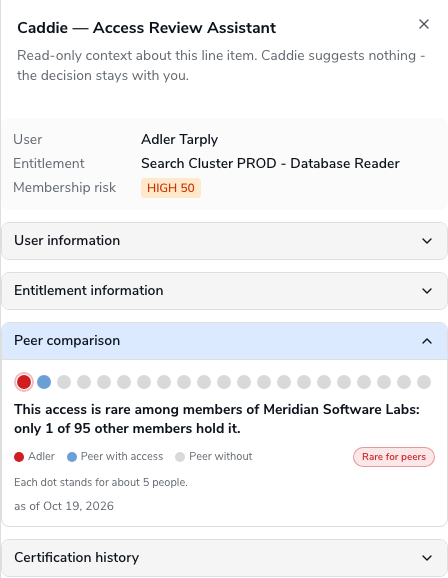
*Is this normal for someone like them?* is the question a manager can answer for their own team and nobody else can. The **Peer comparison** block answers it with one sentence: how many of the people in the same organization unit, or on the same team, hold this same access. This page explains where that sentence comes from, what the cohort is, every sentence the block can produce, and why it sometimes says it cannot compare.
**On this page**
* [What it reads](#block-peer-comparison)
* [The cohort](#peer-cohort)
* [The sentences](#peer-sentences)
* [The freshness line](#peer-freshness)
* [When it says nothing](#peer-not-available)
* [Reading it](#peer-reading)
## What it reads
The block reimplements nothing. When the campaign scored this grant for risk, the **Peer Rarity** factor counted how many members of the person's cohort hold the same entitlement and stored the result on the review item, together with the band it fell in: common, uncommon, rare, unique or unknown. Until now that result surfaced only as a factor row with a score inside the risk explanation, which a line manager does not read. The block takes the same stored result and writes it as a sentence.
Expanding the block sends no request for the statistic. The only lookup it makes is the organization's name, so that the sentence can say *members of Engineering* rather than an id, and that lookup happens on expand only. Where the Peer Rarity factor sits among the other risk factors, and how its cutoffs are set, is a matter for your administrator; see [Risk factor reference](/administration-guide/risk/factors.md).
## The cohort
Who counts as a peer is decided on the risk policy, not in the block. The policy's peer cohort is one of two things:
| Cohort basis | Peers are | The sentence says |
| ------------ | ---------------------------------------------------------------------------------------------------- | --------------------------------------------------- |
| Organization | The other members of the person's organization unit of the configured type, a department for example | *members of {unit name}*, with the unit named |
| Manager | The other people who report to the same manager | *people on the same team*, never naming the manager |
The manager is never named, in any locale, because the label would be a person and a sentence such as *rare among the people reporting to Jane Doe* discloses something about Jane rather than about the grant. Where the organization's name cannot be resolved, the sentence says *the same organization unit* instead of a name, and where the platform recorded neither basis it falls back to *their peers*.
## The sentences
Every sentence is descriptive. None contains *should*, *safe*, *suspicious* or a decision, and the block uses no colour of its own.
| Band | Organization cohort | Team cohort |
| -------- | ------------------------------------------------------------------------------------------------------- | --------------------------------------------------------------------------------------------- |
| Common | *This access is common for members of Finance: 12 of 15 other members hold it.* | *This access is common for people on the same team: 12 of 15 other members hold it.* |
| Uncommon | *This access is not widespread among members of Finance: 4 of 15 other members hold it.* | *This access is not widespread among people on the same team: 4 of 15 other members hold it.* |
| Rare | *This access is rare among members of Engineering: only 1 of 14 other members hold it.* | *This access is rare among people on the same team: only 1 of 14 other members hold it.* |
| Unique | *No other member of Engineering holds this access (14 people compared).* | *No other person on the same team holds this access (14 people compared).* |
| Unknown | *There is not enough peer data to compare this access (the peer group is too small or not configured).* | Same |
The first number is how many **other** members hold the access; the second is how many people were compared. The person under review is counted on neither side. Where the band cutoffs lie, and the smallest cohort the factor will score, are Peer Rarity settings on the risk policy.
## The freshness line
Under the sentence, in smaller text, the block says *as of {date}*: when the item's risk was last computed. The Peer Rarity factor is refreshed by the nightly risk sweep, so the count can be up to one day behind the directory. If a colleague joined or left the team this morning, the sentence does not know yet.
## When it says nothing
Two different sentences mean two different things.
| The block reads | Why |
| ------------------------------------------------------------------------------------------------------- | ----------------------------------------------------------------------------------------------------------------------------------------------------------------------- |
| *There is not enough peer data to compare this access (the peer group is too small or not configured).* | The factor ran and found no usable cohort: the person has no organization of the configured type or no manager, or the cohort is below the minimum size the policy sets |
| *Peer comparison is not available for this item.* | The item carries no Peer Rarity result at all: the factor is not attached to the risk policy, the campaign predates it, or the item was never scored |
The second is shown rather than hidden, so that a block present on one row and missing on the next does not look like a fault. If it appears on every row of a campaign, the factor is not in use; that is a question for your administrator, not a reason to certify.
## Reading it
* **Unique or rare on a powerful entitlement is where to spend your attention.** Tom Becker's `Payments-Admin` reads *No other member of Engineering holds this access (14 people compared).* An engineering contractor is the only person in Engineering who can release payments. That is not proof of anything; it is the row to read fully.
* **Common is a reason to move faster, not to stop reading.** Maria's `Finance-Reports-Read` reads *common for members of Finance: 12 of 15*. Twelve colleagues hold the same dashboard access. If her job is the same as theirs, certify.
* **Common does not mean correct.** If a department was over-provisioned as a whole, every member reads *common*. The sentence compares people with their peers; it cannot know that the peers are wrong too. Two other blocks help here: [This entitlement across other users](/administration-guide/caddie/certification-history.md#block-entitlement-history) says whether reviewers elsewhere have been revoking it, and [What happens if I revoke this?](/administration-guide/caddie/revocation-impact.md) says what it actually grants.
## Related
* [Certification history](/administration-guide/caddie/certification-history.md) — the other two blocks that answer "is this normal?"
* [Risk factor reference](/administration-guide/risk/factors.md) — the risk factors, including where the Peer Rarity factor and its cohort are configured
* [Reading risk on the reviewer screen](/administration-guide/risk/reviewer-experience.md#reviewer-breakdown) — the risk explanation, where the same factor appears as a scored row
* [Caddie troubleshooting](/administration-guide/caddie/troubleshooting.md#not-enough-peer-data) — what to check when the block has no peer data or no comparison
*Applies to OpenIAM 2026.9.2. Last reviewed 16 October 2026.*
---
# Agent Instructions
This documentation is published with GitBook. GitBook is the documentation platform designed so that both humans and AI agents can read, navigate, and reason over technical content effectively. Learn more at gitbook.com.
## Querying This Documentation
If you need additional information that is not directly available in this page, you can query the documentation by asking a question.
Perform an HTTP GET request on the following URL with the `ask` and `goal` query parameters:
```
GET https://docs.openiam.com/administration-guide/caddie/peer-comparison.md?ask=&goal=
```
`ask` is the immediate question: it should be specific, self-contained, and written in natural language.
`goal` is what the user is ultimately trying to achieve, the reason they need the answer. Sharing it helps GitBook give you a better, more relevant answer. A goal is most helpful when it describes the outcome the user wants rather than restating the question. For example, with `ask=how do I create an API token`, a goal like `automate deployments from our CI pipeline` lets GitBook tailor the answer to that use case.
The response will contain a direct answer to the question and relevant excerpts and sources from the documentation.
Use this mechanism when the answer is not explicitly present in the current page, you need clarification or additional context, or you want to retrieve related documentation sections.