> For the complete documentation index, see [llms.txt](https://docs.openiam.com/llms.txt). Markdown versions of documentation pages are available by appending `.md` to page URLs; this page is available as [Markdown](https://docs.openiam.com/administration-guide/caddie/ask-for-help.md).
# Ask for help
For reviewers and administrators — the Ask for help block: whom a reviewer can write to about one review item, the message OpenIAM drafts, who it is sent from, the mail template behind it, and what is
A reviewer who cannot decide about a line item has, until now, had no way to ask someone who can from inside the product. "I do not know, let the owner decide" tended to end up recorded as a certification. **Ask for help** closes that gap. From the Caddie — Access Review Assistant panel the reviewer picks someone who can answer, reads the message OpenIAM has already written, edits it, and sends it.
Asking is **not a decision**. The item keeps its outcome, its step and its place in the reviewer's queue, and the reviewer still has to decide it afterwards.
**On this page**
* [The Ask for help block](#block-ask-for-help) · [Who the reviewer can ask](#help-options) · [Why an option may not be offered](#help-options-missing)
* [The message](#help-dialog) · [Several recipients](#help-recipients) · [Who the message comes from](#help-sender)
* [The link back to the item](#help-link)
* [What is recorded](#help-recorded)
* [For administrators: the mail template](#help-template) · [Tuning](#help-tuning)
## The Ask for help block
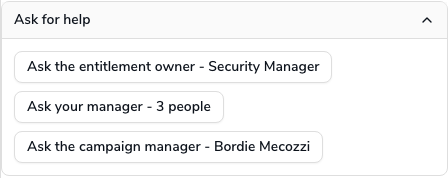
The block is the last one in the Caddie panel, on purpose: the panel first says who this is, what the access is, how it was decided before and what revoking it would do, and only then offers a person to ask. Expanding it resolves up to four kinds of helper for that one item, and offers one button per kind: *Ask the entitlement owner - Scott Nelson*, *Ask the campaign manager - 3 people*.
### Who the reviewer can ask
| Option | Who it reaches |
| ------------------------------------------------------------------------------------- | ---------------------------------------------------------------------------------------------------------------------------------------------------------------------------------- |
| **the entitlement owner** | The owner recorded on the role or group under review. If the owner is a group, every member of that group |
| **the application owner**, or **the owner of Payments** when the application is known | The owner of the application the access belongs to. Strictly, the owner of the resource behind the access's managed system, which is not the same thing as the entitlement's owner |
| **your manager** | The reviewer's own primary supervisor; if none is recorded, their other supervisors |
| **the campaign manager** | The people listed as **Manager of Access Review** on the certification |
The list is resolved from the item itself, so a reviewer never has to know who owns what. Below the buttons, the block lists what has already been asked about this item: *Help requested from the entitlement owner (Scott Nelson) on Sep 21, 2026.* A helper already asked is no longer offered; once everyone has been asked, the block reads *You have already asked everyone available about this item.*
### Why an option may not be offered
Only options that resolve to someone who can actually be written to are shown. A person is left out when they:
* have no **published** email address, one that is active and marked **Published** in their profile, so nothing could be delivered to them;
* have a status the deployment counts as inactive, listed in the system property `org.openiam.ui.webconsole.inactive.user.status`, because the account says they are not there to answer. If the property is empty, nobody is left out on status;
* are the reviewer themselves, because asking yourself is not help;
* are the built-in system account.
If that leaves an option with nobody, the option is not shown. If it leaves *no* options at all, the block says so explicitly: *Unfortunately the system cannot identify any user to ask for help from.* This is deliberate. The same reviewer sees four options on one row and none on the next, and a section that silently disappeared would look like a fault.
Resolution runs only when the block is expanded, never for every row of the table and never on page load. Because an owner belongs to the entitlement rather than to the person holding it, the owner is remembered for up to five minutes, so walking down a screen of holders of the same role resolves its owner once. The list of helpers for an item is kept in the browser for about a minute.
If an option you expected is missing, see [Caddie troubleshooting](/administration-guide/caddie/troubleshooting.md#nobody-to-ask-for-help).
## The message
Choosing an option opens a dialog titled **Ask for help** with the message **already written and filled in**. Nothing has been sent yet. While the draft is prepared the dialog reads *Preparing the message...*; if it cannot be prepared it says so.
| Field | What it holds |
| --------------------------------------------------- | ---------------------------------------------------------------------------------------------------------------------- |
| **To** | The recipient's name. For several recipients, a picker with everyone selected; see below |
| **Subject** | Editable |
| *OpenIAM adds this line at the top of the message:* | The attribution line, shown in italics and not editable; see [Who the message comes from](#help-sender) |
| **Message** | The drafted body, plain text, editable |
| **Notes** | Anything else you would like to add. Kept when the recipients change |
| **Cancel**, **Send** | Send is available only when a draft exists, the subject and message are not blank, and at least one person is selected |
The message carries what the recipient needs in order to answer without opening OpenIAM: who holds the access, with their login, title and organization; what the access is, its description, the application it belongs to and when it was granted; the access rights and tags on the membership; what the platform makes of its risk; and what has already been recorded against the item. **Anything the platform does not have is left out entirely.** An item with no risk score and no history produces no empty *Risk* or *History* heading.
The reviewer reads it, changes whatever they like, and chooses **Send**. A toast confirms *Your request for help was sent.*, the dialog closes, and the block lists the new request. If the message could not be handed to the mail service, the toast reads *The request for help could not be sent.*
### Several recipients
Where an option reaches more than one person, an entitlement owned by a group, several campaign managers, a reviewer with two managers, the **To** field becomes a picker showing the chosen names, with everyone selected to begin with. The reviewer can remove anyone they would rather not bother. Removing everybody is refused: *Select at least one person to write to.*
Removing someone **rewrites the message**, because it greets its recipients by name; a dropped person must stop being addressed by a message they will not receive. That means a draft already edited by hand is replaced when the recipients change. The reviewer's **Notes** are kept, but their edits to the subject and body are not, so choose the recipients first and write afterwards.
A very large group is trimmed: *Only the first 25 of 40 people will be contacted.* The limit is a system property; see [Tuning](#help-tuning).
### Who the message comes from
The message is sent from the mailbox's configured default sender, **not** from the reviewer, and the reviewer is copied in.
That is a deliberate choice rather than a limitation. Sending as the reviewer would have OpenIAM claim to be a third party: mail relays using modern authentication authenticate as the configured sender and commonly reject or rewrite a mismatched sender address, the reviewer's own domain may fail SPF (Sender Policy Framework) or DMARC (Domain-based Message Authentication, Reporting and Conformance) checks, and the send is fire-and-forget, so a rejection would be invisible to everyone involved. Instead, every message opens with a line naming the reviewer on whose behalf it was sent and asking the recipient to reply to them directly, and copying the reviewer in means reply-all reaches them and they keep their own copy. A reviewer with no published address of their own is named by login instead, and simply receives no copy.
## The link back to the item
Only **campaign managers** are given one. The reviewer screen is reachable only by someone reviewing that campaign, so an entitlement owner, an application owner or the reviewer's own manager would follow a link straight to a permission error; they are sent none, and the line disappears from their copy entirely.
The link is absolute, built on the system property `org.openiam.webconsole.defaultBaseDomain`, the same setting the SoD notifications use, so one domain configures links across all outbound mail. That property ships empty; until it is set, **no link is included at all**, because a path without a domain is resolved by the recipient's mail client against nothing useful and simply breaks.
## What is recorded
A sent request adds one entry to the item's history, marked **Help requested**, recording who asked, which kind of helper they asked, how many people it was addressed to, when, and whether the message was accepted for sending. It appears in the [audit trail](/administration-guide/caddie/item-audit-trail.md) as *Help requested from the entitlement owner (2 recipients).*
It deliberately records **nothing of what was said**. The subject, the body and the notes are not stored, and the names of the individual recipients are not written to the trail. An auditor needs to know that the reviewer sought advice and from what kind of person; turning the certification record into an archive of correspondence would be a different and far more sensitive thing to keep.
Because it is not a decision:
* the item's outcome and step are unchanged, and it stays in the reviewer's pending list;
* its risk score keeps following the live score, exactly as before the question was asked;
* the entry appears as a request for help, never as a certification.
A request that could not be handed to the mail service is still recorded, marked as failed, and the reviewer is told. What cannot be reported is whether the message was ultimately **delivered**. OpenIAM has no delivery feedback for outbound mail, so an accepted request means accepted for sending and nothing more.
## For administrators: the mail template
The message body comes from the mail template **`UAR_CADDIE_ASK_FOR_HELP`**, editable under the access-certification mail templates like any other; see [Notification templates](/administration-guide/platform/mail-and-notifications.md#notification-templates). One template serves all four kinds of helper: the recipient's name and the sentence explaining why *they* were written to are supplied as parameters, so there is only one thing to keep up to date.
The template is **plain text**, because the reviewer edits it in a plain text box and should not have to keep markup balanced. OpenIAM converts the final text to HTML, escapes it and prepends the attribution line when it sends. If you edit the template, write plain text.
Available parameters include the recipient and the sentence explaining their role; the reviewer's name, email and login; the access holder's name, login, title and organizations; the entitlement's name, type and description; the application name; the membership start date, its tags and access rights; the risk band, score and justification; the recorded history; the campaign name; and a link back to the item. Every optional parameter is wrapped in a check for its presence. **Keep those checks when editing**, or a message for an item that happens to be missing a value will not render at all.
The link is written as `[name](url)`, which the sender turns into a real link showing the name. That keeps the template and the reviewer's editor free of markup, and means a recipient sees something to click rather than a long identifier wrapped across several lines. Only `http` and `https` links are built.
{% hint style="info" %}
Mail templates have no language column, so the message is sent in one language regardless of the recipient's locale. The reviewer can of course rewrite it before sending.
{% endhint %}
## Tuning
| Property | Default | Effect |
| ------------------------------------------------ | ------- | -------------------------------------------------------------------------------------------------------------------------------------- |
| `org.openiam.cert.caddie.help.maxRecipients` | `25` | The most people one option may address. An entitlement owned by a very large group is trimmed to this many, and the reviewer is told |
| `org.openiam.cert.caddie.help.ownerCacheSeconds` | `300` | How long a resolved owner is reused before being looked up again. Capped at five minutes, so an owner change appears without a restart |
| `org.openiam.webconsole.defaultBaseDomain` | empty | The domain of the link sent to campaign managers. Empty means no link |
## Related
* [Audit trail for a review item](/administration-guide/caddie/item-audit-trail.md) — where the request appears afterwards, and the Campaign managers contact card for reviewers who would rather call
* [What happens if I revoke this?](/administration-guide/caddie/revocation-impact.md) — the block that often answers the question first
* [Mail and notifications](/administration-guide/platform/mail-and-notifications.md) — the mailbox configuration whose default sender the message uses
* [Configure the review workflow](/administration-guide/governance/certification/configure-the-review-workflow.md) — who the campaign managers and reviewers are
* [Caddie troubleshooting](/administration-guide/caddie/troubleshooting.md#nobody-to-ask-for-help) — why the block can find nobody to ask, and how to fix it
*Applies to OpenIAM 2026.9.2. Last reviewed 16 October 2026.*
---
# Agent Instructions
This documentation is published with GitBook. GitBook is the documentation platform designed so that both humans and AI agents can read, navigate, and reason over technical content effectively. Learn more at gitbook.com.
## Querying This Documentation
If you need additional information that is not directly available in this page, you can query the documentation by asking a question.
Perform an HTTP GET request on the following URL with the `ask` and `goal` query parameters:
```
GET https://docs.openiam.com/administration-guide/caddie/ask-for-help.md?ask=&goal=
```
`ask` is the immediate question: it should be specific, self-contained, and written in natural language.
`goal` is what the user is ultimately trying to achieve, the reason they need the answer. Sharing it helps GitBook give you a better, more relevant answer. A goal is most helpful when it describes the outcome the user wants rather than restating the question. For example, with `ask=how do I create an API token`, a goal like `automate deployments from our CI pipeline` lets GitBook tailor the answer to that use case.
The response will contain a direct answer to the question and relevant excerpts and sources from the documentation.
Use this mechanism when the answer is not explicitly present in the current page, you need clarification or additional context, or you want to retrieve related documentation sections.